About this app
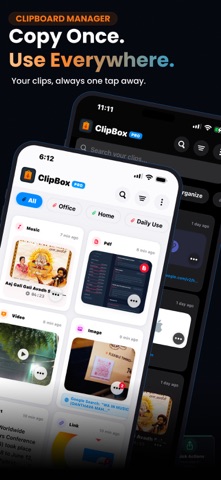
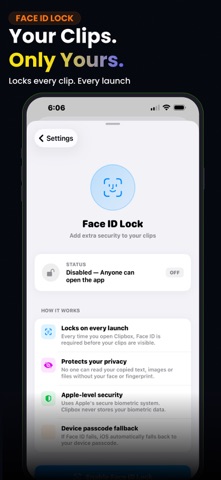
Your clipboard remembers one thing. ClipBox remembers everything — and knows exactly what to do with it. Copy a phone number and call it instantly. Copy an email address and start a message. Copy an OTP code and paste it before it expires. Copy a QR code from a screenshot and open it without using the camera. Copy sensitive information and let ClipBox automatically remove it when it's no longer needed. Because a clipboard should do more than store data. It should help you use it. SMART ACTIONS ClipBox automatically detects what you've copied and surfaces the right action instantly. • Phone Numbers → Call or Save Contact • Email Addresses → Compose Email • OTP & Verification Codes → Detect and Paste Faster • QR Codes from Images → Scan and Open • Contact Cards from Photos → Save to Contacts • URLs → Preview, Open, Archive • Credit Card Numbers → Detect Sensitive Content SENSITIVE CONTENT AUTO DELETE Passwords, OTP codes, card numbers, and other sensitive clipboard content should not live forever. ClipBox can automatically remove sensitive items after use and synchronize deletion across your devices when clipboard sync is enabled. Private information stays private. NEVER LOSE A COPY AGAIN ClipBox is a powerful Clipboard Manager and Clipboard History app for iPhone and iPad. Save and organize: • Text • Links • Images • Screenshots • Videos • Audio Files • PDFs • Documents • Code Snippets Find anything you've copied in seconds with Smart Search. Organize clipboard history with folders, tags, and pinned items. CLIPBOARD KEYBOARD Access your clipboard history directly inside any app. Paste saved clips into Messages, Mail, Notes, Safari, social apps, and productivity tools without switching screens. No app switching. No searching. Just tap and paste. EVERYWHERE YOU WORK • Clipboard History Sync across iPhone and iPad • Clipboard Keyboard • Folders & Tags • Smart Search • Pin Important Clips • Custom Clip Names • Bulk Actions • Duplicate Detection • Backup & Restore • Share Extension • Action Extension PRIVATE BY DESIGN • Face ID Protection • Touch ID Support • Passcode Lock • Encrypted Storage • Secure Clipboard Vault • On-Device Processing Whether you're a developer, student, writer, support professional, or someone who copies information throughout the day, ClipBox helps you save time and stay organized. Stop losing copied content. Download ClipBox today and experience a smarter Clipboard Manager, Clipboard History app, and Clipboard Keyboard for iPhone and iPad. GO PREMIUM Unlock Smart Actions, unlimited clipboard history, clipboard sync, advanced privacy tools, premium organization features, and more. Subscription plans available. Privacy Policy: https://appreator.com/privacy-policy/ Terms of Use: https://appreator.com/terms-of-use/ Support: [admin@appreator.com](mailto:admin@appreator.com)
Latest release
What’s New
Thank you very much for using ClipBox, your advanced and smart personal clipboard manager app. We appreciate your reviews and suggestions to make this app stronger and better with every update. What's new in this version: • Smart Actions & Auto-Detect: ClipBox now automatically detects copied text (such as URLs, phone numbers, email addresses, QR codes, and OTP verification codes) and presents instant Smart Actions to open links, dial, send emails, or perform tasks with a single tap. • Custom Keyboard Globe Button: A dedicated globe button has been placed on the custom keyboard layout, making it easy to change keyboards and toggle back to your default system keyboard seamlessly. • iPad Landscape Support: Enjoy full screen compatibility with a responsive landscape layout designed specifically for iPad, making multitasking more comfortable than ever. • UI Enhancements & Bug Fixes: Various interface refinements and under-the-hood fixes for a smoother, faster, and more reliable user experience.
Audience growth
Ratings growth
Baseline captured. Growth appears after the crawler observes a changed rating count.
Momentum comes from crawler snapshots for the tracked storefront. “Viral growth signal” means unusually fast recent rating gains; it is an indicator, not download data.
Price tracking
Price intelligence
First snapshot captured. The trend line starts after the next crawler price observation.
- First observed Aug 15, 2026 · 6:15 PM Free
Screenshots