About this app
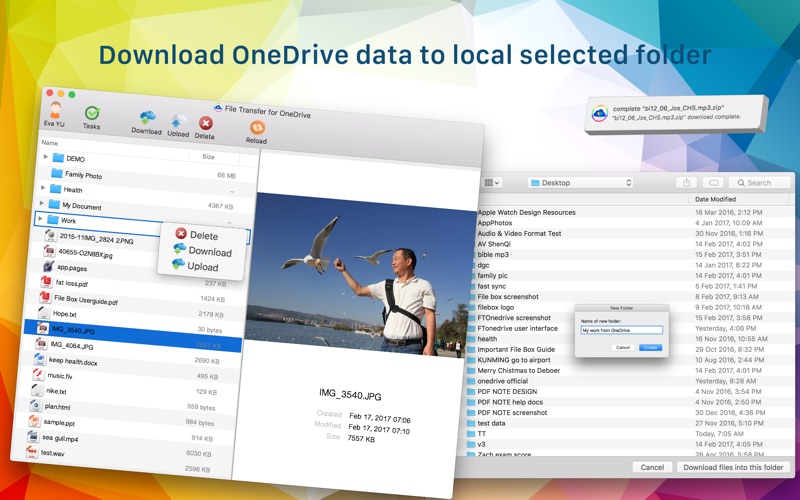
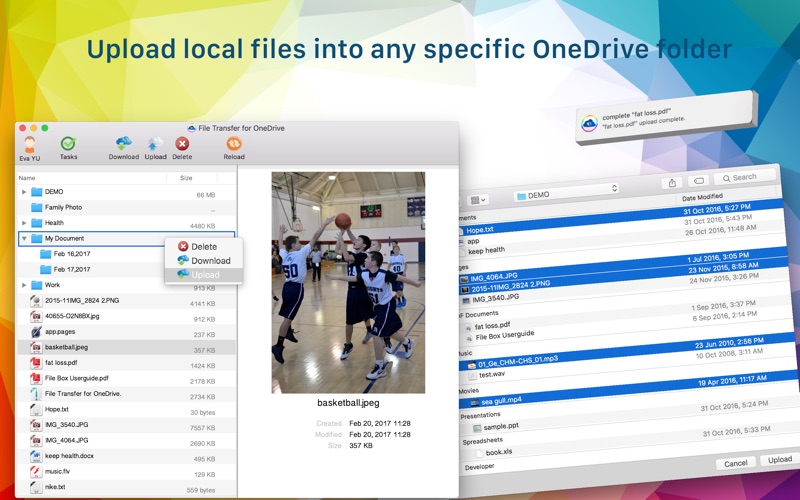
Download and upload OneDrive's files and folders to your MacBook efficiently. Easy to use. (Only “for personal accounts” now! It doesn’t work with OneDrive for Business now!) * Download speed is three times faster than MicroSoft ! * Download OneDrive data to local selected folder ! * Upload local files into any specific OneDrive folder ! PROMINENT FEATURE • Use "DuLoad for OneDrive", you can download any selected files or folders on OneDrive to your Mac. Meanwhile these downloaded files or folders can be saved in any folder selected in your Mac. • Also you can upload any selected files or folders on your Mac to OneDrive. Meanwhile these uploaded files or folders can be saved in any folder selected in your OneDrive. • After login, it will appear your all files and folders on OneDrive. Right-click on the folder, there are three options:Upload,Download,Delete. 1) Choose Upload option:The files or folder on your Mac will be uploaded to this selected folder. 2) Choose Download option:The folder on OneDrive will be downloaded to any selected folder on your Mac. 3) Choose Delete option:Delete the OneDrive folder. • Dragging the files from "Finder" to every folder on OneDrive you want. Easily upload your Mac's files to OneDrive. • Support select multiple files or folders to download or upload. • Support folders or files upload or download. • Support cancel when downloading or uploading • Prompt window and sound during upload and download. Such as, complete uploaded files, downloaded files, recovery files, continue downloading or uploading files. • Display the progress rate number on the dock.You can see the transfer process timely. • The log of the downloading or uploading files. • The log of the finished download or upload files. • Support change OneDrive's account . • Transfer may continue from the point of interruption. (eg.When the network condition is bad, or restart your Mac) • Support File preview function: Date Created,Date Modified,Size,Name,Content,Picture preview,Kind... • Support upload or download a huge size file efficiently (Passed a file size 3G+ test). • Using multithreading for transmission. Save more time. Download speed is three times faster than MicroSoft ! • Support upload empty folders or empty files. • Little CPU and memory use.Save your computer resources and memory footprint. • Super easy to use: clean and intuitive interface. • Support for changing the windows size. OTHER • Difference between "DuLoad for OneDrive" and “MicroSoft OneDrive" "MicroSoft OneDrive" Sync files. "DuLoad for OneDrive" download or upload files. Easy to use. "MicroSoft OneDrive" need you create one folder in your Mac to sync files. Your OneDrive's files and Mac's files will sync only in this folder. Use "DuLoad for OneDrive", you can download any appointed files or folders on OneDrive to your Mac. Meanwhile these downloaded files or folders can be saved in any folder appointed in your Mac. Also you can upload any appointed files or folders on your Mac to OneDrive. Meanwhile these uploaded files or folders can be saved in any folder appointed in your OneDrive. • Compared to MicroSoft, "DuLoad for OneDrive" has more advantages: 1. Download speed is thirty percent faster than MicroSoft. 2. You can upload the local files by dragging the files from "Finder" . 3. Support selected files or folders to upload or download 4. Cancel when downloading or uploading. 5. Prompt window and sound during upload and download. 6. Display the progress rate number on the dock. 7. File preview function. SUPPORT • If you have any inquiries or questions, regarding this application, please contact us: hanmingjie@gmail.com. This app will continue to be upgraded and improved to achieve the 100% customer satisfaction.
Latest release
What’s New
Reduce the dosage of CPU when downloading. Fixed some bugs.
Audience growth
Ratings growth
Baseline captured. Growth appears after the crawler observes a changed rating count.
Momentum comes from crawler snapshots for the tracked storefront. “Viral growth signal” means unusually fast recent rating gains; it is an indicator, not download data.
Price tracking
Price intelligence
First snapshot captured. The trend line starts after the next crawler price observation.
- First observed Oct 12, 2026 · 6:19 PM $1.99
Screenshots