About this app
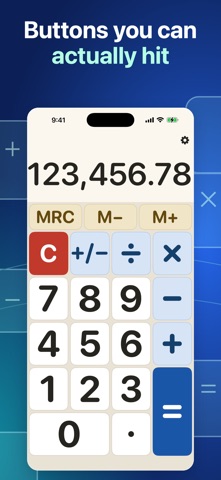
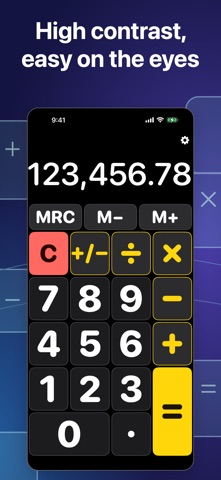
A calculator you can actually see — and now hear. Big Calculator does four things — add, subtract, multiply and divide — with keys and digits large enough to read and to hit first time. Nothing else is on the screen. It was built for people who find the calculator that came with their phone too small: for cataracts, glaucoma and macular degeneration, and for anyone whose eyes are simply not what they were. BIG WHERE IT COUNTS • Keys that fill the screen, with room between them • A readout in large, heavy type — no thin, faint numbers • Hide the memory keys and every remaining button grows • Long sums stay readable, grouped the way your country writes them • Portrait or landscape, on iPhone and iPad IT READS THE ANSWER OUT LOUD Turn on VoiceOver and Big Calculator speaks each result the moment it is worked out, so you never have to hunt across the screen for the answer. • Every key says what it is — "Add", "Equals", "Memory add" — not "plus sign" • Divide by zero and it says so, in words • Switch the speaking off in Settings if you would rather it stayed quiet Most calculators leave a blind user to explore the screen and guess. This one tells you. THREE LOOKS — PICK WHAT SUITS YOUR EYES • Warm Paper — dark type on a bright, warm background. Easiest to read for most people. • Night — white on black at high contrast, for eyes that find bright screens painful. • Classic — the original look, with bolder type. The whole app repaints the moment you choose, so you see the difference before you commit. A DESK CALCULATOR ON YOUR PHONE • M+, M− and MRC memory keys, where you expect them • AC clears everything, C clears just the entry • A key press you can hear — or silence it in Settings IN YOUR LANGUAGE, WITH YOUR NUMBERS Available in 33 languages. The decimal point and the thousands separator follow your own country's convention, so the number on screen is written the way you write it — 1,234.56 or 1.234,56 or 1 234,56, whichever is yours. NOTHING ELSE No account. No sign-in. No cloud. Nothing to learn. Your sums stay on your phone. Big Calculator is free, supported by a single banner advert at the bottom of the screen. SUBSCRIPTION Big Calculator Plus — an optional auto-renewing subscription, one year in length. No ads, plus a bigger keypad and display with more room for your calculations. Payment is charged to your Apple Account when you confirm the purchase. It renews automatically unless cancelled at least 24 hours before the end of the current period. Manage or cancel in your Apple Account settings. The price is shown before you confirm. Terms of Use (EULA): https://www.apple.com/legal/internet-services/itunes/dev/stdeula/ Privacy Policy: https://developer-yl.github.io/big-calculator/privacy.html
Latest release
What’s New
Big Calculator Plus is here.\n\nSubscribe yearly for no ads—and get that space back for a bigger display and keypad. Subscribe or restore purchases from Settings. Now in 33 languages. • 20 new languages: Thai, Turkish, Vietnamese, Swedish, Norwegian, Danish, Dutch, Romanian, Ukrainian, Czech, Polish, Croatian, Hungarian, Slovak, Malay, Indonesian, Urdu, Tamil, Telugu, and Bangla. Urdu joins Arabic with full right-to-left layout. • The decimal point and the thousands separator follow your own country, so a sum reads the way you write it. Also since 1.0: • Big Calculator talks. Turn on VoiceOver and every answer is spoken the moment it is worked out, and every key says what it is — "Add", "Equals", "Memory add". • Three looks — Warm Paper, Night and Classic. • Hide the memory keys and every remaining button grows. • Longer sums, up to 19 digits.
Audience growth
Ratings growth
Momentum comes from crawler snapshots for the tracked storefront. “Viral growth signal” means unusually fast recent rating gains; it is an indicator, not download data.
Price tracking
Price intelligence
- First observed Oct 3, 2026 · 2:36 PM Free
Screenshots