About this app
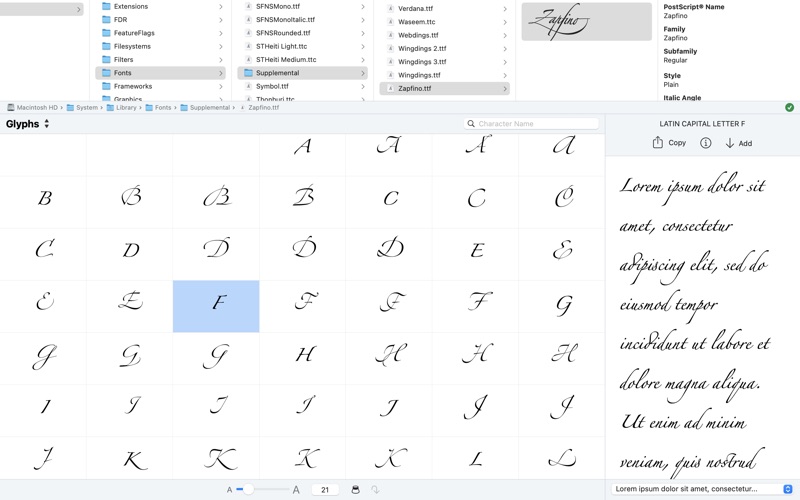
A character map for font files (installed or not). Quickly browse through a list of font files and preview their contents without installing them. Font File Browser saves you time as you search for the right fonts to use in your projects. Main Features: - Quickly browse through a list of font files and preview their contents without installing them. - View the fonts, characters, and glyphs contained in a TTF, TTC, DFONT, OTF, or WOFF font file. - Preview text using uninstalled fonts. - Print font samples and character maps or save them as PDF documents. - Extract characters from uninstalled fonts as pictures that you can use in other apps. - Get detailed information about fonts, characters, and glyphs.
Latest release
What’s New
- Minor fixes and improvements. Introduced in Version 1.2 - Quickly zoom in on the character map using the new Macro button. - Get any character’s JavaScript escape sequence and easily copy it to the clipboard. Introduced in Version 1.1 - Print font samples and character maps. - Copy characters and glyphs to the clipboard as SVG pictures. - Supports macOS’s Dark Mode. - Supports color SVG fonts under macOS 10.14 Mojave or later. - Enjoy a redesigned user interface. - Performance improvements.
Audience growth
Ratings growth
Baseline captured. Growth appears after the crawler observes a changed rating count.
Momentum comes from crawler snapshots for the tracked storefront. “Viral growth signal” means unusually fast recent rating gains; it is an indicator, not download data.
Price tracking
Price intelligence
First snapshot captured. The trend line starts after the next crawler price observation.
- First observed Aug 17, 2026 · 7:25 PM $9.99
Screenshots