About this app
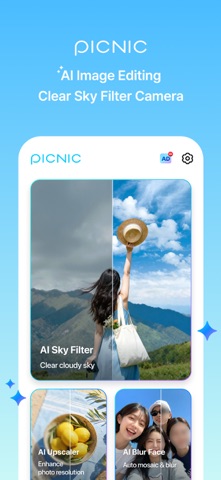
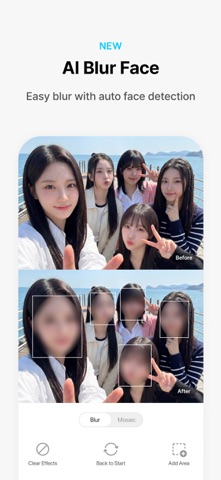
Turn gloomy skies and blurry photos into stunning shots with AI. One tap is all it takes. From gray skies and low-resolution photos to privacy concerns, solve everything at once with PICNIC, a free AI photo editing and clear sky filter camera. Enhance light, color, mood, and atmosphere with AI sky filters. Upgrade photo resolution and apply natural face blur with AI photo editing tools. Make every travel moment more beautiful with just one tap. --- [Key Features] ● AI Sky Filters AI auto-detects the sky and transforms dull, cloudy scenes into beautiful clear skies. · 33 mood sky filters: Santorini morning, Paris sunset, New York skyline · Adjust filter brightness and color with a single tap · Turn any gloomy travel photo into a picture-perfect memory ● AI Photo Enhancer (Upscaler) Automatically sharpen blurry, low-resolution photos with AI. · Upgrade photo quality from low-res to high-definition · Fix old, blurry photos in one tap · No manual editing required, AI does the work ● AI Blur Face (Mosaic) Automatically detects faces and applies natural blur for privacy. · Select specific areas to blur manually · Blur & mosaic effects for safe sharing · Protect privacy in travel photos and social media posts - ● Perfect For · Travelers who shot photos on a cloudy day · Anyone who wants to replace a gloomy sky with a clear blue one · People looking to enhance old or blurry photos · Those who need to blur faces before sharing on social media - ● Why PICNIC? · #1 Sky Filter, 33 mood sky presets · AI Photo Enhancer, Sharpen blurry photos instantly · AI Face Blur, Share safely with automatic face detection · Trusted by millions of users worldwide · All features completely free Download PICNIC now and transform every photo into a masterpiece. --- [App Permissions] PICNIC only accesses permissions that are essential for providing the service. Optional Permissions · Camera: Used for taking photos · Photos: Used to save captured or edited images to your device · Location: Used to record location information in photo metadata · Activity Tracking: Used to provide personalized ads and benefits ※ You can use the app without granting optional permissions, but features that require these permissions may be limited until access is granted. Terms of Use: [https://www.apple.com/legal/internet-services/itunes/dev/stdeula/](https://www.apple.com/legal/internet-services/itunes/dev/stdeula/)
Latest release
What’s New
- Improved the first screen ad display for a more convenient app experience. - Added a section introducing ALTools apps.
Audience growth
Ratings growth
Momentum comes from crawler snapshots for the tracked storefront. “Viral growth signal” means unusually fast recent rating gains; it is an indicator, not download data.
Price tracking
Price intelligence
- First observed Aug 1, 2026 · 1:29 PM Free
Screenshots