About this app
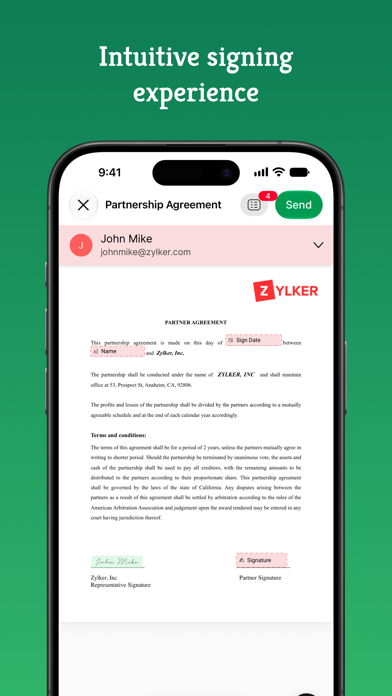
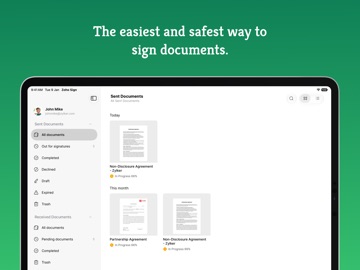
Zoho Sign is a robust digital signature solution that lets you securely sign documents from anywhere, at any time, directly on your iPhone, iPad, or MacBook. Built entirely on the cloud, our e-signature app seamlessly integrates with your everyday applications, providing a smooth and efficient online signing experience on the go. Trusted by users worldwide, Zoho Sign combines simplicity with top-notch security, making it one of the most reliable electronic signature apps on the market. "Zoho Sign is a comprehensive tool that serves all signing purposes. From sequential signing to automated follow-ups and document tracking, Zoho Sign does it all." - Devendra Kandalkar, ACG World Key features: - Sign and send legally binding agreements, contracts, and forms across devices (iPhone, iPad, Mac) in various formats (PDF, DOCX, PNG, and more). - Export signed documents to cloud storage apps like Google Drive, Dropbox, and OneDrive. - Create reusable, custom templates for enhanced productivity. - Customize and manage SignForms with QR codes for easy signing without the app. - Add customizable fields (signatures, dates, text, and more). - Incorporate logic and advanced fields for dynamic data collection. - Collect signatures in person on your iPhone or iPad to speed up contract execution. - Collect payments during signing with the Zoho Checkout integration. - Verify signer identity using dynamic KBA (knowledge-based authentication). - Get real-time push notifications for every action taken on your document. - Switch between multiple Zoho Sign accounts or view everything in one place through the unified inbox. Additional features: - Send reminders for prompt document signing. - Initiate signing directly from your inbox. - Reassign signing tasks when needed. - Share completed documents via iMessage. - Use split-screen on iPad for multitasking. - Set up Siri shortcuts for signing using face ID, tracking, and scanning documents. - Add Zoho Sign's widget to your Control Center to quickly scan, sign, and browse. - Find signed documents instantly with Spotlight Search. - Get key details summarized with Zia's text summarization. Common documents to eSign with Zoho Sign: - Invoices - Sales contracts - Business proposals - Purchase orders - Lease agreements - Partnership agreements - Employment offers and more. Security and compliance: - Data is securely transmitted via an SSL/TLS connection and encrypted with AES 256-bit encryption while at rest. - Zoho Sign complies with the ESIGN Act, UETA, GDPR, HIPAA, and other industry-standard regulations, ensuring legal digital signatures and data protection compliance. - All documents are legally binding with a comprehensive audit trail including timestamps, the signer's email address, device IP, and completion details. - Biometric authentication like Touch ID and passcodes prevent unauthorized access. - Security codes ensure only authorized individuals can access and sign the documents. Legal & Security: - Certification of Completion: Get automatic audit trails for completed documents with time stamps and IP addresses. - Increase security using Touch ID and Passcode to block unauthorized access. - Set security codes and share it directly with the recipients to prevent unauthorized access. - Compliant with ESIGN act and industry standard laws. Plans and pricing: Free plan: Sign up for our free eSign app and get five documents per month at no cost. Standard plan: - Monthly: 12 USD/month - Yearly: 120 USD/year - Includes 25 documents per month for signing Professional plan: - Monthly: 18 USD/month - Yearly: 180 USD/year - Unlimited document signing Subscription details: Subscriptions are charged to your iTunes account upon purchase. Subscriptions renew automatically unless cancelled at least 24 hours before the end of the current period. Auto-renewal can be disabled in Account Settings after purchase. Privacy Policy: https://zoho.com/privacy Terms of use: https://zoho.com/terms
Latest release
What’s New
With the latest iOS 27 and iPadOS 27 updates, Zoho Sign introduces powerful new capabilities to make signing and managing documents smarter, more seamless, and more productive. App Resizability: Resize Zoho Sign to fit your workspace. The app automatically adapts its layout for different screen sizes and multitasking configurations. OnScreen Awareness: Ask questions, look up unfamiliar terms, and explore related information without leaving the document you're viewing. Get the context you need while staying focused on your workflow. Apple Foundation Models: Understand long and complex contracts with concise summaries and intelligent insights. Identify important details such as cancellation clauses, renewals, and key obligations with ease. All-new Portrait Widget: Keep track of documents without opening the app. View pending signatures, monitor sent documents, and more with the all-new Portrait Widget to stay updated at a glance. Visual Intelligence: Identify documents and relevant details from emails, webpages, or the world around you. Bring them directly into Zoho Sign to review, sign, or take the next step. Core ML and Spotlight: Find important documents faster with intelligent on-device capabilities. Discover relevant content and easily access key actions from Spotlight.
Audience growth
Ratings growth
Momentum comes from crawler snapshots for the tracked storefront. “Viral growth signal” means unusually fast recent rating gains; it is an indicator, not download data.
Price tracking
Price intelligence
- First observed Aug 7, 2026 · 10:37 PM Free
Screenshots