About this app
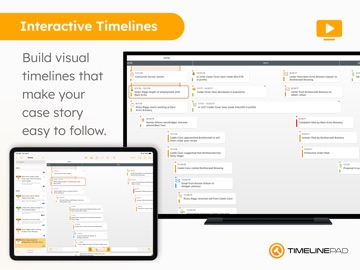
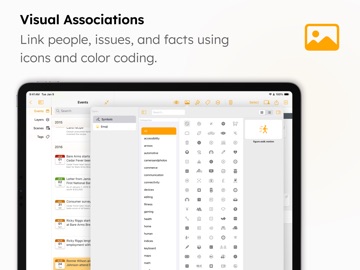
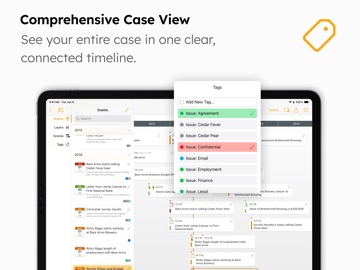
TimelinePad creates beautiful interactive timelines of events that allow lawyers and support staff to wirelessly present chronologies in a courtroom or remote setting. Create events individually or import events in bulk from an Excel spreadsheet to instantly create a timeline. Link people, issues, and facts to events, add icons and colors for visual clarity, assign tags to organize and group events, create scenes to recall moments in time, and much more. TimelinePad can integrate with your Windows workflow, is powerful, easy to use, and a fraction of the cost of traditional or cloud-based programs, all while being secure, private, mobile, and efficient. LIT SOFTWARE has set the bar for developing the best in litigation apps, garnering awards for innovation and ease of use. Our apps have been featured by Apple, and are loved by lawyers. —— LIT SUITE REVIEWS —— “The short review. Wow.” “This app can do things I’ve previously had to do on a desktop, but much easier and faster.” “Super way to review documents quickly.” “Generates professional reports with all the bates numbers listed, and exports to TrialPad into folders named for the issue code. Extremely useful.” “Helps me keep documents organized, bates stamps them, and create issue codes, which can then be generated into an easy-to-read report.” “Initial document analysis on iPad is fresh and fast, and frankly is a big winner.” “These are incredibly sophisticated and useful apps that are in many ways more powerful than PC software costing hundreds of dollars more.” —— QUICK FEATURE SUMMARY —— • Full electronic timeline presentation capability, no cloud connection needed • Present via HDMI to a TV or projector, or present wirelessly using an Apple TV • Step through individual events with simple taps to present your story like a slideshow • Easily import an Excel file with all your events to instantly create a beautiful interactive timeline • Drag and drop a document onto the timeline to automatically create an event with an attachment • Customize timeline events with colors, symbols, and emoji • Organize and group events by assigning custom tags • Save scenes to group events in a particular timeframe • Create layers to show and hide groups of events (e.g. all emails) • Multi-select events to easily assign colors, symbols, or tags in bulk • Use intuitive touch gestures to edit your timeline and events • Attach supporting files to events to display them in context • Search for events by name, description, tags, or attachments • Filter events to show only those with attachments, are hidden, have selected icons, or have tags • Export editable Excel file of your events to share with opposing counsel or judge • Export a PDF file of your timeline to print or share via email • Import files directly from a USB drive, or cloud storage providers like Box, Citrix Files, Dropbox, Google Drive, Microsoft OneDrive, and many more • Share entire case files with other users using cloud storage or a USB drive • File formats supported: PDF, JPG, PNG, TIF, video and audio • Available for iPad and Mac —— EASILY CREATE AND PRESENT TIMELINES —— Instantly import hundreds of events with their date, time, and description from an Excel file, or add events individually. Then plug-and-play via HDMI to present to a projector or TV, or present wirelessly using an Apple TV. Create beautiful timelines by importing events from a spreadsheet, customizing the look and feel with colors and icons, organizing by tags and layers. Share your entire timeline as a PDF or Excel file, or present your story as an interactive slideshow. LIT SUITE SUBSCRIPTION One subscription gives you access to all LIT SUITE apps on iPhone, iPad, and Mac. After your 7-day free trial, your App Store account will be charged and your subscription will renew automatically unless canceled in advance. Manage your subscription in your App Store account settings.
Latest release
What’s New
• NEW / IMPROVED – Updated the appearance of event cards during presentations to use a larger and more square aspect ratio. – Improved the TimelinePad Event Edit screen with a more responsive layout for smaller windows and better support for external keyboard navigation. – Updated the Icon/Symbols Picker with a refreshed, more adaptable design, faster and more responsive search, improved performance in compact window sizes, and quick access to recently used icons at the top of the list. – Added an AI-powered Suggested Icons section to the Icon Picker, surfacing contextually relevant icons for the active timeline to speed up and simplify icon selection. – Improved the TimelinePad sidebar by limiting unnecessary expansion, resulting in a cleaner layout and more efficient use of space. – Updated event handling to allow multiple events with the same title, while preventing events from having no title. – Added layer validation check to prevent multiple layers from having the same name. – Updated minimum system requirements to be iPadOS 26. – Added new Entire Timeline scene as a default scene with dynamic zoom and responsive layout. – Added titles to attachments in events when viewing them in the event editor. – Added a rule to allow exact duplicates to be created when importing an Excel file with events. – Added a confirmation dialog when deleting a scene to help prevent accidental deletion. – Added support for minutes in the ruler bar. – Added tips for first time users. – Updated to support liquid glass layout. – Updated app icon for liquid glass effect. – Ongoing improvements. • FIXED – Fixed an issue where the event description and file name could appear on the output screen during presentations. – Fixed an issue where the date label was not perfectly aligned with timeline events. – Fixed an issue where events could point to the wrong area of the timeline bar. – Reduced the transition fade when cycling through events in a timeline. – Fixed an issue where events with icons did not appear when filtering for events with icons. – Improved stability when closing timelines, preventing unexpected app closures during normal exit workflows. – Ongoing bug fixes and enhancements. Please let us know if you encounter an issue or have other feedback. We value your feedback as it helps us address issues, refine features, and update documentation. – Visit our Help Center: https://support.litsoftware.com – Email Support: support@litsoftware.com – Learn Online with LIT SUITE Academy: https://learn.litsoftware.com
Audience growth
Ratings growth
Baseline captured. Growth appears after the crawler observes a changed rating count.
Momentum comes from crawler snapshots for the tracked storefront. “Viral growth signal” means unusually fast recent rating gains; it is an indicator, not download data.
Price tracking
Price intelligence
First snapshot captured. The trend line starts after the next crawler price observation.
- First observed Aug 13, 2026 · 3:02 AM Free
Screenshots