About this app
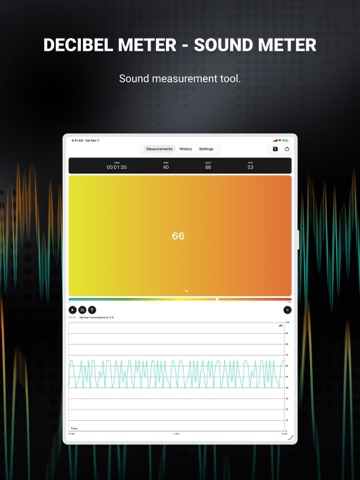
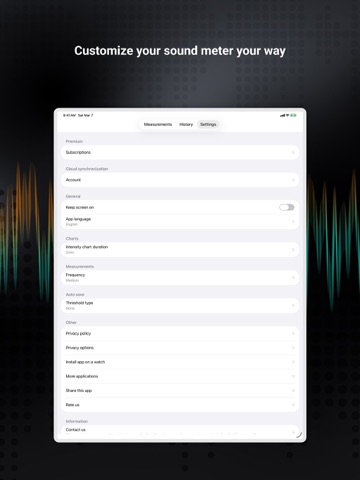
Turn your smartphone into a sound measuring device. Our app uses a built-in microphone to display current decibels level with a corresponding, easily readable text description, and you can start/stop a measurement to get an average as well as min and max values from a specific period of time. - Precision Sound Measurement: Turn your smartphone into a high-accuracy sound meter! Displays real-time decibel levels with clear text descriptions. - Comprehensive Data Analysis: Capture minimum, average, and maximum sound levels. Perfect for analyzing specific time periods and sound environments. - Seamless Watch Integration (Apple Watch): Effortlessly control measurements from your wrist with our Apple Watch app. Hands-free and interference-free! - Customizable Calibration: Manually or automatically adjust decibel input values to fit your needs. Perfect for personalized sound measurement. - Easy Data Sharing: Share sound level readings instantly. Export as CSV or share engaging screenshots with friends or colleagues. - Historical Data Tracking: Revisit your sound measurements with our intuitive history screen. Displays all your past data with detailed statistics. - Cloud Data Security: Keep your data safe and accessible anywhere with our cloud services. Log in with social media or email on any device. - Adaptive Display Settings: Customize your display for short or long-term monitoring. Keep your screen on to always have an eye on your recordings. - Features Exclusive to Apple Watch - Remote Measurement Control: Manage your phone's sound measurements directly from your Apple watch. Simplify your experience! - Real-Time Monitoring on Your Wrist: Monitor current sound levels conveniently on your Apple Watch device. Stay informed effortlessly! Using the calibration option, you can adjust the input decibels values according to your needs. You can also screenshot the whole view and share it with friends. The history screen allows you to see your saved data with the date, time, avg, and max values along with the CSV file from the whole span of measurement, which you can also share as you please. Keep your data safe with our cloud services, which allows you to create accounts and store your data.. Log in using your social media accounts or email to a different device to see and share your data. In settings, you can set up chart length according to your needs, whether you want to see a short period of time or a longer time span. Also, you can change the settings to keep your screen on in order to keep an eye on your recordings at all times. Our app comes with a brand new application for Apple Watch devices. You can easily control your measurements with your watch without having to touch your phone. Controlling the measurements with the watch avoids interference! Privacy policy: https://mysticmobileapps.com/legal/privacy/decibelmeter Terms and conditions: https://mysticmobileapps.com/legal/terms/decibelmeter
Latest release
What’s New
- bug fixes
Audience growth
Ratings growth
Baseline captured. Growth appears after the crawler observes a changed rating count.
Momentum comes from crawler snapshots for the tracked storefront. “Viral growth signal” means unusually fast recent rating gains; it is an indicator, not download data.
Price tracking
Price intelligence
First snapshot captured. The trend line starts after the next crawler price observation.
- First observed Aug 21, 2026 · 3:38 AM Free
Screenshots