About this app
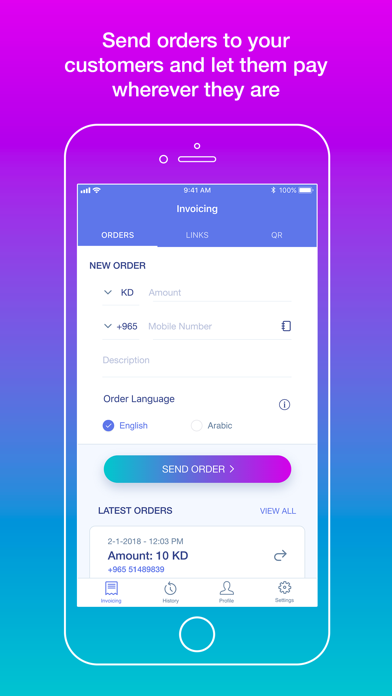
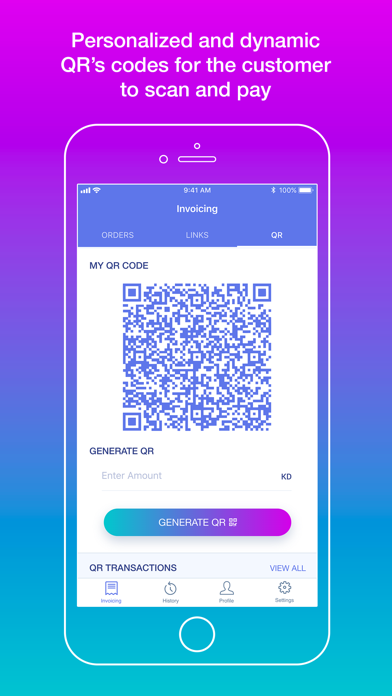
About Og Business Managing business just got a whole lot easier With user-focused engagement tools, multi-modal access and support, and a holistic view of your business health. Now available to One Global customers, Og Business is an easy-to-use, personalized financial experience that will motivate and empower you to take smarter steps now and for a lifetime. Og Business is designed to cover all areas of individual to empire of businesses and engage customers in a smart, reliable and compelling way. Intuitive interface offers a user experience that will help manage risk, reduces time & costs, and reward customers with cashback. Based on self-reported and digitally captured data, Og Business provides engagement through business performance, personalized recommendations, rewards, coaching, tools, community interaction, and content that promotes healthier business lifestyles. Streamline your business activities whether in-store, remote, delivery or Online acceptance on your website or app. Business payment activities have been combined within payment, billing, and collection: • QR Code, SMS and in-app orders • Order management and real-time alerts • Branch and account management • Tracking daily business activities against those of your coworkers • Improve sales with cashback scheme • Retain customers with loyalty scheme • Accept payments in-store, web and apps • Manage events with payment collections • B2B and B2C marketplace with real-time settlement to your bank account Og Business optimizes the customer experience by offering the ability to shop more often with next-sell, up-selling and cross-selling abilities. What are the benefits of QR? • Accept payments directly with local or an International customer • Personalize your promotions and offers with existing customers, keeping tracks and ability to contact them. How to use QR? • Simply ask customers to Scan QR code from Og Money app or any QR Scanner. • If the customer is not Og Money user then it will open a browser and they can select the payment methods whichever they find more convenient to pay with. • You can predefine the amount by simply entering the amount and clicking on “Generate QR”. The customer will scan and pay the amount you entered. • If customer scan the static QR without amount, then the agreed amount will be entered by the customer and the merchant will verify the payment status. What are the benefits of Order? • Creating and sending orders remotely on condition that the customer is an Og Money user. • Orders through the Og Money app is much faster and safer rather than links that goes to web browser, which requires more input from the payer (Like card details and OTPs) • How to use Order? • Simply by entering the amount, mobile number, description (if any) and finally clicking on “Send Order” • The transaction will be in Pending tab and will be moved to Paid tab once the Og Money payer processed successfully the payment. What are the benefits of Link? • All customer can pay through the link shared with the Payment methods available locally and internationally. • You can predefine the amount and send the link to one or multiple customers. • You can schedule the collection that can be used by schools, institutions, installments, rental and on demand payment collection. How to use Link? • By entering the amount, description (if any) and clicking on “Generate Link”. • The customer will receive the link via any channel sent through and pay the amount you entered. • For security reason any payer should be verified by an OTP to make sure payments in safe for both for payer and merchant payee.
Latest release
What’s New
Enhancements and Bug fixes.
Audience growth
Ratings growth
Baseline captured. Growth appears after the crawler observes a changed rating count.
Momentum comes from crawler snapshots for the tracked storefront. “Viral growth signal” means unusually fast recent rating gains; it is an indicator, not download data.
Price tracking
Price intelligence
First snapshot captured. The trend line starts after the next crawler price observation.
- First observed Aug 21, 2026 · 9:20 PM Free
Screenshots