About this app
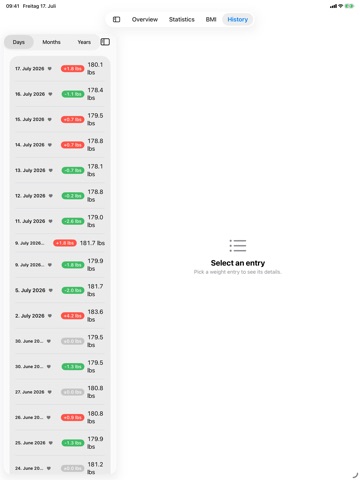
WeightFit is a weight diary that helps you log your body weight, track your progress, and reach your goal — on iPhone and Apple Watch. WHY WEIGHTFIT - Clean dashboard with current weight, goal progress, and trend chart - Realistic "Days to Goal" estimate based on your actual data - Detailed statistics: weekly, monthly, and long-term trends - BMI calculator with WHO and DGE classification systems - Fast manual entries with date and time - Apple Watch companion app for quick weight logging on your wrist - Watch complications showing weight, goal progress, and trends - HealthKit integration — your data stays private on your device BUILT FOR YOUR DAILY ROUTINE See your progress at a glance, drill into detailed stats when you want, and keep your weight history organized over months and years. Whether your goal is weight loss, weight gain, or simply monitoring your fitness and health — WeightFit keeps you on track with clear data and zero distractions. PREMIUM SUBSCRIPTION WeightFit Premium is an optional auto-renewing subscription, available as a monthly or yearly plan. Payment is charged to your Apple Account at confirmation of purchase. The subscription renews automatically unless it is canceled at least 24 hours before the end of the current period. You can manage or cancel your subscription in your Apple Account settings. WeightFit Premium is also available as a one-time purchase (Lifetime). It is not a subscription and does not renew. Terms of Use (EULA): https://www.apple.com/legal/internet-services/itunes/dev/stdeula/ Privacy Policy: https://weightfit.app/privacy-app
Latest release
What’s New
Improved: - Entries imported from Apple Health can now take a private note and a progress photo - The goal forecast follows a real change of pace instead of a rate from weeks ago, and states which weeks it used - Where the goal date would be, everyone now gets an explanation instead of blank space - The doctor report can carry your date of birth and gender — both off by default - The exact-line chart is the new default style - BMI bands and category swatches are drawn at full strength - At large text sizes, History rows, the month summary and the Insights trend row keep their numbers instead of truncating
Audience growth
Ratings growth
Baseline captured. Growth appears after the crawler observes a changed rating count.
Momentum comes from crawler snapshots for the tracked storefront. “Viral growth signal” means unusually fast recent rating gains; it is an indicator, not download data.
Price tracking
Price intelligence
- First observed Oct 2, 2026 · 4:36 PM Free
Screenshots