About this app
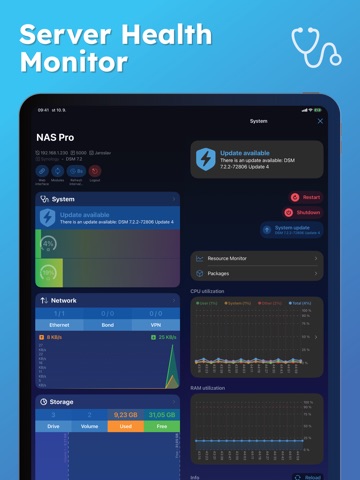
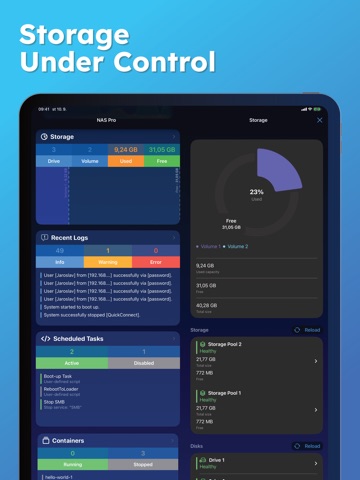
NAS Pro is a powerful NAS management and monitoring app that lets you control your Synology (DSM), QNAP, or TrueNAS server from anywhere. Monitor system health, storage, network activity, containers, virtual machines, backups, and downloads — all in one professional-grade mobile app. Whether you manage a home NAS, private cloud, or business server, NAS Pro gives you remote access, real-time monitoring, and administrative control directly from your iPhone, iPad or Mac. With support for Wake on LAN, Widgets, and Siri Shortcuts, you stay in control of your NAS anytime, anywhere. Key Features**: System Monitoring & Control: * View system health at a glance * Restart or shut down your NAS remotely * Real-time CPU and RAM usage monitoring * Start or stop installed packages * Update Server * UPS status: mode, battery level, and estimated runtime Network Management: * Real-time network traffic overview * Connect or disconnect VPN interfaces * Manage connected users (with option to terminate sessions) * Detailed interface information Storage Management: * View all storage pools, volumes, and disks * Run S.M.A.R.T. tests on disks * Detailed external storage information (partitions and capacity) * Eject external storage safely Containers (Docker): * See all containers with image names, uptime and utilization * Real-time CPU and RAM usage per container * Filter by status (running, stopped) * Perform actions: start, stop, restart, force stop, clear * Remove unused Images Virtual Machines: * List and monitor all virtual machines * View utilization, network, and storage details * Start, stop, or force stop virtual machines * Filter by state (running, stopped) Backups: * View all backup tasks with status and details * Browse backup versions * Start or stop individual backup tasks Downloads: * Manage all download tasks in one place * Create and edit download jobs * Filter by task state (running, finished, paused) * Pause, resume, or delete downloads Logs: * Browse the latest logs with color-coded severity * Filter by log level (warnings, errors, etc.) * Clear all logs in one tap * Copy log messages to clipboard Tasks: * View all tasks and events * Filter by status (enabled, disabled) * Check “Run results” for selected tasks * Perform actions: enable, disable, run, delete Users & Groups: * Manage users and groups * Create, enable, disable, or delete accounts * Adjust group memberships ** Functionality and available modules may vary based on your NAS. Supported systems: * Synology DSM 6.0 and above * Qnap QTS 5.0 and above * TrueNAS 24 and 25. -- Terms of Use: https://ezv-software.com/nas-pro/terms/ Privacy Policy: https://ezv-software.com/nas-pro/privacy/
Latest release
What’s New
New in 10.1.4: - Login flow improved, especially the second factor authorization. - Other stability improvements and fixes. New in v10: Biggest update to the app yet! Main new features: - Added Qnap (5.0 and higher) and TrueNAS (24 or 25) support. - Compilations: Connect to multiple servers at the same time - with single tap. - Major UI and UX redesign. - Accessibility improvements. - Optimized for iOS 26 and iPadOS 26. - Internal / External address can now be specified to connect to your Server from inside / outside of your network with different addresses. - Import / Export of data is now possible from Settings. - Name change from DS Manager Pro to NAS Pro. - Lot of other improvements and fixes. All your previous purchases work with this version. Enjoy major new features at no extra cost for existing customers!
Audience growth
Ratings growth
Baseline captured. Growth appears after the crawler observes a changed rating count.
Momentum comes from crawler snapshots for the tracked storefront. “Viral growth signal” means unusually fast recent rating gains; it is an indicator, not download data.
Price tracking
Price intelligence
- First observed Sep 6, 2026 · 4:41 PM Free
Screenshots