About this app
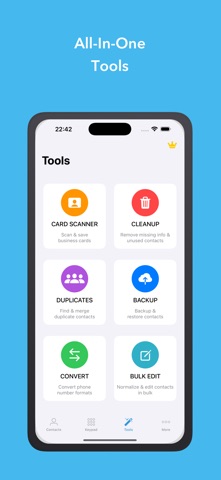
1Contact – Smart Contact Manager Overview 1Contact is a comprehensive contact management application that helps you organize, clean, back up, and maintain your contacts efficiently. With powerful AI-driven features and intuitive tools, 1Contact transforms how you manage your address book. Main Features Contact Management • Add, edit, delete, and search contacts with ease • Smart organization and categorization • Quick access to frequently contacted people • Advanced search with multiple criteria Contact Cleaning & Optimization • Remove contacts with missing or incomplete information • Delete outdated or unused contacts • Clean up duplicate phone numbers and email addresses • Optimize your contact list for better performance Duplicate Detection & Merging • AI-powered detection by name, phone number, or email • Smart merging with conflict resolution • Batch merge multiple duplicates • Preview changes before applying Backup & Restore • Secure local backups • Cloud backup integration (iCloud, Google Drive, Dropbox) • Automatic scheduled backups • One-click restore functionality • Export contacts in multiple formats (vCard, CSV) Sharing & Communication • Share multiple contacts via Email, SMS, or messaging apps • Bulk sharing with custom groups • QR code generation for easy sharing • Export contact lists for professional use Additional Smart Features • Business card scanner with OCR technology • International phone number formatting • Contact analytics and insights • Custom contact groups and labels • Birthday and anniversary reminders • Import contacts from various sources Privacy & Security • Local data processing for enhanced privacy • Encryption for sensitive information • No unnecessary permissions required • GDPR-compliant data handling Performance & Usability • Fast and responsive interface • Offline functionality • Cross-device synchronization • Dark mode support • Accessibility features Why Choose 1Contact? 1Contact combines powerful tools with an intuitive design, making it ideal for both personal and business use. Our AI-powered features help keep your contact list clean and organized while ensuring important data is always safe and accessible. Perfect for: • Business professionals managing large contact lists • Individuals wanting to declutter their address book • Anyone needing secure backup and restore options • Users who frequently share contact information If you enjoy using 1Contact, please share it with your friends and leave a review on the App Store. Your feedback helps us improve and supports our continued development. Thank you for choosing 1Contact.
Latest release
What’s New
- Add haptic feedback, home screen quick actions, native StoreKit reviews, CSV export support, and context menu interactions.
Audience growth
Ratings growth
Baseline captured. Growth appears after the crawler observes a changed rating count.
Momentum comes from crawler snapshots for the tracked storefront. “Viral growth signal” means unusually fast recent rating gains; it is an indicator, not download data.
Price tracking
Price intelligence
- First observed Aug 8, 2026 · 1:04 AM Free
Screenshots