About this app
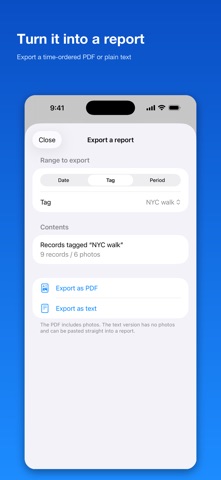
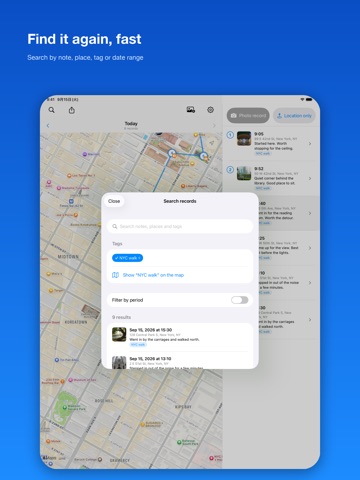
A notebook written in places and times. Save what you found, where you found it: a location, a time, a photo, a note. Later, retrace it on the map and along the timeline, in the order it happened. That is all pictoMap does. ■ Save it on the spot Three ways in: take a photo on the spot, save the location only, or bring photos in from your library. Photos from your library already carry their location and the time they were taken, so there is nothing to type. If a photo has no location, you can place it on the map afterwards. ■ The map and the list move together A day's records line up on the map as numbered pins, joined in the order you made them. Pick a pin and the list follows; pick a row and the map follows. On iPad the map and the list sit side by side. ■ Group with tags Tag records "Kyoto trip" or "October inspection" and everything under that tag is drawn on one map, across as many days as it took. A three-day trip or a week of site visits becomes a single route you can follow. ■ Find it again Search by the text of your notes, by place name, by tag, or by date range. ■ Material for a report Export any range of records as a PDF or as plain text, laid out in time order. It gives you something to build a site report or a training write-up on. ■ Your data stays yours Records are kept on this device and in your own iCloud. There is no account and no sign-in. You can also export a backup file and keep it yourself. ■ Also - A single record can hold several photos - Choose a standard map, satellite imagery, or both together - Pick location accuracy and photo quality from three levels each - Choose whether the time, place, and note are written into a photo when you share it - Works with VoiceOver, larger text sizes, and Dark Mode Free to use. Contains ads, which you can remove with a one-time in-app purchase.
Latest release
What’s New
Version 3.0 is a rebuild of the app from the ground up. - Rebuilt from scratch, now requiring iOS 17 or later - The map and the list now move together. On iPad they sit side by side - Tags added. Follow a route across several days on a single map - Search added, by note text, place name, tag, or date range - Export a time-ordered report as PDF or plain text - iCloud sync added, along with backup export and import to a file - A single record can now hold several photos - Works with VoiceOver and larger text sizes - English is now supported
Audience growth
Ratings growth
Baseline captured. Growth appears after the crawler observes a changed rating count.
Momentum comes from crawler snapshots for the tracked storefront. “Viral growth signal” means unusually fast recent rating gains; it is an indicator, not download data.
Price tracking
Price intelligence
First snapshot captured. The trend line starts after the next crawler price observation.
- First observed Sep 30, 2026 · 8:46 PM Free
Screenshots