About this app
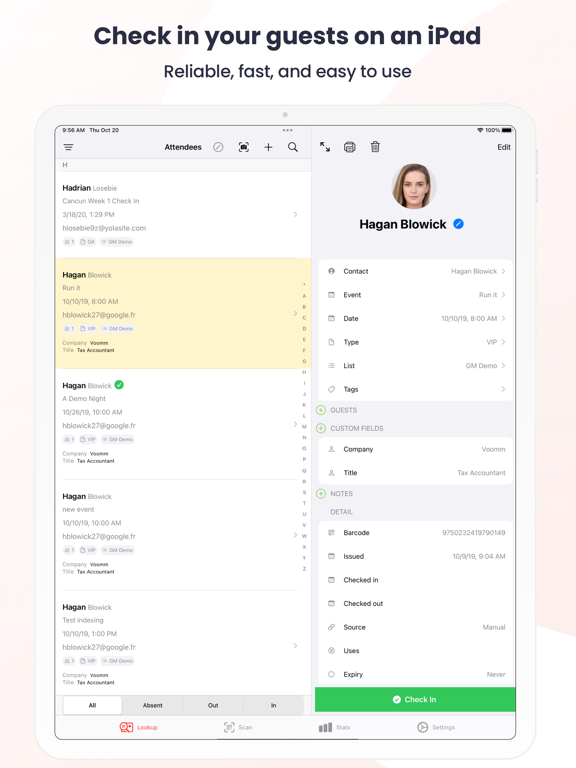
Guest Manager Check In is your perfect onsite check in and ticket scanning solution for your events. As part of our web based tools (learn more at www.guestmanager.com), you can: Web based tools - Import your own pre-registered guests - Email barcoded ticket PDFs to your guests - Collect RSVPs and send private invitations online - Sell tickets online - Offer free or paid event registration online Onsite tools - Fully offline capable - Syncs in realtime to all connected iOS devices - Check in guests by name with realtime searching - Scan barcoded tickets (using our generated tickets, or your own) - Scan tickets using the built-in camera, or rent laser scanner reader attachments from us - Tally simple head counts (by scanning or through the app) - Add new guests onsite with custom fields, tags, and more - Check in summaries by ticket type, and more - Check out and check in guests, tracking arrival and departure times - Manage and build your own unified guest profiles, with across event check in history - Print name badges And much more!
Latest release
What’s New
Staff roles and permissions Give each team member a role with exactly the access they need. Control who can scan, look up guests, edit or delete attendees, and change scanner settings, and limit an operator to specific events. • Staff sign in on a shared device with their own PIN, and it works offline. • Require a manager's PIN approval for sensitive actions like undoing a check-in, checking everyone in, or adding a guest. The approval is recorded on the scan. • Lock scanner settings so front-line staff can't change them, and set scanners up centrally by role or event. Faster guest lookup Search is quicker, especially at large events, and results now show each guest's list and order source. A clearer scan result Custom fields now appear in the order you set, with more of the details that matter at a glance. iPad refinements and reliability A smoother event picker and split-view layout on iPad, plus a range of sync and offline check-in fixes.
Audience growth
Ratings growth
Baseline captured. Growth appears after the crawler observes a changed rating count.
Momentum comes from crawler snapshots for the tracked storefront. “Viral growth signal” means unusually fast recent rating gains; it is an indicator, not download data.
Price tracking
Price intelligence
- First observed Aug 13, 2026 · 4:21 PM Free
Screenshots