About this app
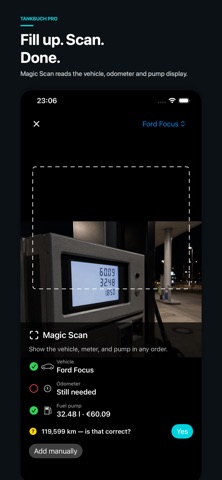
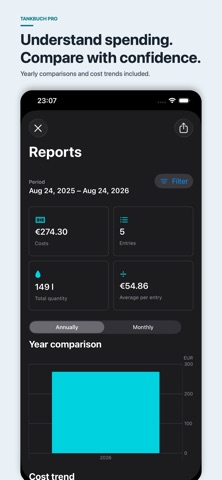
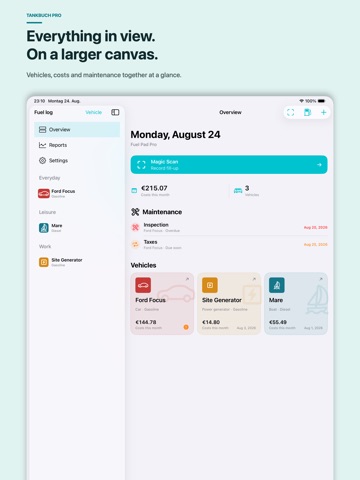
Fuel Journal Pro is your private fuel, charging, maintenance and cost log for iPhone, iPad and native Mac. The modern interface brings vehicles, costs, service and activity together more clearly. Magic Scan helps capture a stop directly on your device: it can detect the vehicle, odometer or meter reading and pump display in any order, then shows the result for review before saving. In version 2.1, Magic Scan learns from confirmed cockpit and odometer views so it can recognize a vehicle even when no license plate is visible. For cars, vans, motorcycles, boats, yachts, machines and power generators, you can save fill-ups, charging sessions, receipts, locations, foreign currency, service, maintenance, reminders, recurring costs and other expenses. Price trends, maps, filters, print-ready reports, CSV export and complete backups are included. Your data stays on your devices and can optionally sync through your private iCloud across iPhone, iPad and Mac. Shared vehicles support owner, editor and read-only roles. Widgets, Shortcuts, Siri, Spotlight, app quick actions and supported system actions use the same safe capture paths. No Fuel Journal Pro account, no ads and no ad tracking. One vehicle is free. Fuel Journal Pro Premium is a one-time in-app purchase for unlimited vehicles and all Pro features, with no subscription. Previous buyers of the old paid app are unlocked automatically from the verified original production purchase.
Latest release
What’s New
Fuel Journal Pro 2.1 makes the app clearer, smarter and more complete. • New modern interface for iPhone, iPad and native Mac • Magic Scan learns confirmed cockpit and odometer views and can recognize your vehicle without a visible license plate • Vehicle, odometer or meter and pump display can be captured in any order • Service, maintenance, reminders, costs, generator runs and charging are more tightly integrated • Expanded price trends, maps, filters and print-ready reports • Improved iCloud sync, shared vehicles, widgets, Shortcuts and system actions
Audience growth
Ratings growth
Baseline captured. Growth appears after the crawler observes a changed rating count.
Momentum comes from crawler snapshots for the tracked storefront. “Viral growth signal” means unusually fast recent rating gains; it is an indicator, not download data.
Price tracking
Price intelligence
First snapshot captured. The trend line starts after the next crawler price observation.
- First observed Sep 21, 2026 · 1:04 AM Free
Screenshots