About this app
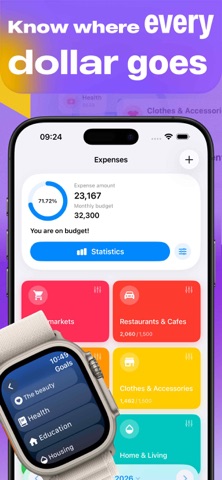
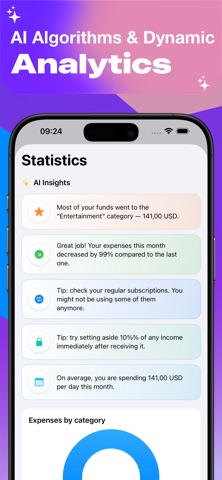
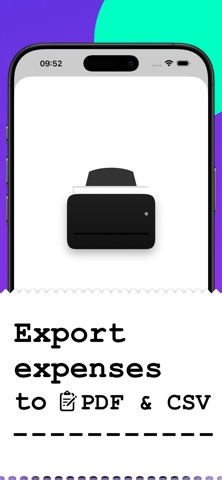
Plan! — The Ultimate Budget & Finance Tracker Take control of your money, get out of debt, and achieve your financial dreams. Plan! is a simple, intuitive, and powerful financial tracker that brings your income, expenses, and savings goals into one clear picture. Whether you're saving for a vacation, paying off a mortgage, or tracking multiple bank accounts, Plan! does the heavy lifting for you. WHY CHOOSE PLAN! Goal Tracking: Have savings in different banks? Track all your financial goals in one place. Monitor your progress in days or percentages and watch your wealth grow. Smart Expense Manager: Automatically group your spending into customizable categories. Our intuitive Timeline view lets you see, edit, or delete daily transactions in seconds. Multi-Currency Support: USD, EUR, RUB, and dozens of other currencies are fully supported. Perfect for travelers, freelancers, and expats. Debt & Mortgage Planner: Keep your finger on the pulse. Track loans and mortgages with custom deadlines and smart reminders so you never miss a payment. Deep Analytics: Beautiful statistics for your overall budget and detailed breakdowns for every single goal. Apple Watch Integration: Log expenses and check your balance directly from your wrist. Your budget is always with you. Seamless Sync: Securely sync your financial data across all your devices. Bank-Level Security: Keep your financial plans safe from prying eyes with PIN, Touch ID, or Face ID protection. Plan! is more than just a piggy bank — it’s your personal tool for long-term financial success. Calculate your expenses the moment you make a transfer and take the stress out of budgeting. Download Plan! today and make every cent count! Important info about purchases. Payment will be charged to your Apple ID account at the confirmation of purchase. Subscription automatically renews unless it is canceled at least 24 hours before the end of the current period. Your account will be charged for renewal within 24 hours prior to the end of the current period. You can manage and cancel your subscriptions by going to your account settings on the App Store after purchase. Terms of Use (EULA): https://www.apple.com/legal/internet-services/itunes/dev/stdeula/
Latest release
What’s New
You’ll receive a reminder to log your expenses every day at a time that’s convenient for you—so you no longer have to worry about whether you’ll remember to use the app or not. The app will alert you when spending in a category reaches 80% and 100% of the limit, so overspending won’t come as a surprise at the end of the month. Long-pressing a transaction opens quick actions: repeat, copy the amount, edit, or delete—recurring expenses can be entered with a single tap. The search function now includes filters by period, amount range, and goal type: it’s now easy to find all major expenses for a specific month. You can add the “Plan” buttons to the Dashboard and create a new transaction or expense directly from there. Achieved and outdated goals are moved to the archive—the main screen stays clean, while the entire transaction history is saved, and you can restore a goal at any time. Plus, improvements to the interface and stability.
Audience growth
Ratings growth
Baseline captured. Growth appears after the crawler observes a changed rating count.
Momentum comes from crawler snapshots for the tracked storefront. “Viral growth signal” means unusually fast recent rating gains; it is an indicator, not download data.
Price tracking
Price intelligence
- First observed Aug 7, 2026 · 11:35 PM Free
Screenshots