About this app
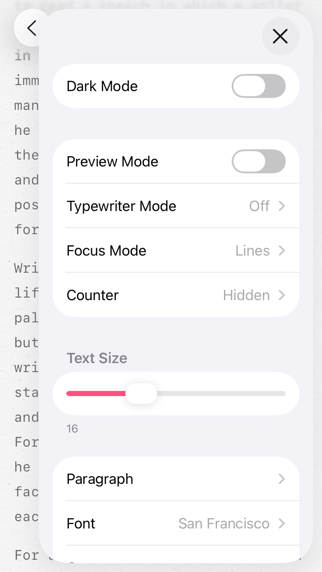
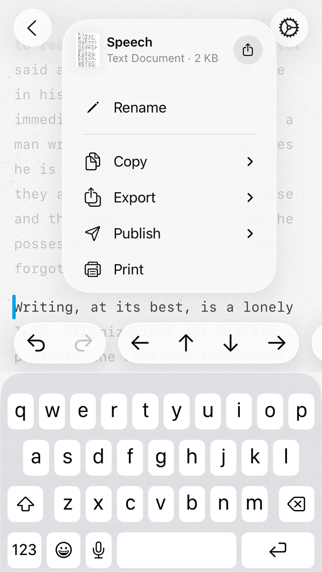
“This is a super-clean writing space with a lot of configurability that stays out of sight when you don’t need it.” App Store Review 2020 # STORY Read it here → paper.pro/story # HIGHLIGHTS · Gorgeous writing space · Silky-smooth typing · Deep personalization (Pro) · Markdown or Plain Text · Syncs with iCloud · Integrates with TextExpander · Publishes drafts to Medium, WordPress, Ghost, or Micro.blog · Exports to PDF, HTML, RTF, DOCX, ePub, image, or clipboard · Works seamlessly across your iPhone, iPad, and Mac # PRO FEATURES Basic adjustments like text size are free in Paper. More advanced personalization can be purchased with Pro Features. You will not be buying anything blindly, though. The trial period for Pro Features is untimed, so you can take your time to decide if they are a worthy investment. While trialing Pro Features, you might occasionally see a popup. Simply press Reset in the popup to get rid of it completely. Pro Features are either a subscription or a one-time purchase. Both the subscription and the one-time purchase unlock Pro Features on all your iPhones and iPads that share the same Apple ID. This subscription (or one-time purchase) applies only to iPhones and iPads. Macs require a separate subscription (or one-time purchase). The one-time purchase is hidden by default. To enable it, go to the Settings app → Apps → Paper → Purchases → toggle "Show Lifetime Option". If you want to upgrade from a Monthly subscription to a Yearly one (or to a Lifetime license), go to Paper’s page in the App Store and press the rounded button with the price next to the Yearly subscription option (or next to the Lifetime in-app purchase). # BUSINESSES, SCHOOLS & ORGANIZATIONS Businesses, schools, and organizations can use one of the following methods to purchase the Pro version of the app: · Apple Business Manager · Apple School Manager · Volume Purchasing The Pro version of the app can be accessed from this link → paper.pro/get # MARKDOWN FORMATTING SYNTAX # Heading 1 ## Heading 2 ### Heading 3 #### Heading 4 ##### Heading 5 ###### Heading 6 **Bold** __Bold__ *Italic* _Italic_ ~Underline~ ~~Strikethrough~~ ==Highlight== ::Highlight:: `Inline Code` ``` Code Block ``` [Link Text](http://paper.pro)  - Bulleted List - Bulleted List - Nested Bulleted List * Bulleted List * Bulleted List * Nested Bulleted List 1. Numbered List 2. Numbered List 3. Numbered List 1. Nested Numbered List - [ ] Task List - [x] Task List > Blockquote >> Nested Blockquote >>> 2x Nested Blockquote Text that needs a footnote[^Footnote description] ++ Inline comment ++ /* Inline comment */ %% Comment block | Col 1 | Col 2 | | ------ | ------ | | Cell 1 | Cell 2 | | Cell 3 | Cell 4 | --- ← Horizontal Rule \_ ← Markdown Escape ° ← HTML Escape # FREQUENTLY ASKED QUESTIONS ## How do I share my document? · On the main screen with documents: Tap and hold the document. Select "Share" from the menu. · In the document editor: Tap the title of the document in the top bar, then tap the round "Share" button in the popup. ## How do I print my document? · On the main screen with documents: Tap and hold the document. Select "Print" from the menu. · In the document editor: Tap the title of the document in the top bar. Select "Print" from the menu. ## Can I draw in the app? No. Paper is purely a plain-text editor. ## Can I add pictures? You can only link to public images on the Web. ## Can I password-protect my notes? No. ## Paper changes the font when I switch between alphabetic and non-alphabetic keyboards. How do I prevent it? · Change the keyboard to a non-alphabetic one (Japanese, Chinese, Korean, etc.). · Tap the "Settings" button in the top right corner. · Under the "Font" submenu, toggle "Keep for ABC Keyboards". ## Need more help? You can reach me via the in-app chat → "Settings" button in the corner → "Chat with the Maker" # TERMS OF USE paper.pro/terms-of-use
Latest release
What’s New
Dear User, This version brings a few stability improvements. Pleasant update, Your Paper PS → Loving Paper? A quick rating or review makes a bigger difference than you might think. Thank you!
Audience growth
Ratings growth
Momentum comes from crawler snapshots for the tracked storefront. “Viral growth signal” means unusually fast recent rating gains; it is an indicator, not download data.
Price tracking
Price intelligence
- First observed Aug 24, 2026 · 10:04 PM Free
Screenshots