About this app
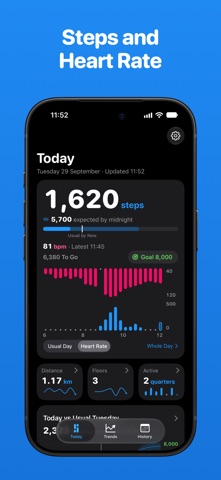
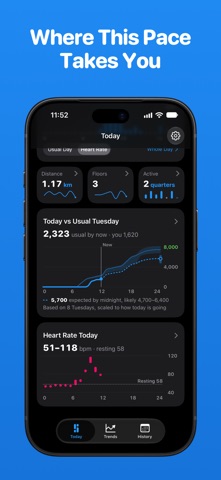
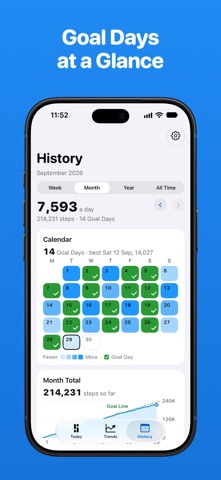
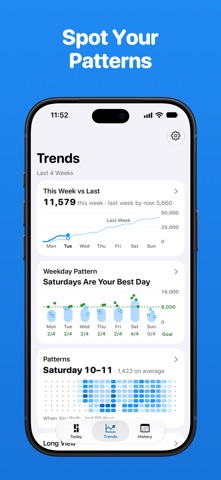
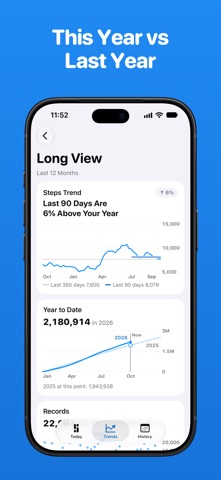
Steps for Watch puts your steps and heart rate together in one clear chart, on iPhone and Apple Watch. See how today compares with your usual day, and where this pace takes you by the end of the day. Works on iPhone alone, too. Heart rate needs Apple Watch. No account, no ads, nothing uploaded. Today at a Glance • Steps toward your goal, and the steps expected by midnight • Steps and heart rate in one chart, or your steps next to your usual day • Today vs Usual: your running total against how a day like today usually goes • Heart rate through the day, with your resting rate • Distance and floors • Your whole day in detail, hour by hour All Your History (Steps Pro) • Week, Month, Year and All Time, with your goal days marked • Records: your best day, week and month, and your longest goal run • Any earlier day in full detail Trends and Patterns (Steps Pro) • Weekday Pattern: how each day of the week usually goes • When You Walk: your busiest hours and days • Long View: this year against last year, and the best day of every month • Compare any period with the one before or with last year Walking and Intensity (Steps Pro) • Walking speed, step length, distance and floors over time • Brisk minutes and steps per minute Heart Rate and Steps (Steps Pro, needs Apple Watch) • See how your heart rate moves with your steps • How it settles after a walk, and your walking heart rate month by month • Descriptive only, not a medical measurement A Goal That Fits • Set your daily steps goal • Goal Simulator (Steps Pro): try a goal against your last four weeks • Goal by Weekday (Steps Pro): a different goal for each day Widgets • The small Today widget is free • Every other widget is part of Steps Pro: Lock Screen, Medium, Large and StandBy Notifications • Goal Reached, Week Ready and a quiet Evening Summary at the time you choose • Local only, and off until you turn them on On Apple Watch • Steps and heart rate in one full-screen chart • Turn the Digital Crown to move through the day. Each bar shows its steps and average heart rate • A 7-day view with daily steps and heart rate averages • Your latest heart rate, and a daily goal you set on the watch • A complication with today's steps and goal progress • Runs on its own; the iPhone app is optional Free and Steps Pro Free: the whole Apple Watch app, the Today screen and today's details on iPhone, your daily goal, notifications and the small Today widget. Steps Pro adds all your history, Trends and Patterns, Walking and Intensity, Heart Rate and Steps, Goal Simulator, Goal by Weekday, every widget, themes and CSV export. Steps Pro is available as a yearly subscription with a 7-day free trial for new subscribers, a monthly subscription, or a one-time Lifetime purchase. Payment is charged to your Apple Account when you confirm the purchase. Subscriptions renew automatically unless auto-renew is turned off at least 24 hours before the end of the current period. Manage or cancel them anytime in your Apple Account settings. Privacy Steps for Watch reads your activity from Health, only with your permission. Your data stays on your devices and is never sent to us or anyone else. No account, no ads. Terms of Use: https://www.apple.com/legal/internet-services/itunes/dev/stdeula/ Privacy Policy: https://sydvesti.com/privacy-policy Questions or ideas? contact@sydvesti.com
Latest release
What’s New
Steps for Watch is now on iPhone, too. • Today: steps and heart rate in one chart, progress toward your goal, and where this pace takes you by the end of the day • Today vs Usual: how today compares with your usual day • A free Today widget for the Home Screen • Optional notifications: Goal Reached, Evening Summary and Week Ready • Works on iPhone alone, too. No account, no ads Steps Pro, an optional upgrade, adds all your history, Trends and Patterns, Walking and Intensity, Heart Rate and Steps, and every widget, including Lock Screen and StandBy. The yearly plan starts with a 7-day free trial.
Audience growth
Ratings growth
Baseline captured. Growth appears after the crawler observes a changed rating count.
Momentum comes from crawler snapshots for the tracked storefront. “Viral growth signal” means unusually fast recent rating gains; it is an indicator, not download data.
Price tracking
Price intelligence
- First observed Aug 5, 2026 · 11:37 AM Free
Screenshots