About this app
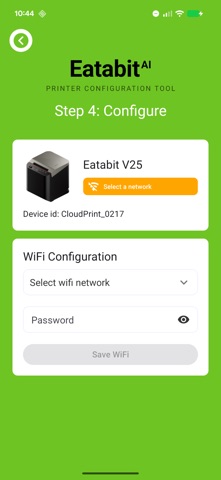
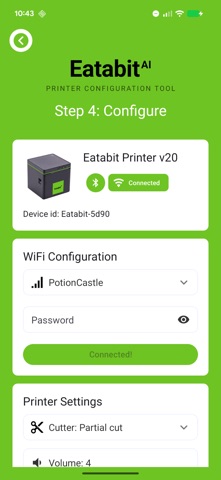
The Eatabit app is the fastest way to get your Eatabit cloud printer online. Pair with your printer over Bluetooth, connect it to your WiFi network, and start printing orders in minutes. SUPPORTED PRINTERS • Eatabit V4 • Eatabit V20 • Eatabit V25 SIMPLE STEP-BY-STEP SETUP 1. Choose your printer model 2. Scan for nearby printers 3. Connect and pick your WiFi network 4. Configure and print PRINTER TOOLS • Update WiFi settings any time • Adjust cutter behavior and alert volume • Run diagnostics and reset your printer • Order replacement paper right from the app Eatabit cloud printers deliver online orders straight to your kitchen — no tablet required. This app handles setup and configuration; orders flow automatically once your printer is online.
Latest release
What’s New
This release focuses on reliability during printer setup. • Fixed an issue where a printer would not appear when you scanned again after leaving the setup screen. Restarting the app is no longer needed. • Updated the Bluetooth connection layer and internal build configuration for improved stability.
Audience growth
Ratings growth
Baseline captured. Growth appears after the crawler observes a changed rating count.
Momentum comes from crawler snapshots for the tracked storefront. “Viral growth signal” means unusually fast recent rating gains; it is an indicator, not download data.
Price tracking
Price intelligence
First snapshot captured. The trend line starts after the next crawler price observation.
- First observed Aug 24, 2026 · 1:22 PM Free
Screenshots