About this app
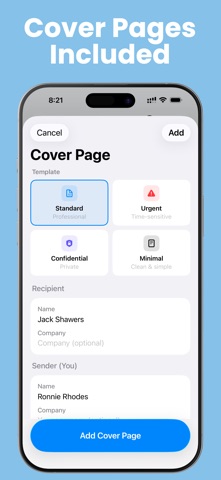
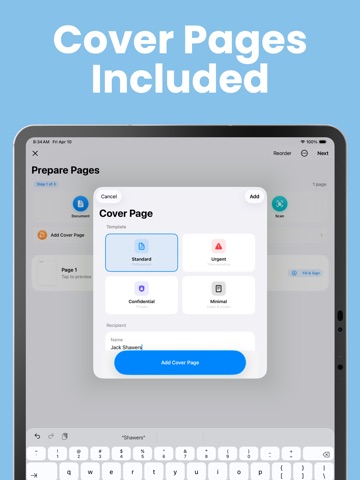
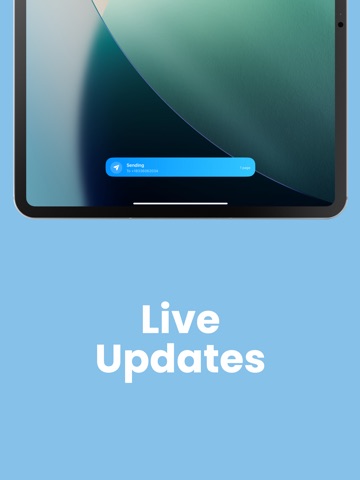
A doctor's office, an insurance company, or a government agency just asked you to fax something — and you don't have a fax machine. Faxeau lets you send one from your iPhone or iPad. Scan it, sign it, send it. A few minutes from paper to sent — and the app tells you when it lands. No subscription. No monthly fees. You buy fax pages, they never expire, and the last screen before you send tells you how many pages this fax will use. "I NEED THIS IN THEIR HANDS TODAY" • Scan paper with your camera — crisp, straight pages every time. • Send PDFs, Word files (.docx and .doc), and photos from the Files app, your photo library, or any cloud app. • On iPad, drag a file straight in from Files, Mail, or any app that hands over a file. • Combine scans, photos, and files into one fax, and reorder pages however you like. • Three steps, in order, each one named. No fax experience needed. "I NEED THE OFFICE TO ACTUALLY FILE IT" • Fill out forms right on your phone: if a PDF has fillable fields, just tap and type. • No fillable fields? Write or type anywhere on the page, just like a pen on paper. • Sign with your finger and save your signature to reuse anytime. • Add a professional cover page in seconds — on iOS 26 with Apple Intelligence, it can even draft the cover note for you. • Ready-made templates for the faxes people actually send: a records request, an authorization form, or a letter. • Scans, photos, and Word files come out on clean, standard letter-size paper. "ONE WRONG DIGIT AND IT GOES TO A STRANGER" • As you type, the number is read back to you in clear, spaced-out digits. • You see the actual page that's about to go, on the same screen as the number. • Pull a number from your contacts — and pick which of their numbers is the fax line, instead of whichever is listed first. • Your saved numbers show by name, like "Dr. Miller's Office." "IT'S BEEN TWENTY MINUTES — DO I CALL THEM, OR IS IT DONE?" • Watch your fax go from Sending to Delivered. The status updates by itself. • Sending to one office? Follow it on your Lock Screen and in the Dynamic Island. • Get a notification the moment it's delivered. • Still going after twenty minutes? The app says so plainly, and tells you to phone the office before you send it again. • Sending to several offices at once? Each one gets its own answer, so you know exactly which to chase. • If we couldn't confirm a fax, we say so instead of guessing — and keep a note about it for two days so it isn't forgotten. "THREE WEEKS LATER THEY SAY THEY NEVER GOT IT" • Save a receipt for any fax: who it went to, when, what happened, and the page count when we have it. • Your sent faxes stay in the app, searchable by number, date, or status. "WILL I RUN OUT HALFWAY? DID THAT FAILURE COST ME?" • The page count is on the screen where you add numbers and on the screen where you send — including the total when you're sending to several offices. • Buy pages once. They never expire. • If a fax doesn't arrive, the app tells you whether your pages came back, were used up, or are still being held — instead of leaving you to guess. • Send the same pages to the same office twice by mistake and the app tells you, instead of sending and charging you again. SEND THE SAME THING AGAIN IN SECONDS • Send Again: a fax that didn't arrive can be resent from the list with one swipe, and one that did can be resent from its own screen. Everything is filled in for you. • Favorites, recent numbers, signatures, and your sender details sync across your devices with iCloud. Faxeau is built for sending faxes — simple, fast, and honest about what it knows. Look around the app freely; you only sign in when you're ready to buy pages or send, with one tap using Sign in with Apple — no forms, no passwords. You can delete your account, and everything in it, from inside the app whenever you want. Privacy Policy & Terms: https://fierce-inlet-63133.herokuapp.com/fax-privacy-and-term
Latest release
What’s New
EASIER SIGNING AND FILLING IN • Every tool is now labeled: Pen, Erase, Text, Date and Sign. • Pinch to zoom into the page, so you can read the small print and sign on the right line. • Undo is always on screen CHECK BEFORE YOU SEND • Documents you create from a template are now shown to you before you type a fax number — and you can go back and edit without losing what you typed. • Filling in a template? Closing it now asks before throwing your work away. EASIER TO READ • If you use larger text, the fax number screen, Review & Send, the send result, the markup tools and the store now fit properly and stay within reach. • Fax numbers are shown in full on your fax list and your send results, instead of being cut short.
Audience growth
Ratings growth
Baseline captured. Growth appears after the crawler observes a changed rating count.
Momentum comes from crawler snapshots for the tracked storefront. “Viral growth signal” means unusually fast recent rating gains; it is an indicator, not download data.
Price tracking
Price intelligence
- First observed Aug 7, 2026 · 6:38 AM Free
Screenshots