About this app
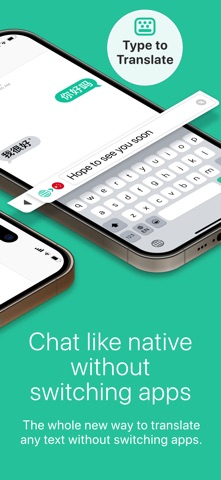
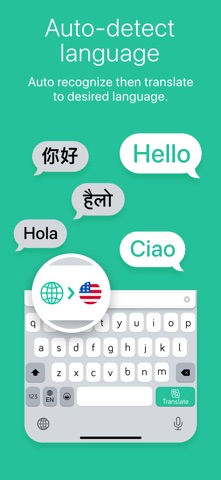
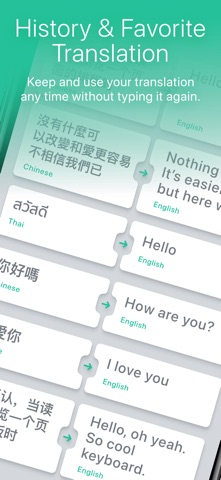
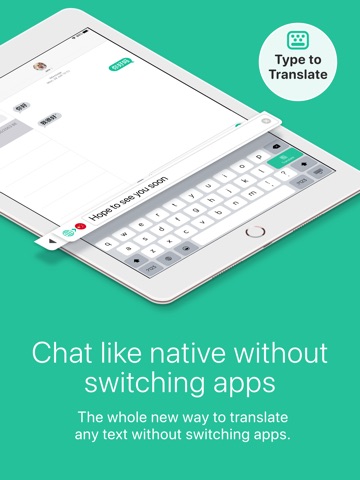
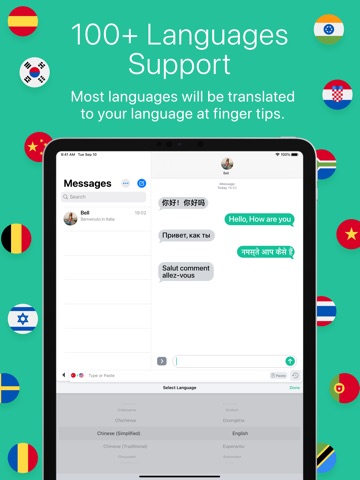
New version!! Translate Keyboard+, Translate any text without switching apps. Use every day with your favorite chat apps. Chat fast like Native with auto switch languages. Translate Keyboard+ is the whole new way to translate any text without switching apps while you Chat, Comments, Post, Taking Note, Writing, selling stuff, shopping online and any text as long as you can launch the keyboard. We bundled the whole Translate app into your keyboard that you use every day with your favorite apps No more confusing switching to translate app to copy and paste so many times to finish your only short sentence. Chat with your foreigner friends? No problem surprising them with their native language. Taking notes with some other foreign language? So easy just copy the text. Don't know what language it is? No problem, our Translate Keyboard will auto-detect language and translate to your desired language. Whether you are traveling to find new experiences, new places, meet new people or learn new languages. Translate Keyboard will make the language no longer an obstacle to you. Just copy and translate. Translate Keyboard+ provides a flawless translation experience in every app you need. Unlike other translators which interrupt the flow by forcing you to switch to another app but Translate Keyboard, you can instantly translate the language you want without switching apps. Translate Keyboard+ designed for iOS 15 up to latest iOS and iPadOS version. With supporting most models including latest ones such as iPhone 13,14,15 and Pro/Promax, iPad Air 6 and iPad Pro M4 KEY FEATURES - Built-in translator app within keyboard - Copy or Type to translate in Chat, Shopping or Document never be this easy and fast. - Can use more than 100+ languages such as English, Chinese, Korean, Japanese, Spanish, Italian, French, German and many more. - Browse through translation history and stores translation records for later access. - Keep favorite translations for more convenient when your wanna use them again. HOW TO USE Open keyboard, tap and hold the Globe key to switch to Translate Keyboard. After that, select the destination language. Type the text you'd like to translate. Tap "Translate" and send your message Now! If you'd like to translate a message you received, tap and hold it until an option to "Copy" appears. Tap "Copy" and the translation will appear in the same place! Full access is needed to communicate with the translator, the keyboard cannot function otherwise. We do not get access to everything you write, only the last sentence of the text field in focus when you are using Translate Keyboard. We do not store or keep a record of anything you translate, please read our Privacy Policy for further information. Translate Keyboard+ PRO With a Translate Keyboard+ PRO subscription, you have unlimited access to all features - Advertisements will be removed automatically - Unlimited access to Unlimited translate - Unlimited access to Translate history - Unlimited access to music feature If you upgrade Translate Keyboard+ PRO subscription, payment will be charged to your iTunes account. And your account will be charged for renewal 24-hours prior to the endow the current period. Subscriptions may be managed by you and auto-renewal may be turned off by going to your Account Settings after purchase. Any unused portion of a free trial period, if offered, will be forfeited when you purchase a subscription. Please read our Privacy Policy for further information. Privacy Policy: https://iappcreation.com/privacy-policy/tk Term of use: https://iappcreation.com/privacy-policy/tk#terms Report any suggestions/questions. Contact us at support@iappcreation.com.
Latest release
What’s New
- Bug fixes
Audience growth
Ratings growth
Baseline captured. Growth appears after the crawler observes a changed rating count.
Momentum comes from crawler snapshots for the tracked storefront. “Viral growth signal” means unusually fast recent rating gains; it is an indicator, not download data.
Price tracking
Price intelligence
- First observed Aug 19, 2026 · 12:25 PM Free
Screenshots