About this app
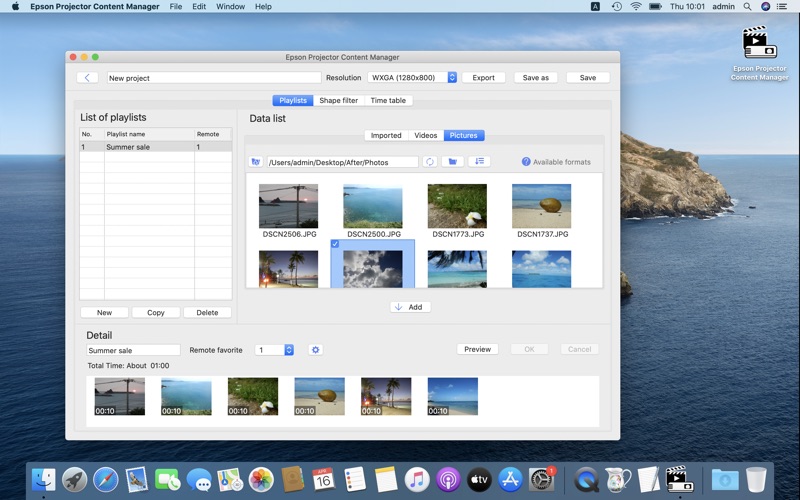
Epson Projector Content Manager allows you to add images and movies to playlists and save them on an external storage device (an SD card or USB memory). Simply insert the storage device into the projector slot to project your playlist content without using a cable connection. *1 You can use the following playlist functions: • Adding effect to a playlist You can add effect such as duration, transition, repeat, lightness, and color and shape filters to photos and videos in a playlist. You can also customize the shape filter by yourself.*2 • Previewing images You can use the program’s preview function to check images so that you can edit them as needed before saving the playlist on a storage device. • Time table setting You can specify when each playlist starts and finishes. Scheduled playlists begin automatically. This feature is useful when you want to periodically repeat the same playlist. • Simultaneous playback You can play the same playlist at the same time on multiple projectors. * The file types below are supported and can be used in playlists. * See your User’s Guide or application notes for details. Image: jpeg, png, bmp, gif Movie: MP4/MOVIE Video codec: MPEG-4 ASP, H.264/MPEG-4 AVC Audio codec: MPEG-4 AAC-LC, LPCM *Operating system: macOS Big Sur or later *1 Compatible projectors • EB-PU series • EB-L1000 series • EB-L700 / L600 / L500 / L400 series • EB-L250F / L255F • EB-L200SW series • EB-800 series • EB-750F / 755F • EV-110 / 100 series • EB-U50 series Please access to URL below to find the list of all supported projectors. https://support.epson.net/projector_appinfo/content_manager/en/ *2 Filters that apply a customized mask to images and movies
Latest release
What’s New
Addressed an issue where thumbnails would disappear on macOS Sequoia.
Audience growth
Ratings growth
Baseline captured. Growth appears after the crawler observes a changed rating count.
Momentum comes from crawler snapshots for the tracked storefront. “Viral growth signal” means unusually fast recent rating gains; it is an indicator, not download data.
Price tracking
Price intelligence
First snapshot captured. The trend line starts after the next crawler price observation.
- First observed Aug 10, 2026 · 6:07 PM Free
Screenshots