About this app
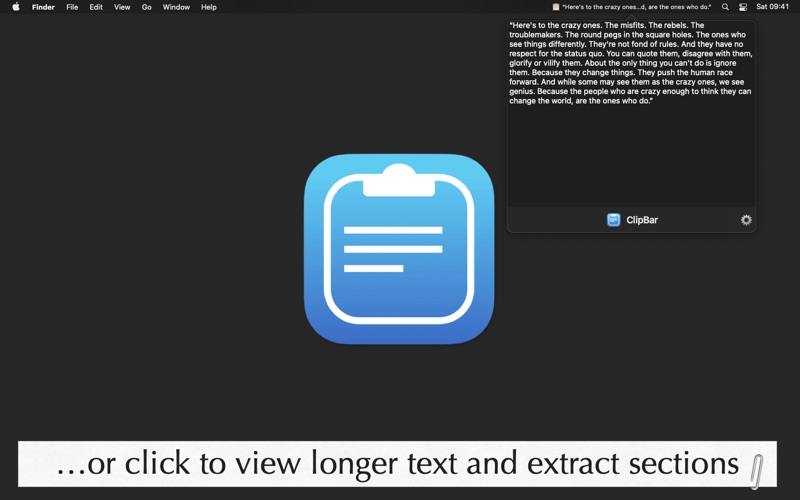
ClipBar lives in the upper right corner of your Mac and displays what's currently in your pasteboard, plus up to the last 100 previously copied items! If you have ever put your fingers on the CMD-V keys and then stopped, wondering what you were going to paste, ClipBar is the small menu bar utility for you. The app main purpose is to allow you to quickly check the text you're going to paste, but ClipBar also shows if the pasteboard is currently holding an image (giving you its size) or a file (showing you the path). And when you click on ClipBar, a popover will appear for viewing a larger preview of your full clipboard's content (from which you can extract part of the text or file path), or to actually view the image currently in your pasteboard. With ClipBar you can also go back in time and view and use a previously copied item; you decide how much the app should remember, anywhere between 1 and 100 items, and you can clear that history with a right click. While it's not a fully featured (and expensive! and complicated!) clipboard manager, ClipBar can be convenient many times each day. We copy and paste stuff so many times every day, and yet having the ability to see at a glance what's in the pasteboard before actually pasting it will make you faster and more accurate. And with Universal Clipboard, which shares what you copy among all your devices, it's even more useful to see at a glance what is currently in the pasteboard! IMPORTANT! Before installing and using ClipBar, you must assess if displaying the content of your pasteboard on screen is acceptable for you: ClipBar shows whatever is your current pasteboard content in the Menu Bar; this might include sensitive information, such as passwords, shown in plain text on screen. ClipBar does try to help: when an app marks what it copies as confidential, following the convention agreed between developers at nspasteboard.org, ClipBar shows "Concealed text" instead. Password managers usually do this, but not every app does, so please don't rely on it alone; you can also turn it off in Settings if you'd rather always see everything. Handling your pasteboard data is a sensitive matter, and ClipBar takes this responsibility seriously: the app does not persistently store the content of your pasteboard, doesn't connect to the Internet, doesn't include 3rd party frameworks of any kind (no analytics or other prying stuff) and is completely sandboxed. For additional information, and before using the app, please review ClipBar's Terms of Service and Privacy Policy at cdf1982.com/privacy/clipbar_terms_of_service_and_privacy_policy.html and get in touch if you need any additional clarifications. The app can launch automatically at login and you can configure the maximum length of the text preview, and if longer strings should be truncated at the beginning, in the middle or the end. If you hover your mouse on the Menu Bar item, you will get a full, untruncated preview even for longer texts and file paths. You can set a global keyboard shortcut to bring up ClipBar's popover without leaving the app you're working in, and you can also share your pasteboard's content to other apps directly from the popover! ClipBar is at home on macOS 27 Golden Gate and is built natively for Apple Silicon, but it is also compatible with previous versions of macOS (it requires version 14.6 Sonoma or newer) and older Intel Macs. ClipBar is an indie product that does not include in-app purchases or subscriptions: you just buy the app once for, dare I say, a very convenient price and keep it forever on all your Macs while also supporting its future development. Support is available from the developer - me, Cesare - at support@cdf1982.com and your reviews and word of mouth are really, really appreciated!
Latest release
What’s New
ClipBar 2.2 fixes the bug behind the rare freezes some of you have run into, where the app stopped responding and kept showing an old clipboard item until you quit and reopened it. It also stops watching your pasteboard while your Mac is asleep or the display is off, so a laptop spends a little less battery on doing nothing. This release is fully compatible with macOS 27 Golden Gate. Two smaller fixes: changing a setting like the emoji or the preview length no longer adds a duplicate to your history, and the first-run pasteboard permission step is clearer. One important note: ClipBar now requires macOS 14.6 Sonoma or later, which is the oldest version the current developer tools can build for. I'm sorry if this means you can't take this update just yet; the version you already have will keep working. As always, thank you for using ClipBar! If it's useful to you, a 5-star review in the App Store helps more than you'd imagine, and you can always write to me at support@cdf1982.com. Ciao, Cesare
Audience growth
Ratings growth
Baseline captured. Growth appears after the crawler observes a changed rating count.
Momentum comes from crawler snapshots for the tracked storefront. “Viral growth signal” means unusually fast recent rating gains; it is an indicator, not download data.
Price tracking
Price intelligence
First snapshot captured. The trend line starts after the next crawler price observation.
- First observed Sep 25, 2026 · 12:36 PM $2.99
Screenshots