About this app
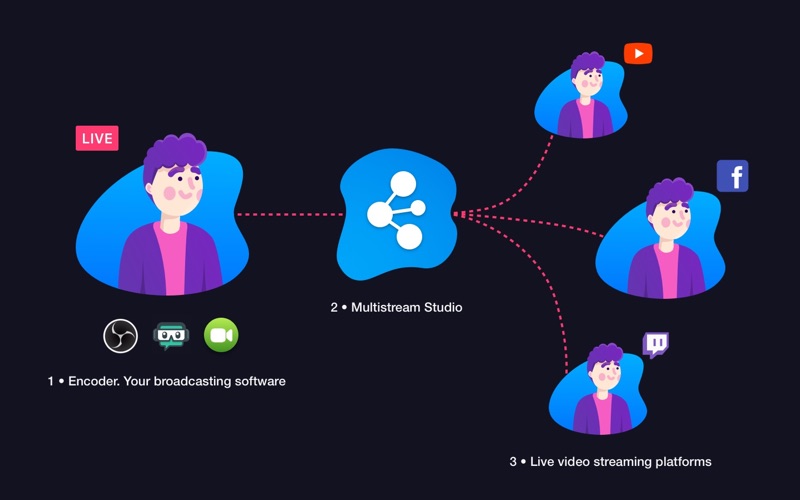
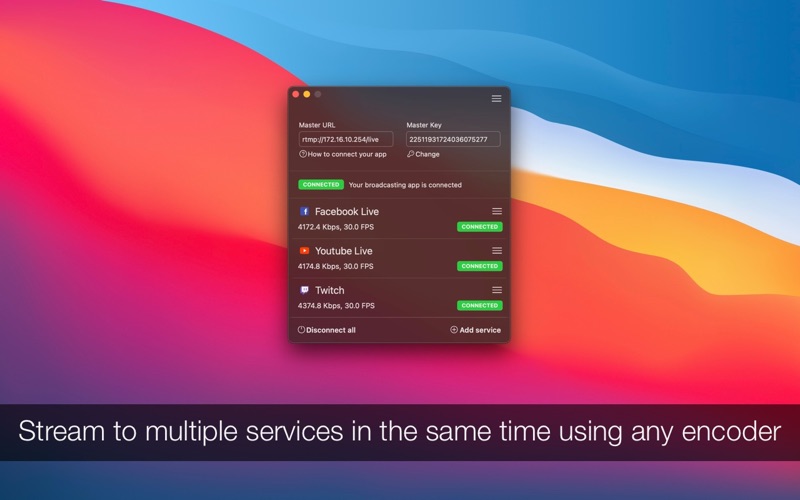
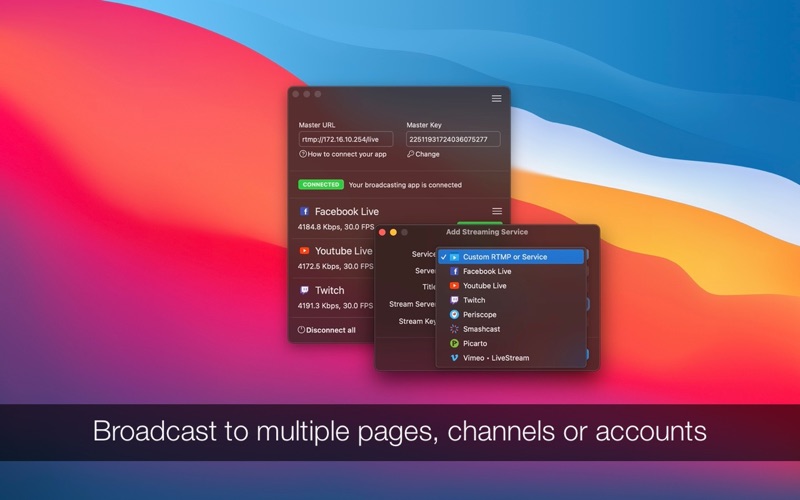
With Multistream Studio, you can simultaneously broadcast to multiple live video services while using your favourite app (like OBS or Streamlabs), mobile app, or hardware encoder. It acts like a middleman, copying your stream to multiple destinations. Stream to Facebook, YouTube, Twitter, Twitch, or custom RTMP/RTMPS services. Stream to multiple pages, channels, or accounts - for example, you can broadcast to multiple Facebook pages or groups and to multiple YouTube channels. Multistream Studio is compatible with any broadcasting software (OBS, Streamlabs, and many more) from any platform (Mac, Linux, or Windows computers), hardware encoder, or mobile broadcasting app. Just configure your app or camera to broadcast to Multistream Studio, and you are good to go. You can work with any kind of setup, platform, and video preferences since Multistream Studio will route your encoder output (video stream) without changes over all your configured RTMP/RTMPS services (Facebook, YouTube, Twitter, or cloud services). KEY FEATURES • Trusted by creators, gamers, musicians, or vloggers to stream content to millions of viewers • Reliable and stable. Each service connection is independent and isolated from the others. If a connection drops, all others will continue to broadcast • Quick setup. To add a service, you only need the broadcasting address and key. Nothing more • Reach more viewers by streaming to multiple live services at the same time (including to multiple accounts, pages, or channels) • Grow your audience, get discovered by new audiences, no matter where they are - Facebook, YouTube, Twitch, LinkedIn, or any RTMP/RTMPS service out there • Supports any video setup and preferences: 720p. 1080p, 4K at 30 FPS or 60 FPS. Multistream Studio will route your video without changes over RTMP/RTMPS • Unlimited destinations. Any wireless internet connection can support up to 5 - 10 live connections. Wired connections can support even more simultaneous connections FROM WHERE CAN YOU BROADCAST • Broadcast with any application - OBS, Wirecast, Streamlabs, or any other app. You can launch your application on your Mac, Linux or Windows computer and configure it to broadcast to Multistream Studio • Broadcast from mobile phones or tablets (all models and platforms). Launch your app on your phone and configure it to broadcast to Multistream Studio • Broadcast with video cameras, including GoPro and any other RTMP/RTMPS compatible camera. Configure your camera to broadcast to Multistream Studio • Broadcast from hardware encoders, including TriCaster, TeraDek, and any other RTMP/RTMPS compatible encoder. Configure your encoder to broadcast to Multistream Studio SUPPORT We read your support emails every day, day by day. Write with confidence any question, feedback, or complaint, and you will receive an answer in a very short period of time. We offer two auto-renewing subscriptions and a one-time payment option: • Basic, a 1 Month subscription • Premium, a 12-month subscription • Lifetime access: one-time payment only Prices may vary by location. Subscriptions will auto-renew unless canceled. • Payment will be charged to the iTunes Account at confirmation of purchase • Subscription may be managed by the user, and auto-renewal may be turned off by going to the user’s Account Settings after purchase. • No cancellation of the current subscription is allowed during the active subscription period. • Subscription automatically renews unless auto-renewal is turned off at least 24-hours before the end of the current period. • Your account will be charged for renewal for the amount of your current subscription within 24-hours prior to the end of the current period. All costs for subscriptions are mentioned above. Privacy Policy https://alexdenk.eu/subscriptions-privacy-policy.html Terms of Use https://alexdenk.eu/subscriptions-terms-of-use.html
Latest release
What’s New
• Bug fixes and improvements
Audience growth
Ratings growth
Baseline captured. Growth appears after the crawler observes a changed rating count.
Momentum comes from crawler snapshots for the tracked storefront. “Viral growth signal” means unusually fast recent rating gains; it is an indicator, not download data.
Price tracking
Price intelligence
First snapshot captured. The trend line starts after the next crawler price observation.
- First observed Aug 7, 2026 · 11:25 PM Free
Screenshots