About this app
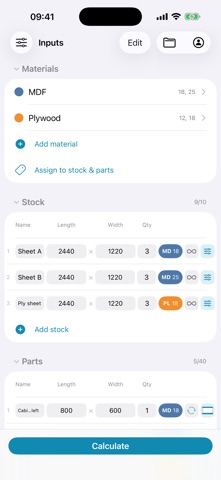
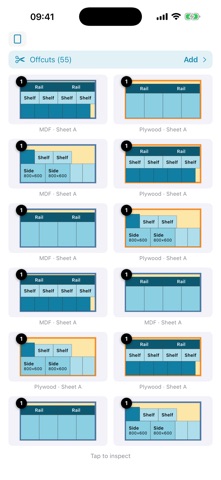
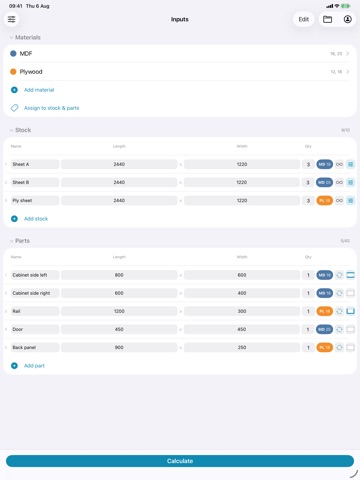
SmartCut is a cutlist optimizer for iPhone and iPad. Enter your parts and the sheets or lengths you can buy, and it works out how to cut them with the least waste. You get the cutting diagrams, the number of sheets you need, where every offcut falls, and a cut-by-cut sequence you can follow at the saw. MATERIALS Sheet materials such as plywood, MDF, chipboard, acrylic, glass and sheet metal, and linear stock such as construction timber, bar, pipe and extrusion. Work in decimals or fractions, in whichever units you use. CUT TYPES • Guillotine — for saws that cut edge to edge in a straight line, such as a table saw or beam saw. Choose length cuts for ripping, or width cuts for cross-cutting on a mitre saw or a cross-cut sled. • Efficiency — the default. Prioritises the fewest cuts and the least waste, ideal for a jigsaw, laser cutter or CNC. REAL-WORLD DETAIL The plan matches how the material will actually be cut: • Blade width, so the kerf is not quietly ignored • Grain direction, with a per-part lock to length or width • Edge banding on any side of a part • Stock trim, to skip damaged or unsquare edges • Infinite stock, when you can buy as many sheets as you need FEATURES • Fast and accurate layouts • Sheet / 2D / boards / panels • Linear / 1D / bars / rods • Decimals and fractions, with quick fraction entry • Colour-coded materials, so a mixed job stays readable • Stack identical layouts • Save and reopen projects • Export to PDF to print for the workshop AT THE SAW Step through the cuts one at a time, with measurements shown from both sides so you can check yourself against either edge. Or print the PDF and take it to the bench. ALSO AVAILABLE Cutlist Evolution runs the same optimizer in any web browser, on Windows, Mac, Linux and Chromebook, with nothing to install. cutlistevo.com FEEDBACK hello@cutrevolution.com TERMS OF USE https://www.apple.com/legal/internet-services/itunes/dev/stdeula/
Latest release
What’s New
• Pinch to zoom and pan the cutting layouts • Landscape mode makes viewing layouts easier • Long, narrow stock now displays at a readable size • Add offcuts back into your stock to reuse them in the next calculation • Cut mode now greys out pieces already cut away • Name field is in the main list • A fresh app icon Plus refinements and fixes throughout. Thanks for using the app!
Audience growth
Ratings growth
Baseline captured. Growth appears after the crawler observes a changed rating count.
Momentum comes from crawler snapshots for the tracked storefront. “Viral growth signal” means unusually fast recent rating gains; it is an indicator, not download data.
Price tracking
Price intelligence
First snapshot captured. The trend line starts after the next crawler price observation.
- First observed Aug 19, 2026 · 10:56 AM Free
Screenshots