About this app
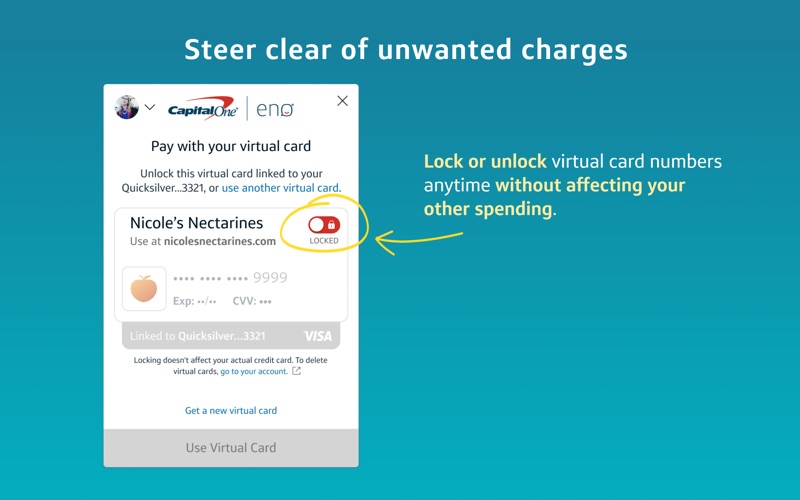
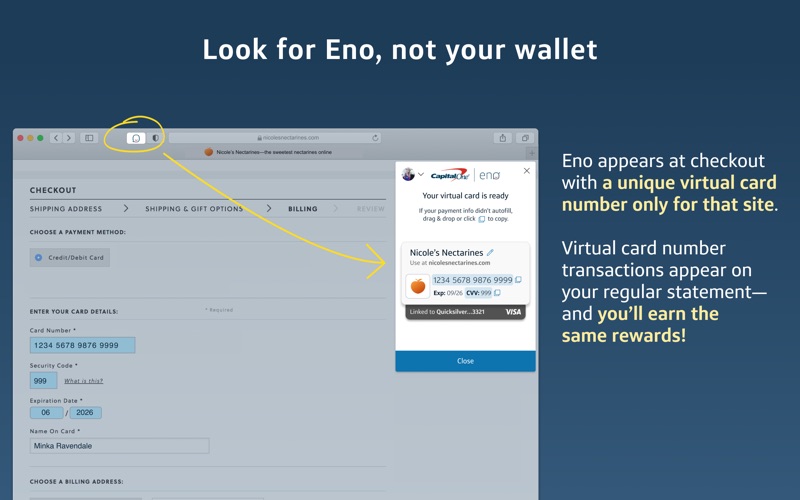
Shop more securely through your desktop browser with Eno®, your Capital One® assistant. INSTRUCTIONS FOR ENABLING ENO FROM CAPITAL ONE IN SAFARI 1. Install the “Eno from Capital One” application from the Mac App Store. 2. Open the “Eno from Capital One” application. 3. Within the application, click the blue “Enable Eno from Capital One” button to be taken directly to the “Extensions” section of Safari preferences. 4. Click the checkbox next to the Eno icon in the preferences window to enable the Eno from Capital One extension in Safari. The Eno icon should now appear to the left of the URL bar in Safari. 5. To begin using the extension, click the Eno icon in Safari. Note: clicking the Eno icon may prompt you to make a selection for website preferences if you have not already done so. Selecting “Always Allow on Every Website” lets Eno automatically pop up when you’re ready to check out! KEEP YOUR CREDIT CARD NUMBER TO YOURSELF Eno appears at checkout and provides a unique virtual card number only for that site, allowing you to shop online without exposing your actual card number. STEER CLEAR OF UNWANTED CHARGES Enjoy greater control over your online shopping experience. With Eno, you can lock or unlock your virtual card numbers anytime without affecting your other spending. SET IT AND FORGET IT Virtual card numbers keep working even if you get a new credit card, so you won't need to manually update your card information on the sites where you've stored one. Eno will handle it behind the scenes, automatically. CHECK OUT EFFORTLESSLY AND KEEP EARNING REWARDS Each purchase made with a virtual card number will be linked to your credit card account, so you’ll still earn the same benefits and rewards. To get started, install the Eno from Capital One application, and just click the Eno icon when you're ready to pay. Eno is only available for certain Capital One cardholders. Not a customer yet? Apply for one of our credit cards here: https://capital.one/enochrome
Latest release
What’s New
Bug fixes and customer messaging
Audience growth
Ratings growth
Baseline captured. Growth appears after the crawler observes a changed rating count.
Momentum comes from crawler snapshots for the tracked storefront. “Viral growth signal” means unusually fast recent rating gains; it is an indicator, not download data.
Price tracking
Price intelligence
First snapshot captured. The trend line starts after the next crawler price observation.
- First observed Aug 5, 2026 · 9:12 AM Free
Screenshots