About this app
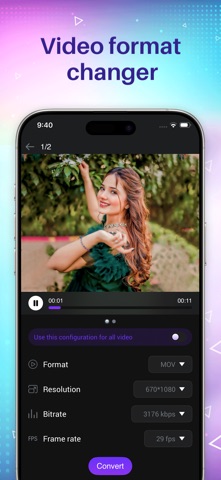
Transform, Resize, and Edit your videos instantly with Media Converter! Whether you need to save storage space by compressing large files, extract music from a video, or convert formats for compatibility, this all-in-one tool makes it simple and fast. KEY FEATURES: ◉ VIDEO CONVERTER Convert videos to any popular format with zero quality loss. • Supports: MP4, MKV, AVI, 3GP, MOV, MTS, MPEG, MPG, WMV, M4V, VOB, FLV, and more. • Perfect for making videos compatible with all your devices. ◉ VIDEO COMPRESSOR Running out of space? Shrink video file sizes easily. • Adjust Resolution, Frame Rate (FPS), and Bitrate. • Reduce file size significantly while maintaining clear quality. • Great for sharing videos via email or social media. ◉ VIDEO TO AUDIO (MP3 EXTRACTOR) Turn your favorite video clips into audio files. • Extract audio from video instantly. • Supports: MP3, AAC, AC3, OGG, M4A, WAV, and more. • Create your own playlists or ringtones from video content. ◉ POWERFUL VIDEO EDITOR • Video Merger: Join multiple clips into one. Supports Sequential, Top-Bottom, or Side-by-Side layouts. • Video Cutter: Trim unwanted parts with millisecond precision. • Video Processing: Reverse, Stabilize, Slow Motion, Crop, and Rotate videos. WHY CHOOSE MEDIA CONVERTER? • User-friendly interface designed for iOS. • Fast processing speeds. • Supports a massive library of video and audio formats. • No internet required for conversion (works offline). Download Media Converter today and take full control of your video files!
Latest release
What’s New
• Fixed minor bugs and improved overall app stability • Enhanced media conversion performance for faster processing • Improved video and audio conversion reliability
Audience growth
Ratings growth
Baseline captured. Growth appears after the crawler observes a changed rating count.
Momentum comes from crawler snapshots for the tracked storefront. “Viral growth signal” means unusually fast recent rating gains; it is an indicator, not download data.
Price tracking
Price intelligence
First snapshot captured. The trend line starts after the next crawler price observation.
- First observed Aug 20, 2026 · 9:46 PM Free
Screenshots