About this app
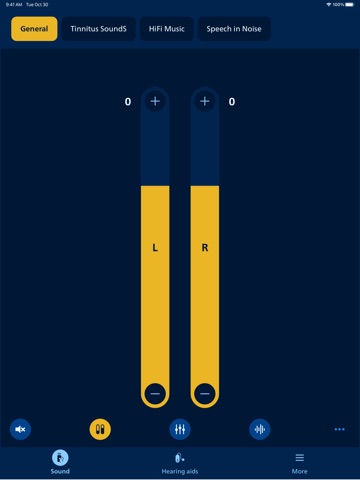
This app lets you control your hearing aids from your mobile device. It comes with an app for Apple Watch helping you discreetly change programs and adjust volume (when within Bluetooth range). Note: some features may be available depending on your hearing aid model. Check below for details. • Adjust sound volume for each hearing aid together or separately • Mute surroundings for better focus • Switch between programs set by your hearing care professional • Check battery level • Stream calls, music, and podcasts directly to your hearing aids (availability may vary depending on your phone model) • Find your hearing aids if lost (requires location services always turned on) • Access app support and troubleshooting solutions • Meet your hearing care professional for an online visit (by appointment) • Adjust streaming sounds with streaming equalizer (available for all hearing aid models except Philips HearLink 00) • Adjust sounds around you with sound equalizer (available for Philips HearLink 60, 50 and 40 models) • Track your progress with Philips Journal feature (available for Philips HearLink 60, 50 and 40 models) • Handle wireless accessories paired with your hearing aids such as TV Adapters and AudioClip • Connect to and adjust an Auracast™ broadcast (available for Philips HearLink 60 and 50 models) • Get reminders to replace your wax filters to maintain sound quality (available for Philips HearLink 60 and 50 models) • Reduce background noise while streaming with Streaming Balance (available for Philips HearLink 60) First use: You need to pair your hearing aids with this app to use it to control your hearing aids. App availability: We recommend regular hearing aid updates during your routine check-up with your hearing care professional. For optimal performance, we recommend updating your device to iOS 18 or later. To check the latest list of compatible devices, please visit: hearingsolutions.philips.com/compatibility
Latest release
What’s New
In this update, we have added wax filter replacement reminders to help you keep your sound quality at its best, and streaming filter for clear and comfortable streaming especially in noisy environments, both available for compatible devices.
Audience growth
Ratings growth
Baseline captured. Growth appears after the crawler observes a changed rating count.
Momentum comes from crawler snapshots for the tracked storefront. “Viral growth signal” means unusually fast recent rating gains; it is an indicator, not download data.
Price tracking
Price intelligence
- First observed Aug 16, 2026 · 9:40 PM Free
Screenshots