About this app
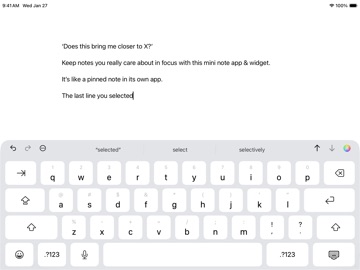
Keep notes you really care about in focus with this mini note app & widget. It’s like a pinned note in its own app. The app feels like just 1 note, but you can create up to 8 infinite pages. It features beautiful typefaces. There is extra spacing between lines. You can mark lines with color, italics, or both. Pages can also be given custom names. Each page is saved as a plain text file, either in iCloud Drive or only on your iPhone or iPad. Text and links can be added to a page in the app from within other apps using the Share button. You can add a sticky note widget to your Home Screen and Lock Screen that shows the last line you selected in the app or the line you pinned in the Home Screen widget. A control lets you open the app directly from Control Center or your Lock Screen. You can also assign this control to your iPhone’s Action button. An Apple Watch app and widget show the last line you selected in the app on your paired iPhone or the line you pinned in the app on your watch. App Privacy: There is no sign-in and no data is collected. Your files are encrypted on your device using your passcode when it’s locked or turned off. If iCloud Backup is turned on for the app in the Settings app > [Your Name] > iCloud > Storage > Backups > [Your Device], your app data is uploaded to iCloud. If you want your files in iCloud Drive to be end-to-end encrypted, please turn on Advanced Data Protection in Settings > [Your Name] > iCloud > Advanced Data Protection. If you have Share Analytics turned on in Settings > Privacy & Security > Analytics & Improvements, we receive app analytics from Apple. This does not contain your app data or personally identify you. Other Features: To add a new line, pull down when you are at the top of a page. Easily move lines up ↑ or down ↓. Quickly undo or redo changes above the keyboard. Tap the ⋯ button above the keyboard for more actions, such as adding the date or inserting a line break. Link or move lines to another page using the Quick Actions menu. List markers (like ‘•’) and spaces you type at the start of a line automatically get added to a new line below it. A URL scheme allows you to go directly to a page or to a specific line on a page. Support for Apple’s Writing Tools on compatible devices. Supports multiple windows on iPad. Fully accessible with VoiceOver. Gestures: Swipe left or right on a page while editing to move the insertion point from word to word. To move the insertion point, touch and hold the Space bar on the onscreen keyboard with one finger, then slide your finger around the keyboard. Swipe left with three fingers to undo or right to redo. Tap on a page with three fingers to show a menu with undo, cut, copy, paste, and redo. The use of this app is subject to your agreement to: Apple’s Standard End User License Agreement: https://www.apple.com/legal/internet-services/itunes/dev/stdeula/ Apple’s Privacy Policy: https://www.apple.com/legal/privacy/ If you use iCloud with the app, iCloud’s Terms of Service: https://www.apple.com/legal/internet-services/icloud/
Latest release
What’s New
This update provides a small improvement. Version 3.2 adds an option to create a new page when moving lines to another page. It also adds a new screen documenting the tag syntax, improves autoscrolling when the text selection changes, and supports additional filename extensions for the app’s plain text files.
Audience growth
Ratings growth
Baseline captured. Growth appears after the crawler observes a changed rating count.
Momentum comes from crawler snapshots for the tracked storefront. “Viral growth signal” means unusually fast recent rating gains; it is an indicator, not download data.
Price tracking
Price intelligence
First snapshot captured. The trend line starts after the next crawler price observation.
- First observed Aug 21, 2026 · 7:40 PM Free
Screenshots