About this app
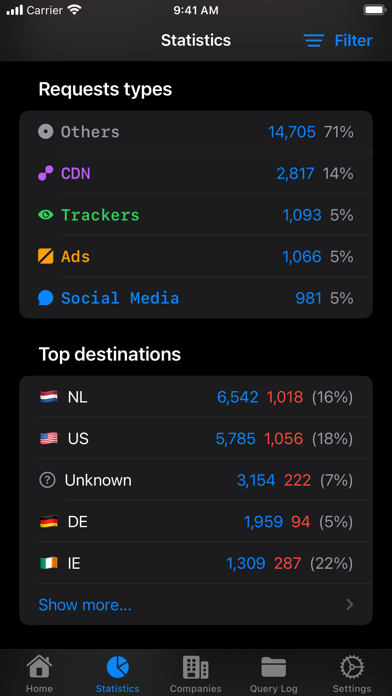
Take control of your AdGuard DNS setup from anywhere. Monitor DNS activity as it happens, inspect blocked requests, and adjust protection for servers and devices—all from a fast, native iOS app. *See What Your Network Is Doing* Follow requests in real time with Live Log, search your Query Log, and inspect detailed request and response information. Find the answers you need without digging through a web dashboard. *Control Protection in Seconds* Enable or disable protection for an entire server or fine-tune settings for individual devices. Manage blocklist filtering, user rules, parental control, and browsing security. Siri Shortcuts make common actions even faster. *Understand Your DNS Traffic* Explore clear statistics for your DNS activity, including top domains and destinations, and see what is being blocked at a glance. *Manage Servers and Devices* Add or edit servers, update device details, and keep important DNS settings within easy reach. *Built for Apple Devices* Enjoy a truly native iOS experience built with SwiftUI, plus Home Screen widgets for quick actions and status updates. Features: • Toggle protection for servers and individual devices • Control blocklist filtering, user rules, parental control, and browsing security • View basic and advanced DNS statistics • Search the Query Log with filters and detailed request information • Monitor requests in real time with Live Log • Use Home Screen widgets for quick actions and status • Automate common actions with Siri Shortcuts How it works: 1. Connect your AdGuard DNS account. 2. Select a server or device. 3. Monitor activity, review statistics, and manage protection. Remote for AdGuard DNS is an independent, third-party app and is not affiliated with or endorsed by AdGuard. An AdGuard DNS account is required. Learn more about AdGuard DNS at https://adguard-dns.io/.
Latest release
What’s New
- Better handling & display of automatically generated devices - Several fixes for loading the Query Log
Audience growth
Ratings growth
Baseline captured. Growth appears after the crawler observes a changed rating count.
Momentum comes from crawler snapshots for the tracked storefront. “Viral growth signal” means unusually fast recent rating gains; it is an indicator, not download data.
Price tracking
Price intelligence
First snapshot captured. The trend line starts after the next crawler price observation.
- First observed Aug 17, 2026 · 10:44 PM $2.99
Screenshots