About this app
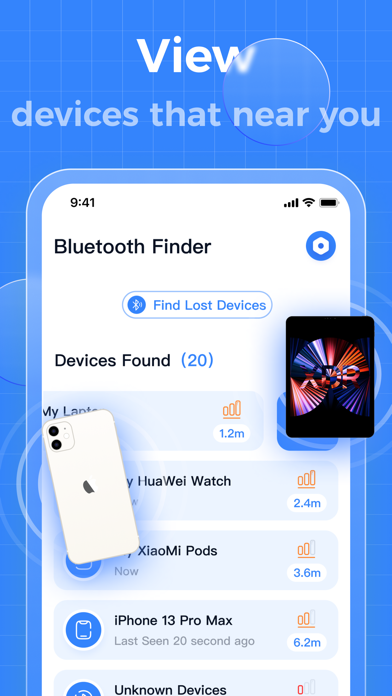
Lost your headphone or Bluetooth? It happens all the time, but a Bluetooth finder will help you locate your lost device quickly. It shows you all the devices that you are near. Select one specific device and see the calculated distance score. Especially to learn more about how this score changes as you move to find your lost device. Benefits: 1. Find your lost AirPods, Bluetooth, SmartWatch, Apple Pencil, etc. in moments. 2. Even if you lose one AirPods, you can local your lost AirPods and bring them back. 3. Playing a sound helps find lost devices fast. 4. Use this device finder any time you want. 5. Help you save a ton of money because you were going to buy a new pair. 6. Anyone of any age can navigate the app. Very easy to use. Stey by stey instructions included. Bluetooth Finder Feature: 1. Find a wireless device or Bluetooth signer. 2. Works indoors and outdoors. 3. Display the last time the lost device was seen on your map. 4. Play a sound through lost headphones to locate them quickly. How to use it: 1. Start the application and watch the Bluetooth finder locate the lost device around you. 2. Walk around slowly and the Bluetooth finder will soon be able to find your lost device in the matched position. 3. You will find your lost device. Notes for success: Bluetooth technology is fickle, so it may take a few tries to find what you're looking for! Thousand of people have found their lost devices using this app. If you don't find yours right away, take a deep breath, keep trying, and make sure you've read our detailed instructions and tips in the app. We care about you and work to maximize your chance of finding your devices. If you find your device, consider leaving a 5-star rating and writing a review. Bluetooth finder offers two Auto-renewing subscription options for $5.99 per month and $49.99 per year. - Payments will be charged to your iTunes account at confirmation of purchase. - You can choose between a single tip or a weekly subscription to our expert predictions - Bluetooth Tracker expert predictions prices can vary depending on your country. - Subscriptions may be managed by the user and auto-renewal may be turned off by going to the user's Account Settings after purchase. - Your subscription will automatically renew unless you have turned off auto-renewal at least 24 hours before the end of the current period. - When your subscription auto-renews, the same iTunes Account as the initial purchase will be charged the same amount as the initial purchase. - After canceling your subscription, your subscription will remain active until the end of the purchased period. Terms of use: https://sites.google.com/view/bluetooth-finder-terms-of-use/homepage Privacy Policy: https://sites.google.com/view/bluetooth-finder-policy/homepage
Latest release
What’s New
In this update, we've fixed several bugs and improved the app's performance.
Audience growth
Ratings growth
Baseline captured. Growth appears after the crawler observes a changed rating count.
Momentum comes from crawler snapshots for the tracked storefront. “Viral growth signal” means unusually fast recent rating gains; it is an indicator, not download data.
Price tracking
Price intelligence
First snapshot captured. The trend line starts after the next crawler price observation.
- First observed Aug 14, 2026 · 12:01 AM Free
Screenshots