About this app
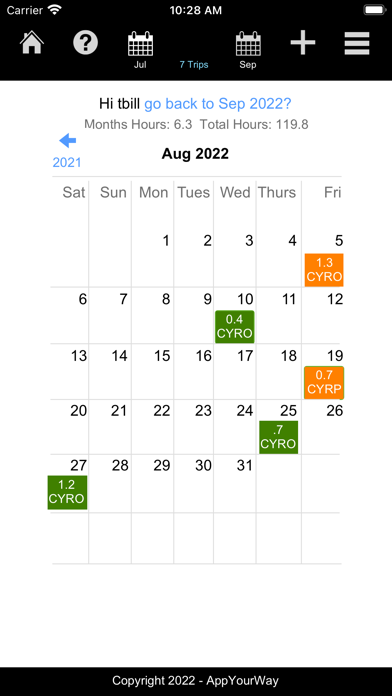
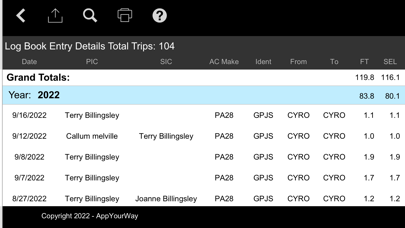
For way too long aviators have had to maintain a physical log book to record their flight times. While this works it's not handy, you can only refer to it when the book is with you and calculating totals can be cumbersome. Instead, this aviation log book keeps things simple, you can quickly see your log entries in calendar view or switch to logbook view, the choice is yours. At a glance you can see your months totals, your grand total life hours to date or you can search on any trip, any copilot or passenger, any note or endorsement without having to scramble thru a physical log book. The log book contains totals of Flight Time, single engine, multi-engine, helicopter, glider, day/night landings, instrument time, sim time, solo, PIC, SIC, dual times as a standard paper log book would track. You can even quickly check how many hours you've logged per aircraft identifier - it's easy. Not sure you're comfortable having your logbook on a device instead of paper, concerned that somehow you'll loose your information?? That was my concern too, so I've incorporated an export feature that lets you export all the information into any format you wish, CSV, TAB, XLS etc. - Simply export your log records as often as you'd like as a backup. You can also print your logbook at anytime to PDF or your printer, this way your information is always safe. For those who would like an easy way to calculate their flight time and air time I've incorporated a flight calculator that helps with that. Hopefully you find it as helpful as I have. Cheers. Please note: This is a standalone app, please install it on one device ie iPhone or iPad, not both as the data is not shared.
Latest release
What’s New
Fixed an error with rounding and multi flight days. ------------------ - Found a calendar bug upon release of 1.0.2 needed to fix it.. ------------------ - Fixed a bug where the calendar would not show a flight in color although the logbook shows the flight correctly. - The app now tracks the start and stop times for each log entry so you can go back and see the exact times entered - Added a feature where every 30 days you'll be prompted to perform a backup of your data - Minor other bugs and fixes.
Audience growth
Ratings growth
Baseline captured. Growth appears after the crawler observes a changed rating count.
Momentum comes from crawler snapshots for the tracked storefront. “Viral growth signal” means unusually fast recent rating gains; it is an indicator, not download data.
Price tracking
Price intelligence
First snapshot captured. The trend line starts after the next crawler price observation.
- First observed Aug 16, 2026 · 12:45 AM $3.99
Screenshots