About this app
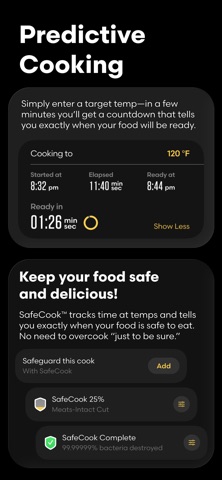
See (and graph!) exact temperatures throughout your food while it cooks. Know exactly when it will be done. View and graph core, surface, and ambient temps in real time. The wireless Predictive Thermometer was built to answer a simple but important question: when will my food be ready? Combustion’s Predictive Engine™ estimates exactly when that will be, using the data from 8 onboard sensors (the most of any cooking thermometer). Important firmware updates! The Combustion App includes the latest firmware updates for Predictive Thermometers and other Combustion Accessories including Boosters, Displays, Giant Grill Gauges and other forthcoming products. Firmware updates improve core functions including time-to-cook predictions, longer battery life, and can add new features. MeatNet™ Cloud – for functionally unlimited range! Use with WiFi Accessories or with a second mobile device to stream your cook data to the cloud. Watch your cook in real-time from anywhere with internet access. Live Activity/Apple Watch support. The Combustion App works with iOS as well as iPadOS and MacOS (M1 or newer). Includes Live Activity (Dynamic Island) display feature so you can watch key temps even when the app is in the background. So handy! Combustion App Features: – Set target temp: so that your food comes out just the way you want it – See predictions in relative time (“ready in” countdown) or in absolute “clock” time – See key temps in real-time: including TrueCore®, TrueSurface™, TrueAmbient™ – Get notifications for important cooking events with advanced alerts (ready alarm, 5-minute warning, disconnect alert, low battery notification) – Set SafeCook™ parameters (integrated food-safety) – Know exactly when your food is safe to eat – Set-up WiFi connectivity for Combustion WiFi accessories – Graph your food’s temperatures in real-time! – See (and graph) temperatures from all 8 sensors with Advanced Cooking Mode – Enables multi-node MeatNet™: use any combination of Combustion accessories to extend Bluetooth signal range + strength – Use with or without Combustion Display – Export cooking data - to fine-tune your technique – Update firmware: get better performance and new features for Combustion tools – Works with most cooking appliances and cookware types – Works with all kinds of foods and most cooking appliances - BBQ smokers, ovens, ranges, grills, and more - indoors and out. – Works with or without WiFi Get more consistent results with all your favorite foods: steak, pork chops, brisket, pork shoulder, roasts, turkey, whole chicken, ribs, fish, bread, and more. Advanced graphing on the Combustion App helps you visualize exactly how heat moves through your food. You will understand the relationship between ambient cook temps and surface temps. And how surface temps really control how long things take – and how evenly food cooks. It may shock you to find out the oven temp (or grill temp) you set is not the same as the food is actually experiencing! The Combustion Inc app puts all that knowledge in front of you – with instant feedback, so you’re not just cooking better, you’re also learning as you go. And learning has never been so delicious.
Latest release
What’s New
• Fix for rounding differences between the Live Activity and in app display • Order of Live Activities now reflects the in app order of devices (requires at least one re-order to enable) • Added GGG to CPT Live Activity when merged • Fix for duplicate notifications • Fix for manually offline devices not returning to active • Fix for graph zooming in when prediction state changes • Fix for SafeCook showing when disabled during cook • Minor bug fixes
Audience growth
Ratings growth
Baseline captured. Growth appears after the crawler observes a changed rating count.
Momentum comes from crawler snapshots for the tracked storefront. “Viral growth signal” means unusually fast recent rating gains; it is an indicator, not download data.
Price tracking
Price intelligence
- First observed Aug 18, 2026 · 2:44 AM Free
Screenshots