About this app
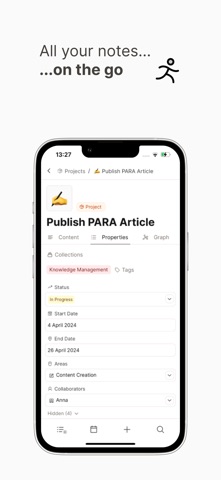
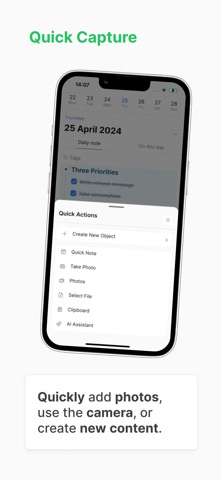
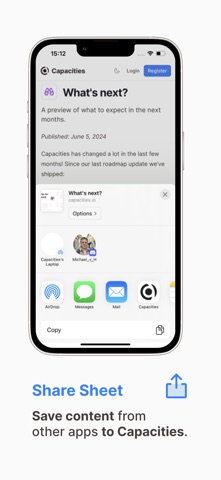
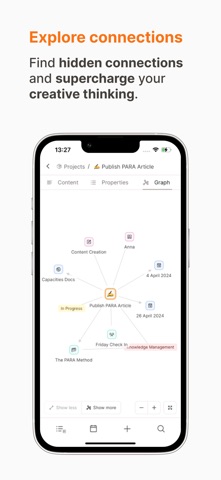
The Capacities Mobile App for iPhone and iPad is your note-taking companion when you're on the go. Access all your notes, quickly save important info, and create new content. If you're stuck, ask our integrated AI assistant (Capacities Pro). As the mobile version of Capacities, it is adapted to mobile workflows and works great together with the desktop app. KEY FEATURES DAILY NOTES Plan your day, write down ideas, and reflect. POWERFUL SEARCH Find what you are looking for in seconds. QUICK CAPTURE Quickly add photos, use the camera, or create new content. SHARE SHEET Save content from other apps to Capacities. AI ASSISTANT A powerful assistant right and your pocket and linked to your notes. BROWSE AND READ Browse through all your notes and let them inspire you. EXPLORE CONNECTIONS Find hidden connections and supercharge your creative thinking. LEARN MORE HERE Website: capacities.io Contact: team@capacities.io Discord: https://discord.gg/3eBP9YxHgQ Twitter: @CapacitiesHQ YouTube: https://www.youtube.com/channel/UCLqpKLWf9hmmh07z9U1cNIg Reddit: reddit.com/r/capacitiesapp/ Terms and conditions: https://capacities.io/terms-and-conditions Privacy policy: https://capacities.io/privacy-policy
Latest release
What’s New
MOBILE APP 2.0 Capacities on phone is redesigned to feel faster and easier to use. - Floating top bar, tabs, and search sit over your content so more of the screen is yours - Home and Search are real pages with normal back navigation - Clearer settings, lists, tasks, and daily notes - Faster share sheet for links, text, photos, and media from other apps - Full-screen images and PDFs, floating audio player, and Explore AI with a composer that stays in easy reach - The phone app starts much quicker than before HOME SCREEN WIDGETS (EXPERIMENTAL) Add widgets for Daily Note, Pinned, Recents, Tasks, Quick Capture, Quick Open, Quick Create, and AI Assistant. On iOS you also get App Shortcuts for quick capture, new tasks, search, and more. EXPLORE AI Browse your AI chats in one place, search your history, and start new conversations. On phone, Explore uses the new glass look with larger tap targets. AI ASSISTANT - Better at multi-step work: plans, asks follow-ups, and proposes creates and updates for you to approve - Auto model option picks a strong model from your preferred provider - Longer chats stay usable as older context compresses in the background ALSO IN THIS RELEASE - Confirm and form sheets pin Done to the bottom on long content - Smoother calendar week and month swipes - Tag and query menus open as proper phone sheets - Easier task editing with clearer property layout - Cleaner daily note week strip with optional month overview FIXES - Lower memory use for PDFs, images, and long sessions - More reliable file picking and mic permission flow on iOS - Tab bar returns if you cancel a file or media picker - Widgets route into AI and search correctly - Login input no longer jumps when focusing fields - Share sheet space selection stays consistent - Reliable Backspace delete for blocks on iOS
Audience growth
Ratings growth
Baseline captured. Growth appears after the crawler observes a changed rating count.
Momentum comes from crawler snapshots for the tracked storefront. “Viral growth signal” means unusually fast recent rating gains; it is an indicator, not download data.
Price tracking
Price intelligence
First snapshot captured. The trend line starts after the next crawler price observation.
- First observed Aug 21, 2026 · 5:37 AM Free
Screenshots