About this app
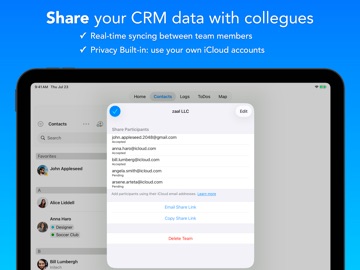
Stay on top of your relationships with a powerful, easy-to-use CRM. Contacts Journal gives you the tools to track conversations, manage follow-ups, and organize your contacts—so you can build stronger relationships and never miss an opportunity. With Contacts Journal, you can: • Always know your last interaction with each contact, so you’re prepared for any conversation • Stay consistent with timely follow-ups, reminders, and tasks • Organize contacts using tags, groups, and filters • Keep all relevant notes, files, and documents in one place • Plan smarter meetings by seeing who’s nearby and where opportunities are • Maintain a private, secure address book fully under your control • Reach out faster with personalized emails using templates or AI TRUSTED BY PROFESSIONALS WHO MANAGE RELATIONSHIPS: • sales professionals and account managers • small business owners • freelancers, consultants, and independent operators • real estate agents, lawyers, and other client-facing roles • individuals who want to stay intentional about their personal network KEY FEATURES: LOGS, TODOS AND FILES Keep notes for each meeting with Logs; create follow-ups and reminders with ToDos; attach images and documents with Files IMPORT CONTACTS You can easily import your contacts from the Contacts app, or from a CSV file ORGANIZE CONTACTS Categorize and visualize your contacts list with Contact Tags, Favorite Contacts, Groups and Filters COMPANY ACCOUNTS Link multiple contacts to a Company Account, to track interactions at the organization level DUPLICATE DETECTION AND MERGE Detect and merge duplicate contacts CUSTOM FIELDS Extend the app by defining and creating your own custom fields MAP YOUR CONTACTS Turn your contacts into a map of opportunities. See who’s nearby, plan smarter meetings, and spot patterns with color-coded locations BUSINESS CARD SCANNER [requires a Teams plan] Quickly convert business cards into contacts EMAIL TEMPLATES Create email templates with personalization tags, to send prepared emails quickly with a personal touch AVAILABLE ON iOS AND MAC Contacts Journal is available on iOS and Mac App Store, with seamless syncing via iCloud so your data is always up to date across devices. POWERFUL FEATURES • Share Extension to save notes, links, and images from other apps • Siri Shortcuts for faster workflows and automation • Home and Lock Screen widgets for quick access • Group Emails to reach multiple contacts at once • Visual charts to track your relationship activity GREAT FOR PRIVACY No account signup needed. Your data stays fully under your control, and we never have access to it UNLIMITED PERSONAL PLAN: • The app is initially limited to 20 Logs, ToDos, Files, Custom Fields, etc. To add unlimited entries, please purchase the “Unlimited Personal Plan” • The Unlimited Personal Plan is a one-time purchase • You can purchase the "Unlimited Combined Plan" to unlock both iOS and Mac apps together CONTACTS JOURNAL FOR TEAMS: • Share your Contacts Journal data with others using iCloud accounts • Real-time, automatic syncing between multiple users • Create multiple teams to share different information with different users • Includes a Business Card Scanner Contacts Journal For Teams requires a monthly or annual subscription that is purchased through the app. The subscription will automatically renew unless canceled within 24 hours before the end of the current period. Payment will be charged to iTunes Account at confirmation of purchase. Subscriptions may be managed by the user and auto-renewal may be turned off by going to the user’s iTunes Account Settings after purchase. Any unused portion of a free trial will be forfeited if you purchase a subscription. Terms of Service: https://contactsjournal.zendesk.com/hc/en-us/articles/360015780571 Privacy Policy: https://contactsjournal.zendesk.com/hc/en-us/articles/360015414291 Please send us your suggestions and feedback at support@zaal-llc.com
Latest release
What’s New
Built for iOS 27, with Siri and Spotlight that finally know your contacts. SEARCH WITH SIRI On iOS 27 with Apple Intelligence, say "Search CJournal for Michelle" and jump straight to her in the app. FIND ANYTHING IN SPOTLIGHT Your contacts, logs and ToDos now show up in Spotlight and system search. Tap a result to open it directly. SIRI AND SHORTCUTS THAT UNDERSTAND YOU Ask Siri for your logs, ToDos or files the way you'd naturally say it, for everyone or for a specific contact, and get an answer without a follow-up question. Results appear as a clean list right in Siri, with the contact's photo, the note and the date. Building automations? The Find action for logs can now filter by contact name and sort by date. Plus layout refinements on iPad and large iPhones, and the usual round of fixes. Questions or ideas? Email support@zaal-llc.com. If you like the update, a review helps more than you know.
Audience growth
Ratings growth
Momentum comes from crawler snapshots for the tracked storefront. “Viral growth signal” means unusually fast recent rating gains; it is an indicator, not download data.
Price tracking
Price intelligence
- First observed Aug 10, 2026 · 3:20 AM Free
Screenshots