About this app
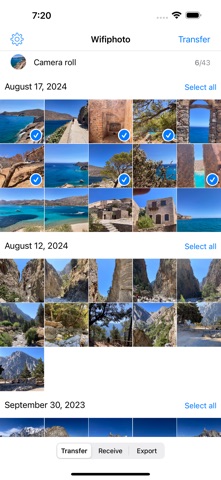
WiFiPhoto is more than a photo transfer app — it's a complete image processing and batch export toolkit. Build custom templates to resize, convert formats, add timestamps or watermarks, then process hundreds of photos at once. Share the results via Wi-Fi to any browser, AirDrop, Files, Mail, or save directly to your Photo Library. IMAGE PROCESSING WORKFLOW Create export templates with format conversion (JPEG/PNG), resize, timestamp and watermark overlays — then batch-process your entire selection. Preview the result with overlays applied before committing. Pick your destination: Share via AirDrop or Mail, Save to Library as a named album, or Transfer over Wi-Fi. WI-FI TRANSFER & WEB GALLERY Scan the QR code or type the URL on any computer. Download instantly as a zip or browse a beautiful web gallery where the receiver picks exactly which photos to download. TWO-WAY TRANSFER Not only can you send photos — you can receive them too. Open the upload page on any browser and drag files directly into your Camera Roll. FREE FEATURES — NO LIMITS - Unlimited photo & video transfers and exports - Export to Files, AirDrop, Mail, Messages, and more - Save processed photos to Library with named albums - Web Gallery with selective download or Zip download - Receive photos from any browser - QR code for instant connection - Metadata viewer (long-press any photo for EXIF, GPS, camera info) - Background processing for large batches - iPad drag & drop with haptic feedback - 1 export template included - Available in 11 languages WIFIPHOTO PRO — $2.99 ONE-TIME UPGRADE Unlock powerful export tools for professionals and enthusiasts: - Unlimited export templates (create, edit, duplicate) - Image format conversion (JPEG/PNG with quality control) - Image resize (Size to Fit / Size to Fill, custom dimensions) - Custom filename patterns with placeholders ({date}, {counter}, {original}) - Timestamp overlay (choose font, color, and position) - Watermark overlay (text or image, adjustable opacity, tiled mode) - H.264 video conversion for universal compatibility - Live Photo export (Still + Video or Video only) - Strip metadata to protect your privacy (EXIF, GPS, camera info) - Template picker and preview before batch processing YOUR PRIVACY MATTERS WiFiPhoto works entirely on your local network. No files are uploaded to any server. No account needed. No tracking. Your photos stay yours.
Latest release
What’s New
WiFiPhoto 2.2 transforms from a simple transfer tool into a full image processing workflow with batch support. New export & processing features: - Export to Files, AirDrop, Mail, Messages — not just Wi-Fi - Save processed photos to Library with automatic album creation - Timestamp overlay: burn date/time with custom font, color, and position (Pro) - Watermark overlay: text or image with opacity, tiling, and positioning (Pro) - Custom filename patterns with {date}, {counter}, {original} placeholders (Pro) - Placeholder toolbar for quick filename editing - H.264 video conversion for universal compatibility (Pro) - Live Photo export: Still + Video or Video only (Pro) - Strip metadata: remove EXIF, GPS, camera info for privacy (Pro) - Template picker and preview with overlays before batch processing New transfer features: - Web Gallery: browse and selectively download photos from any browser - Receive Photos: upload files from any browser directly to Camera Roll Stability & performance: - Streaming zip for large transfers — no more crashes with GB-sized videos - Background processing continues when app is minimized - Network auto-retry and memory pressure handling UI & platform: - iPad drag & drop support with checkmark selection badges - Haptic feedback and accessibility improvements - Metadata viewer: long-press any photo for EXIF, camera, GPS info - New languages: Portuguese (Brazil) and Korean - Requires iOS 17
Audience growth
Ratings growth
Baseline captured. Growth appears after the crawler observes a changed rating count.
Momentum comes from crawler snapshots for the tracked storefront. “Viral growth signal” means unusually fast recent rating gains; it is an indicator, not download data.
Price tracking
Price intelligence
First snapshot captured. The trend line starts after the next crawler price observation.
- First observed Aug 21, 2026 · 1:46 PM Free
Screenshots