About this app
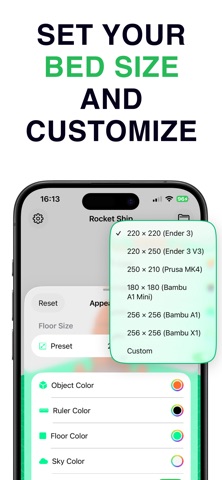
Open, explore, and inspect 3D models on your iPhone or iPad. 3D Kit is a fast, intuitive viewer built for makers, designers, engineers, and anyone who works with 3D files. Drop in an STL, OBJ, USDZ, or 3MF file and see it rendered instantly. Orbit around your model with smooth turntable controls, zoom in to inspect fine details, and get a complete breakdown — triangle count, vertex count, dimensions, bounding box, file size, volume, and surface area. BUILT FOR 3D PRINTING Choose from popular printer bed presets or enter custom dimensions to see exactly how your model fits on the build plate. A floor grid gives you spatial reference, and real-time measurement overlays show width, height, and depth in millimeters — so you can verify scale before you slice. Whether you are checking a downloaded file or reviewing your own design exports, 3D Kit gives you a quick, reliable way to preview models without launching a full slicer or CAD application. SEE YOUR MODEL IN THE REAL WORLD Place any 3D model into your physical environment using augmented reality. Point your camera at a flat surface, tap to place, and walk around your model as if it were sitting right in front of you. AR mode is perfect for checking the real-world size of a print, showing a design to someone who does not use CAD software, or seeing how a model looks on your desk before committing to a print. Measurements work in AR too, so you can verify dimensions while viewing the model in context. MAKE IT YOURS Customize every aspect of the viewing experience. Change the object color, floor color, sky color, grid color, grid line width, and ruler line color. Choose from camera presets — front, back, left, right, top, bottom, and isometric — or orbit freely to find the perfect angle. All appearance settings persist across sessions. CAPTURE AND SHARE Take high-resolution screenshots or record smooth video walkthroughs. Export to your photo library, save to Files, or share directly to any app. Video recording works in both the standard viewport and AR mode. YOUR MODEL LIBRARY Import files from the Files app, AirDrop, email attachments, or any app that shares 3D files. 3D Kit organizes your models in a built-in library with quick access to recent files. Rename, delete, and manage your collection without leaving the app. Browse the included sample models to explore what 3D Kit can do, no files required. SUPPORTED FORMATS - STL (binary and ASCII) - OBJ - USDZ - 3MF KEY FEATURES - Instant 3D model rendering with smooth orbit controls - Detailed model info: triangles, vertices, dimensions, volume, surface area, file size - Printer bed presets or custom dimensions - Real-time measurement overlays in millimeters - Augmented reality placement on any flat surface - Customizable colors for object, floor, sky, grid, and ruler lines - Camera orientation presets for standard views - Screenshot and video capture in viewport and AR modes - Built-in model library with import, rename, and delete - Sample models included to get started immediately - Designed for iPhone and iPad 3D Kit is the fastest way to go from file to visual on iOS. No account required, no cloud uploads, no waiting. Just open a file and see your model. https://www.apple.com/legal/internet-services/itunes/dev/stdeula/
Latest release
What’s New
Improved 3D file importing: • If a file didn't fully download from your cloud storage, you'll now see a clear message asking you to re-download it instead of a generic import error • Stability improvements
Audience growth
Ratings growth
Baseline captured. Growth appears after the crawler observes a changed rating count.
Momentum comes from crawler snapshots for the tracked storefront. “Viral growth signal” means unusually fast recent rating gains; it is an indicator, not download data.
Price tracking
Price intelligence
First snapshot captured. The trend line starts after the next crawler price observation.
- First observed Aug 13, 2026 · 1:49 AM Free
Screenshots