About this app
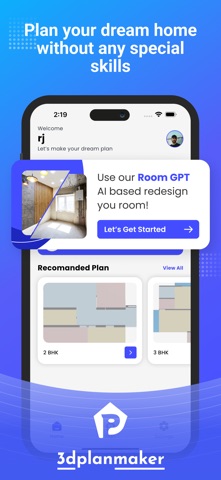
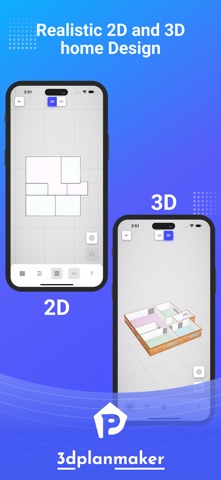
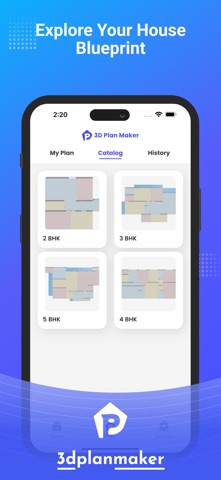
Transform your home with 3DS PlanMaker, AI Redesign Pro, the ultimate AI-powered home design, 3D modeling, and renovation tool! Whether you’re a professional architect, interior designer, contractor, or DIY enthusiast, this app is your all-in-one solution for creating, planning, and visualizing stunning home designs. With cutting-edge AI redesign technology, 3D room planning, and a smart layout generator, designing your dream home has never been easier. Capture real-world spaces with the camera, edit layouts with precision, and bring your home renovation ideas to life using advanced 3D visualization tools. Key Features of 3DS PlanMaker, AI Redesign Pro AI-Powered Room Redesign & Layout Planning • Get instant AI-generated room makeovers based on your preferences. • Experiment with different styles, furniture, and color schemes effortlessly. • See real-time AI-suggested layout improvements for optimized space usage. 3D Room Planner & House Layout Maker • Design detailed floor plans in 2D and 3D with accurate measurements. • Visualize how furniture and décor will fit before making purchases. • Edit and customize layouts to create dream homes, offices, or commercial spaces. Home Renovation & Interior Design Made Easy • Choose from a massive catalog of furniture, flooring, textures, and decor. • Try different design elements and visualize them in real-time 3D rendering. • Plan kitchen remodeling, bedroom makeovers, bathroom upgrades, and complete home renovations with ease. Customizable Design Elements • Select from thousands of wall colors, flooring materials, and decor styles. • Arrange furniture with a simple drag-and-drop interface. • Mix and match elements to create aesthetic and functional home designs. AI Smart Suggestions • Let AI technology optimize layouts for better space utilization. • Get personalized recommendations for furniture placement and color schemes. • Make design decisions to create a more efficient and aesthetic home. Seamless Workflow & Collaboration • Share your designs with clients, team members, or family for real-time feedback. • Save projects in the cloud and access them anytime on any device. • Export and print professional floor plans and 3D models for presentations. Why Choose 3DS PlanMaker, AI Redesign Pro? • AI-powered room redesign & home improvement ideas. • Realistic 3D modeling and immersive floor planning. • Easy-to-use interface with drag-and-drop functionality. • Professional tools for architects, interior designers, and contractors. • A vast catalog of home decor items, textures, and furniture. • Cloud storage and multi-device accessibility. • Regular updates with new design trends and home improvement tools. Unlock Premium Features for Ultimate Design Flexibility Upgrade to PlanMaker Pro and access: • Unlimited Rooms & Design for large-scale renovations. • Exclusive 3D furniture & decor • Flexible View Options • AI Room Generation • Access to All Future updates Who is 3DS PlanMaker, AI Redesign Pro For? •Homeowners & Renters – Redesign, plan, and visualize renovations before making costly changes. • Interior Designers – Present stunning 3D concepts to clients and make revisions effortlessly. •Architects & Contractors – Create accurate floor plans for professional use. Download 3DS PlanMaker, AI Redesign Pro Today! Transform your space with AI-powered home design, smart 3D modeling, and room planning tools. PREMIUM SUBSCRIPTION • You can subscribe to get unlimited access to certain app features. • Subscriptions are billed automatically at the rate depending on the selected subscription plan. By using the app, you are agreeing to our Privacy Policy and Terms Terms of Services: https://docs.google.com/document/d/e/2PACX-1vS6Lb0pkI8aDIentunmur99yMrIcx7Z0WlU49aS_5jezrnxafS8AsFTlZAWB1rHHbHpZphPH3BCu8KY/pub Privacy Policy: https://docs.google.com/document/d/e/2PACX-1vTkseu5Vx6KddhBOObEJSj7WxdjndlXk5BULZ-SjBSwFzuwtQL44BYpKAbEmcK1bZzOZM52G6-yXAQc/pub
Latest release
What’s New
Hi, 3D Planner lovers! A new version is out! We’ve fixed some bugs and improved the app’s performance.
Audience growth
Ratings growth
Baseline captured. Growth appears after the crawler observes a changed rating count.
Momentum comes from crawler snapshots for the tracked storefront. “Viral growth signal” means unusually fast recent rating gains; it is an indicator, not download data.
Price tracking
Price intelligence
First snapshot captured. The trend line starts after the next crawler price observation.
- First observed Sep 10, 2026 · 10:42 PM Free
Screenshots