About this app
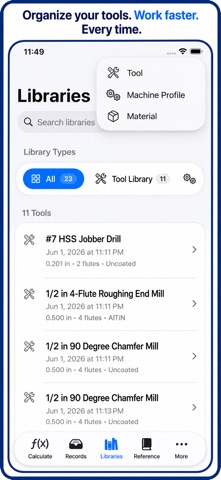
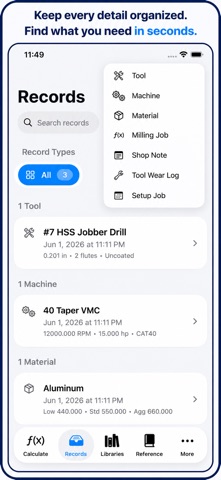
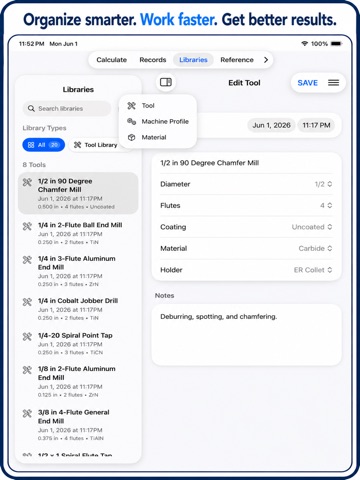
You are the kind of person who checks the cut before committing the part, and Milling Calcs is built for that level of care. Whether you are running a CNC mill, planning a manual setup, dialing in feeds and speeds, or saving shop records for the next job, this app helps you move faster without treating the numbers casually. Milling Calcs gives machinists, CNC programmers, setup techs, fabricators, students, and garage builders a practical collection of milling calculators, shop references, saved records, and setup tools in one focused workspace. - Calculate spindle RPM from cutter diameter and surface speed. - Estimate feed rate from RPM, flute count, and chip load. - Find chip load per tooth from feed rate, RPM, and flute count. - Convert feed per revolution for drilling, boring, and production planning. - Work with surface speed, SFM, IPM, tool diameter, cutter geometry, and common shop units. - Plan a milling or drilling job from material, tool size, machine assumptions, SFM, and feed data. - Use a cut optimizer for material removal rate, estimated cutting force, and tool deflection. - Check material removal rate from width of cut, depth of cut, and feed rate. - Use true position, arc, chord, segment, sine bar, shrinkage, tap drill, and layout calculators. - Keep reference data close, including drill sizes, tap drill charts, thread data, pipe threads, G-code, fractions, and metric conversions. Milling Calcs is not a toy calculator with one answer screen. It is a shop notebook for the work around the answer. - Save calculation records for later review. - Keep notes with the setup that created the result. - Mark important records as favorites. - Browse records by date in the calendar workspace. - Search records, notes, tools, materials, machines, setup jobs, and local reference data. - Build setup sheets from saved calculations. - Add customer, DOC, and WOC fields to a saved calculation record. - Share setup information as plain text, PDF, JSON, or QR setup cards where supported. - Use import and export tools to move shop data between devices or keep a backup. The app is designed for real shop use: - Large, readable inputs. - Clear units beside the numbers. - Fast reset and randomize tools for calculator testing and learning. - Report a bug access from calculator menus. - Organized tabs for Calculate, Records, Libraries, Reference, and More. - A More workspace with Today, Calendar, Data Transfer, Settings, About, and Sources. - A record view that keeps inputs, outputs, notes, tags, dates, and setup sheet actions together. Free users can get real value from the core calculators and saved records. Pro adds room to grow with unlimited records, full libraries, advanced setup exports, reports, and more complete planning tools. Use Milling Calcs when you need a quick RPM check before a cut, a feed rate for a drill, a saved setup for tomorrow, a shop reference during layout, or a setup sheet that explains how the job was planned. Built for: - CNC milling - Manual milling - Drilling setups - Feeds and speeds - RPM calculation - Chip load calculation - Tooling notes - Setup sheets - Shop records - Machinist math - CNC programming support - Tool, material, and machine libraries - Milling job planning - Reference tables - Small shops, classrooms, prototypes, and production support Milling Calcs helps keep the numbers, notes, and setup context in one place, so you can spend less time hunting through scratch pads and more time making good parts. For monthly subscriptions: Monthly Pro is a 1-month auto-renewable subscription. Terms of Use (EULA): https://www.apple.com/legal/internet-services/itunes/dev/stdeula/ Always confirm final cutting data against your tooling manufacturer, machine rigidity, workholding, coolant, material condition, depth of cut, and actual cut conditions.
Latest release
What’s New
Thanks for using Milling Calcs. The app is getting better because users like you notice the difference between a calculator that gives an answer and a tool that supports the whole job. The latest work is focused on navigation, record handling, setup sheets, calculator menus, and the small details that make the app easier to trust during a busy setup. Navigation is clearer across the More workspace: - Calendar records now open with a visible way back on iPad layouts. - Opening a saved record from Calendar no longer leaves you stuck in the detail view. - Setup Sheet opened from a calendar record now has a direct path back to the record. - The More workspace no longer lets a sidebar control hide the calendar back action. - Regular-width layouts now use a more predictable detail flow for Calendar, Today, records, and setup sheets. - Compact navigation keeps its normal push behavior. Setup Sheet has been cleaned up for real use: - The duplicate Job and Operation rows are gone when they both represent the same calculator. - The Source section now shows the calculator clearly. - If a saved record has a custom job title, it can still appear as a separate Job field. - Customer, DOC, and WOC are now presented as the editable fields. - The save action is now labeled Save to Record so it is clear where the data goes. - Saved setup sheet values are stored on the calculation record itself. - Material, tool, and machine rows only appear when the saved record actually has those dedicated fields. - Empty Not Assigned placeholders were removed from setup sheet display. - Setup details that were saved inside calculator inputs still remain visible in the Inputs section. - Help text now explains what a setup sheet is, what can be edited, and what comes from the source record. Exports are cleaner: - Plain text setup sheets no longer include empty placeholder rows. - Setup sheet summaries omit blank customer, setup, and cut sections. - QR setup cards now use the same cleaned source and setup information. - Cut fields only appear when DOC or WOC has been entered. - Shared record summaries avoid printing empty DOC or WOC lines. Calculator menus are more useful: - Randomize has been added where it helps test and learn calculator behavior. - Duplicate Record was removed from calculator menus where it did not belong. - Report a Bug is available from calculator hamburger menus. - Reset and Help remain easy to reach. - Calculator actions are clearer and better matched to what a user expects while working. The More view has been improved: - A Pro cell now appears at the top of More. - More navigation is more stable in the free version. - Opening a record from More no longer kicks the app back to the Calculate tab. - More cells continue navigating properly after attempting to open a record. - The paywall includes a debug-only QA unlock section for testing builds. Record behavior is steadier: - Saved calculation records keep editable setup fields on the record. - Calendar grouping is easier to browse. - Record detail keeps dates, setup data, inputs, outputs, notes, tags, and actions together. - Setup sheets can be reached from saved records without losing the path back.
Audience growth
Ratings growth
Baseline captured. Growth appears after the crawler observes a changed rating count.
Momentum comes from crawler snapshots for the tracked storefront. “Viral growth signal” means unusually fast recent rating gains; it is an indicator, not download data.
Price tracking
Price intelligence
First snapshot captured. The trend line starts after the next crawler price observation.
- First observed Aug 19, 2026 · 10:03 AM Free
Screenshots