About this app
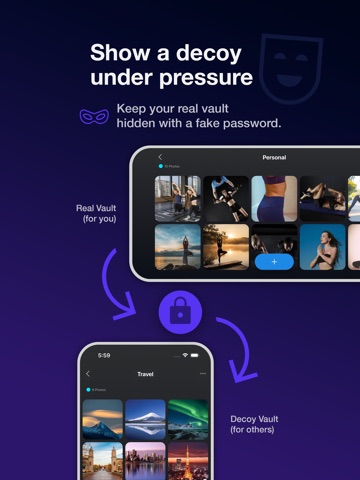
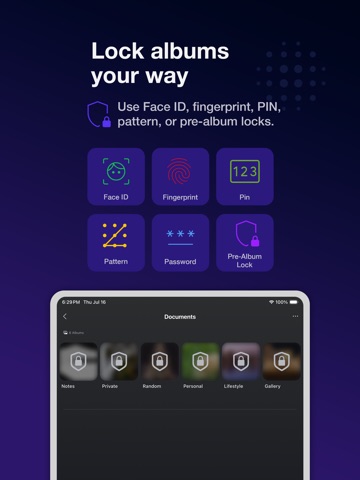
Protect private photos and videos in a zero-knowledge vault built for real privacy, secure backup, and reliable restore. Safety Photo Vault & Backup gives you a protected space for personal photos, private videos, family memories, documents, and other sensitive media. Your content is secured with flexible access controls, while optional cloud backup protects your library when moving to a new device. When secure backup is enabled, your media is encrypted on your device before upload. Only you hold the key needed to decrypt and restore it. REAL PRIVACY, NOT JUST A HIDDEN ALBUM A hidden album may keep media out of sight, but a private vault provides stronger protection, dedicated access controls, private organization, decoy protection, and encrypted backup. ZERO-KNOWLEDGE BACKUP • Photos and videos are encrypted before upload • Only you hold the key needed to decrypt your backup • Your encrypted media cannot be viewed by us • Back up private media without exposing your library BACK UP AND RESTORE WITH CONFIDENCE Protect your private library against device loss, accidental damage, or phone replacement. Restore supported backups to a new device while keeping your media encrypted and private. LOCK THE VAULT YOUR WAY • Face ID and Touch ID access • PIN protection • Combination lock • Dot-pattern lock • Separate passwords for individual albums • Automatic locking when the app is closed or inactive DECOY PASSWORD Create a separate decoy vault that opens with a different password while your real private library remains hidden behind its own protection. PRIVATE CAPTURE AND IMPORT • Take photos and videos directly inside the vault • Keep private captures out of the public camera roll • Import existing photos and videos • Organize media into private albums • Mark important items as favorites PRIVATE PHOTO AND VIDEO MANAGEMENT • View photos and play videos inside the vault • Create and organize private albums • Move, rename, import, and export media • Transfer files through a browser on your local Wi-Fi network • Manage private media separately from your public library BUILT FOR PEOPLE WHO VALUE CONTROL Use Safety Photo Vault & Backup for: • Personal and family photos • Private videos • Identity documents and scans • Sensitive work files • Media stored on a shared device • Private libraries that need secure backup and restore PRIVACY WITH PROOF Your private media is not used for AI training. Your encrypted cloud backup cannot be read without your key, and your photos and videos remain under your control. Protect your private library with a vault designed so that only you can unlock, decrypt, and restore it. Learn more: https://safetyphoto.app X (Twitter): https://twitter.com/SixbytesApp Facebook: https://www.facebook.com/sixbytesapp Privacy Policy: https://safetyphoto.app/legal/privacy Terms of Service: https://safetyphoto.app/legal/terms
Latest release
What’s New
• Bug fixes and stability improvements For more details: Website: https://safetyphoto.app X (Twitter): https://twitter.com/SixbytesApp Facebook: https://www.facebook.com/sixbytesapp If you’re loving the app, we’d greatly appreciate a 5-star review. Your support inspires us to keep bringing you exciting new features. Thanks for being part of our journey!
Audience growth
Ratings growth
Baseline captured. Growth appears after the crawler observes a changed rating count.
Momentum comes from crawler snapshots for the tracked storefront. “Viral growth signal” means unusually fast recent rating gains; it is an indicator, not download data.
Price tracking
Price intelligence
- First observed Aug 19, 2026 · 12:16 PM Free
Screenshots