About this app
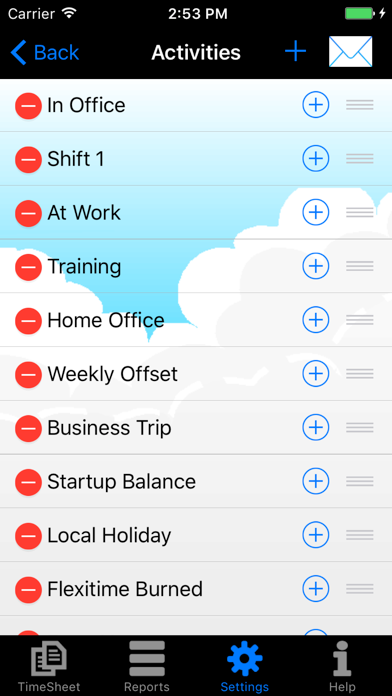
Note: the free version allows you a maximum of 14 days (timesheets). If you like the app you can unlock this limitation by making a purchase within the app: the price of a coffee! Details of all items that can be purchased are described further below this text and can also be looked up in the Help menu of the App. Time keeping against your daily standard hours to calculate your surplus hours…on the go and made simple ! If you work variable hours at your job, My Overtime is the kind of app that makes your Smartphone the indispensable device you expect it to be. Keep a tab as you build up your surplus time for later compensation along with reports for your employer to give you a better work-life balance :-) - Set your daily standard hours (offset) and enter your timesheet - Track your hours by day, week, month and year - 14 day limit! - see below for in-app-purchase details - Get your daily surplus balance - Enter your hours against a variety of Activities - Set up your typical working day using templates - Fast track copy previous day - Templates with Timesheet Samples to get started - Use Fast check-in/out buttons for real-time start/end - Define your activities as flat hours or with start/end times - Use compensation activity to burn your flextime/overtime - Track your vacation allowance - Track overtime payments - Query your balances and activities by date range - Report your data in detail or summary style - Export and send your data in csv, pdf or html format - Set your tracking preferences (minute intervals, working day defaults, etc) - Personalize it (choose heading, choose background) - Backup your data with Dropbox or via email - Works offline so you can work from anywhere/anytime - Local date style supported + A great alternative to your excel based tracking tool + this app keeps your focus on your personal flextime and overtime management without all the gimmicks for billing and project management (there are other tools for that). Do you prefer to update your times once a day (at end of the day) ? - Create a template and enter your times once - You can create templates for each day of the week (Set working days) OR - You can create templates for each situation (My Templates) - You can copy the last day and modify the start/end times if needed Do you prefer to track your times on the go in real-time ? - Use the "Fast-Check-in" button - Update the End time using ‘OUT’ (stop) button - Hit ‘IN’ button when you are ready to check-in again. For US NON-EXEMPT Workers with Overtime Payout: the App was not designed to calculate overtime rates automatically. Please try the new feature "Overtime for Period" to calculate your weekly extra hours and check the FAQ page within the App for more details about Overtime pay tracking. We are exploring more automated features in future versions so please watch this space. Email us at myovertimeapp@gmail.com for any questions. This basic version is free with a limit of 14 day's worth of timesheets. You can upgrade through in-app-purchases for: a) unlocking the 14 day timesheet history limit b) creating e-mail attachments of your report results c) scheduled backups of your data to Dropbox Enjoy!
Latest release
What’s New
Various bug fixes and optimizations. Please check the app's release notes and our Facebook support page for details.
Audience growth
Ratings growth
Baseline captured. Growth appears after the crawler observes a changed rating count.
Momentum comes from crawler snapshots for the tracked storefront. “Viral growth signal” means unusually fast recent rating gains; it is an indicator, not download data.
Price tracking
Price intelligence
First snapshot captured. The trend line starts after the next crawler price observation.
- First observed Aug 20, 2026 · 5:05 AM Free
Screenshots