About this app
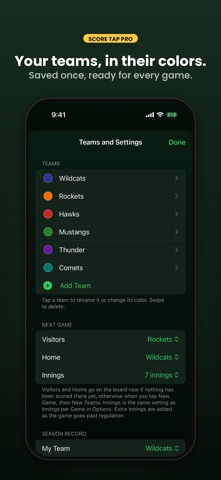
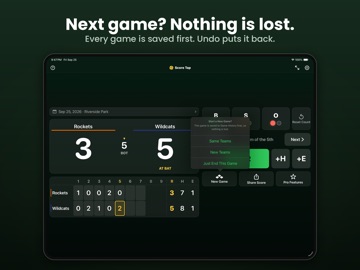
Score Tap turns your iPhone or iPad into a baseball and softball scoreboard for the stands and the dugout. All nine innings are on the board at once, like the scoreboard at the ballpark. Nothing to set up, no account, no sign-in. Made for parents, coaches and scorekeepers at youth, school, rec and adult games. The free app shows a small banner ad at the bottom of the board. Score Tap Pro, a one-time purchase, removes it. ONE TAP PER RUN • Type the team names right on the board. Until you do, the line score reads VIS and HOME • Tap the date bar at the top for Game Details: date, location and team names, plus Start At to join a game already under way or put the board back on the right inning • +R adds a run to the half-inning being scored, +H a hit and +E an error • Runs, hits and errors are kept for every half-inning, with R, H and E totals • Games of 6, 7 or 9 innings (set it in Options or Game Details), with extra innings up to the 18th. Next and Prev move between half-innings • Tapped once too often? Tap Subtract, then the button to take one away: -R, -H, -E, -B, -S or -O • Errors go to the team in the field BALLS, STRIKES AND OUTS Tap B, S and O and the lights on the board show the count, like an umpire's indicator. Ball four clears the count for the next batter. Strike three is an out, and the third out moves the board to the next half-inning with no balls, strikes or outs. Third out tapped by mistake? Tap Undo straight away. THE END OF THE GAME The board knows when the last out or a walk-off ends the game: it shows FINAL beside the date, and Share Score says Final. Tap Next to play on. Mercy rule, or called for rain? Tap End Game in Game Details, or in the New Game menu. AFTER THE GAME • Share Score sends the result to Messages, Mail or any other app • E-mail Game Summary, in Options, sends the line score with the date and location • New Game saves this game to Game History, then starts a fresh one with the same teams or new ones. Nothing is lost, and Undo puts it back OPTIONS Tap the gear at the top right of the board. • Sound: Off, Clicks or Ball, with its own sound for the count, outs, runs, the change of sides and the final out • Vibration, on iPhone: a tap you can feel on the scoring buttons, and a double beat when three outs change sides • Prevent Sleep keeps the screen on during the game • Strike Three Is an Out, Next Half-Inning After 3 Outs and Clear the Count on Each Out: on by default, off to score your own way • Show Quick Tips Again brings back the first-launch tips ON IPAD The board is sized for the bigger screen, and in landscape the score and line score sit beside the buttons. SCORE TAP PRO: ONE-TIME PURCHASE, NO SUBSCRIPTION Free scores the game. Pro remembers the season. Tap Pro Features on the bottom bar to see it all, buy Pro or restore a purchase. • No ads • Game History: every game you score is saved, even before you upgrade, with its full line score, your team's record for this year, and CSV and e-mail export • Saved teams in their team colors • Stadium Display: turn your iPhone sideways for giant runs, the inning and the count, big enough for the bleachers, and turn it back to keep scoring. On iPad, tap the full-screen button at the top of the board • Share Score Card: a picture of the line score in the team colors • The live score and count on the iPhone Lock Screen, in the Dynamic Island and on a paired Apple Watch (iOS 18 or later; nothing to install on the watch) The score is saved on your device as you go, so a call in the middle of an inning won't cost you the game. Keeping score needs no internet connection. Questions or ideas? Email handtechnics@gmail.com
Latest release
What’s New
Lazy Guys Baseball Scoreboard is now Score Tap: Baseball Scoreboard, with a new scoreboard for today's iPhones and, for the first time, iPad. On your Home Screen it is now called Baseball, with a new icon. The game on your board carries over. • A new scoreboard: all nine innings in one row, big numbers and bright count lights, sized for every current iPhone and iPad • On iPad in landscape, the score and line score sit beside the buttons • Hits and errors are now kept for each half-inning, so the line score is complete • Extra innings: the board carries on past the 9th, up to the 18th • Strike three is an out, and the third out moves the board to the next half-inning. Tapped by mistake? Undo takes it back • The board knows when the game is over: the last out with a team ahead, or a walk-off, shows FINAL beside the date. Tap Next to play on • Game Details: tap the date bar to set the date, location and team names, jump to a later inning with Start At, or end a game early with End Game • Ball four clears the count, and Subtract now works for balls, strikes and outs too • New sounds: a different one for the count, outs, runs, the change of sides and the final out • New in Options: Vibration, Strike Three Is an Out, Next Half-Inning After 3 Outs, Clear the Count on Each Out and Show Quick Tips Again • Until the teams are named, the line score reads VIS and HOME • Share Score and Tell A Friend now use the share sheet, replacing the old Tweet Score button • Games of 6, 7 or 9 innings, free, and your last game is always kept: New Game saves it to Game History, and Undo puts it back • New Score Tap Pro, a one-time purchase: no ads, the full Game History with your team's record for the year and CSV and e-mail export, saved teams and team colors, a stadium display, a shareable score card, and the live score on the iPhone Lock Screen, in the Dynamic Island and on a paired Apple Watch (iOS 18 or later)
Audience growth
Ratings growth
Momentum comes from crawler snapshots for the tracked storefront. “Viral growth signal” means unusually fast recent rating gains; it is an indicator, not download data.
Price tracking
Price intelligence
- First observed Aug 20, 2026 · 3:27 AM Free
Screenshots