About this app
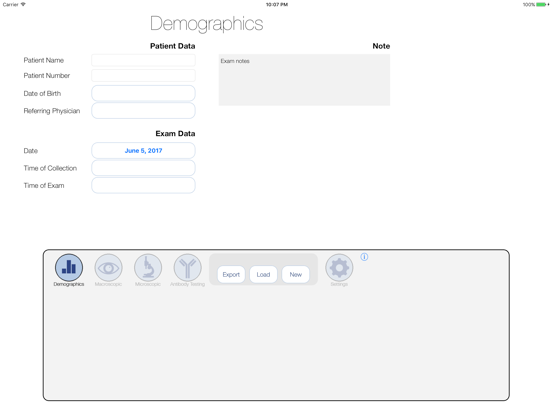
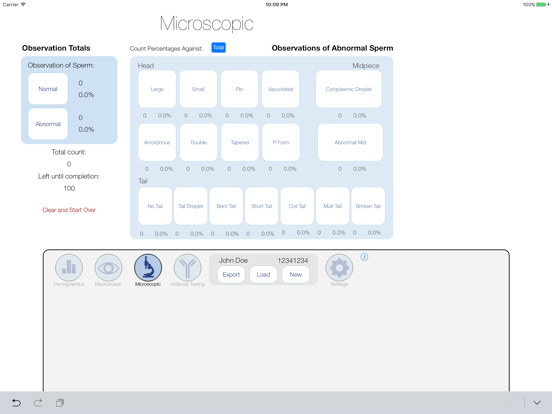
DESCRIPTION: Designed by an Andrologist for use at the lab bench to record data during the analysis of a male reproductive fluid or tissue specimen. AndroCalc allows the Andrologist to directly input all required data into the App while performing the analysis. Calculations are automated. The user can output all data to a spreadsheet for printing, archiving and/or direct entry into their database. AndroCalc was built by LifeLab Solutions Inc. (LifeLabSolutions.com) for their Reproductive Tissue Banking Software. Users of any of the LifeLab Solutions Databases (AndroLab, CryoLab EmbryoLab, QLab) can upload the spreadsheet directly. Users of other databases can print the data directly from the formatted spreadsheet or save the data as a spreadsheet. APP FEATURES: Demographics Page: •Patient Data: Patient Name and Unique Identifier (required), Date of Birth, Referring Physician •Exam Data: Date, Time of Collection, Time of examination Macroscopic Page: •Data: Volume, pH, Complete sample, liquefaction, technician, color, Chamber used, •Agglutination •Observable Averages: Concentration, Motility and Viability with number of repetitions and averages Microscopic page: •Observation totals: Normal and Abnormal •Observations of Abnormal Sperm: Head (8 subtypes), Midpiece (2 subtypes) and Tail defects (7 subtypes) with absolute number and % of total automatically calculated Antibody Testing Page: •IgG, IgA and IgM with Head, Midpiece, Tail and Not Bound subtypes with absolute number and % of total automatically calculated Settings Page: •Table Maintenance: Referring Doctors, Liquefaction, Technicians, Agglutination, Chamber, Specimen Color, Collection Methods can be specified •General: Max exam time limit, Email for data export
Latest release
What’s New
Updated for iOS 10.
Audience growth
Ratings growth
Baseline captured. Growth appears after the crawler observes a changed rating count.
Momentum comes from crawler snapshots for the tracked storefront. “Viral growth signal” means unusually fast recent rating gains; it is an indicator, not download data.
Price tracking
Price intelligence
First snapshot captured. The trend line starts after the next crawler price observation.
- First observed Aug 21, 2026 · 1:56 AM Free
Screenshots