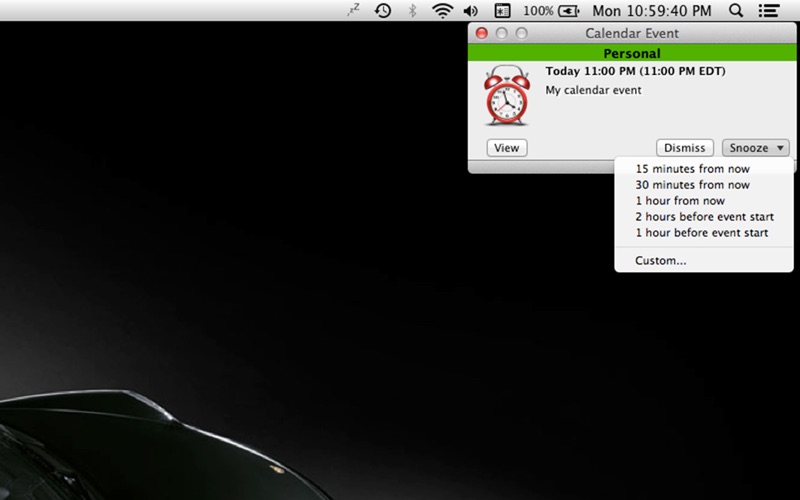
About this app
Are snoozing alerts for only 5, 10, 15 minutes frustrating you? SnoozeMaster is a menu bar utility that allows you to have more control over snoozing your Calendar or Reminders alerts. You can change snoozes to last for 1 minute, 2 hours, 3 days, you name it - SnoozeMaster gives you that ability. Pick one off the menu or create a quick Custom alert. SnoozeMaster features include: • A user definable snooze list. • On-the-fly setting of the snooze duration. • View button to open up the event in the Calendar or Reminders apps. You can snooze: • from now • before event start • before event end • after event start • after event end • until event start The duration can be: • Minutes • Hours • Days Requirements: • MacOS 11 (Big Sur) or greater. NOTE: We recommend that you go into the "System Preferences" -> Notification -> "Calendar" and "Reminders" and set the "Calendar alert style" and "Reminders alert style" to "None". This will prevent the default pop-up from appearing. IMPORTANT: There are some types of events that we are unable to modify as we do not have "permissions" to edit them. This may include appointments such as ones sent to you as an “.ics” file from an email. You are not the “owner” of this type of appointment and you may not be able to use SnoozeMaster to edit it. In those cases, you will have to launch the Calendar app and manually set it in the Calendar app to be reminded again. SnoozeMaster cannot snooze calendars that are “Delegates”, as the Apple system programming interface does not allow us to work with Delegate calendars. We recommend that if you are using Delegate calendars, that you change them regular calendars instead.
Latest release
What’s New
Fixed issue where it may not start on boot for Tahoe. If you have this issue, go into the SnoozeMaster > Preferences and toggle the "Start at Login" OFF and back ON again.
Audience growth
Ratings growth
Baseline captured. Growth appears after the crawler observes a changed rating count.
Momentum comes from crawler snapshots for the tracked storefront. “Viral growth signal” means unusually fast recent rating gains; it is an indicator, not download data.
Price tracking
Price intelligence
First snapshot captured. The trend line starts after the next crawler price observation.
- First observed Aug 13, 2026 · 3:25 AM $1.99
Screenshots