About this app
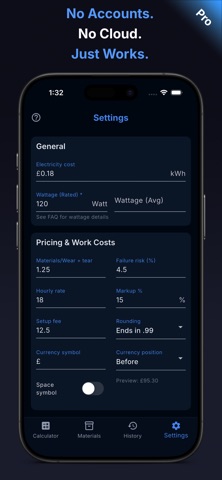
Know your print costs before you quote. 3D Print Cost Calculator helps makers and small print businesses calculate accurate 3D printing costs using more than filament alone. Include electricity, printer power usage, failed prints, labour, setup time, and business overhead in one clear workflow. Use it to cost jobs consistently, protect margins, and move faster from estimate to price. Built for hobbyists, makers, side hustles, and small print businesses. Free includes: • Core print costing • Electricity costing with rated and average wattage support • Multi-material costing • Single-print G-code import • Up to 5 saved materials (manual management) • Up to 2 printer profiles • Up to 7 history entries • Individual job export • Manual batch costing for up to 3 items • Backup and restore • Interface settings for a cleaner custom view • Offline-first operation Free is designed to be genuinely useful. You can cost real prints, save key data, review recent jobs, and handle small manual batches without needing an account. You can also hide controls, tabs, and pricing details you do not use, so the app stays simpler for your workflow while calculations remain accurate underneath. Premium adds tools for scale, pricing control, and faster workflows: • Unlimited materials • Unlimited printer profiles • Unlimited history • Full and bulk export • Batch G-code import • Faster batch setup from G-code files • Unlimited batch costing • Labour pricing • Failure risk cost modelling • Markup support • Setup fees • Rounding rules • Detailed cost breakdowns • Materials CSV export and reviewed import • Filament inventory and remaining spool tracking • Advanced configuration Privacy-first by design: • No accounts • No cloud dependency • No required tracking • Your data stays on your device Designed to stay simple on the surface while remaining accurate underneath. EULA: https://www.apple.com/legal/internet-services/itunes/dev/stdeula/
Latest release
What’s New
Fixed an issue that could prevent subscriptions from completing.
Audience growth
Ratings growth
Baseline captured. Growth appears after the crawler observes a changed rating count.
Momentum comes from crawler snapshots for the tracked storefront. “Viral growth signal” means unusually fast recent rating gains; it is an indicator, not download data.
Price tracking
Price intelligence
First snapshot captured. The trend line starts after the next crawler price observation.
- First observed Aug 24, 2026 · 4:22 AM Free
Screenshots