About this app
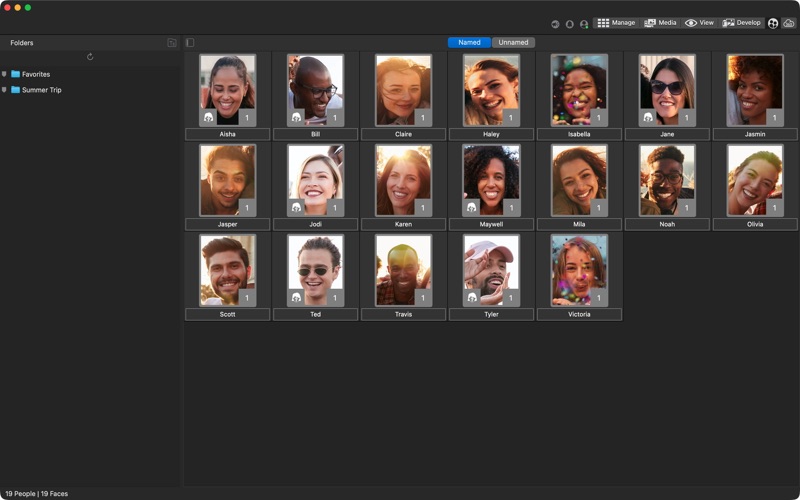
A qualifying ACDSee Photo Studio subscription is required. Get access to the full product FREE for 7 DAYS before incurring the annual subscription fee. ACDSee Photo Studio is designed for photographers who demand both speed and precision. It combines lightning-fast photo browsing, AI-powered photo management, and powerful non-destructive editing in one seamless application. Unrivaled Digital Asset Management • Work directly with your existing folders without importing or duplicating files • Automatically find and group photos of people using AI Face Detection and Facial Recognition • Organize using ratings, color labels, categories, and hierarchical keywords • Instantly locate any photo using metadata, search, and AI-Keywords • Add, edit, and search by location, camera data, and EXIF/IPTC metadata • Detect and remove duplicate files across folders and drives to keep your library clean Batch Processing That Saves You Hours • Build fast, efficient culling and delivery workflows for large shoots and events • Export hundreds of photos at once with automatic resizing, renaming, and format conversion • Rename entire folders of files in seconds using flexible custom naming rules • Apply your saved edits and presets to large batches of photos in one step • Resize, rotate, and update metadata across multiple files at once Non-Destructive RAW Editing • Edit freely knowing your original files are always preserved and never modified • Perform a complete RAW photo editing workflow from start to finish • Fine-tune colors and tones using Light EQ™, Color & Tone Wheels, Curves, Levels, and Color EQ • Make precise local adjustments using the AI masking tools • Retouch portraits and photos using Heal, Clone, and Skin Tune tools • Use snapshots and history to return to any previous version of your edit at any time • Apply LUTs and presets or create your own looks for consistent results On-Device AI-Powered Tools • Automatically analyze and tag your photos with AI Keywords to make searching effortless • Organize your library by person using AI Face Detection and Facial Recognition • Create perfect selections in one click using AI Subject, Sky, and Object masking • Upscale images intelligently with AI Super-Resolution while preserving fine detail • Reduce noise with AI Denoise while keeping textures and edges natural • Apply AI-powered editing presets that intelligently enhance your photos automatically • Keep your photos private with all AI processing running entirely on your Mac
Latest release
What’s New
Improvements • Fixed an issue where adding a new keyword or category could crash the application in a certain scenario. • Fixed an issue where clicking away from a new keyword/category didn't stop editing. • Fixed an issue where ratings for RAW files weren't read accurately in certain scenarios. • Fixed an issue where collapsing parent keywords/categories while creating a child renamed other keywords/categories. • Fixed an issue with iCloud integration.
Audience growth
Ratings growth
Baseline captured. Growth appears after the crawler observes a changed rating count.
Momentum comes from crawler snapshots for the tracked storefront. “Viral growth signal” means unusually fast recent rating gains; it is an indicator, not download data.
Price tracking
Price intelligence
First snapshot captured. The trend line starts after the next crawler price observation.
- First observed Aug 7, 2026 · 11:06 PM Free
Screenshots