About this app
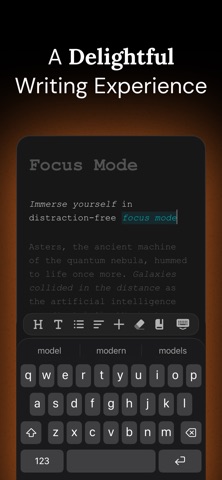
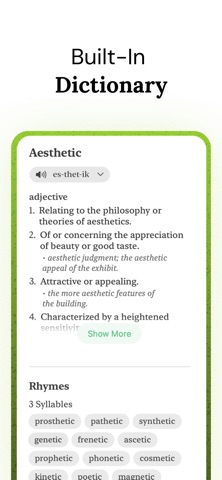
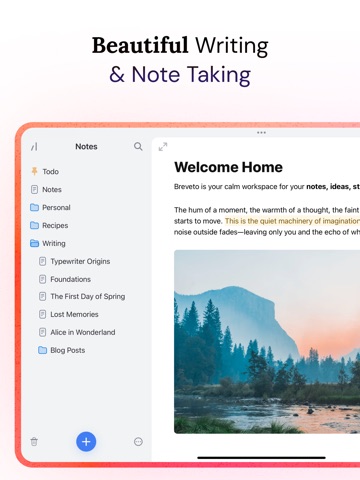
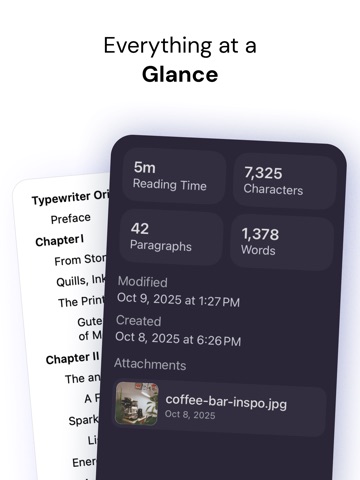
Welcome to your calm workspace for notes, ideas, stories, and everything in between. Breveto is a beautiful, minimal writing app with powerful features — a place to keep your life organized. ## A DELIGHTFUL WRITING EXPERIENCE Once you’ve tried Breveto, you’ll never look back. Every detail has been crafted to make writing a joy. • Immerse yourself in distraction-free focus mode. • Effortlessly format documents just by selecting text. • Add images, math expressions, and more to your notes. • Fix spelling and grammar mistakes with one click. • Find zen with an aesthetic and minimal writing app. ## YOUR FILES, FINALLY ORGANIZED Drag, drop, and organize your files with Breveto's folder system. Pin essential files, or give each project a dedicated workspace. Everything stays exactly where you left it, so nothing ever gets buried. You can even put folders within folders! ## BEAUTIFUL THEMES Your words are personal. Your workspace should be too. Go beyond dark mode with beautiful built-in themes, or unleash your creativity and make your own. ## SEAMLESS SYNC, ACROSS DEVICES From Mac to iPhone to iPad — Breveto carries your files wherever you go, and even works offline when you’re traveling. Your files sync privately and conflict‑free through iCloud. ## FOR THE POWER USERS Customize every shortcut, open files instantly with Quick Open, and tune Breveto’s settings to fit your workflow. ## BUILT-IN DICTIONARY, SYNONYMS, & RHYMES Search words with one click. Breveto is your dictionary, thesaurus, and rhyme book all in one place. ## MARKDOWN Breveto has first-class support for markdown shortcuts, without the clutter of editing markdown syntax. You can copy, paste, import, and export as markdown too. ## MORE FEATURES • View document stats like reading time and character count. • Use the outline view to see your file's structure, and quickly jump to major sections. • Export files as Markdown, Plain Text, RTF, Text Bundle, HTML, and more, or copy as those formats. • Print your files with beautiful styles and fonts. • Search all documents. • Enjoy peace of mind with automatic backups. • Use powerful formatting features: syntax‑highlighted code blocks, first‑line indents, LaTeX math, and more. ## WHAT CAN I USE IT FOR? You can use Breveto for note taking, writing books, journaling, to-do and task lists, drafts, novels, blogging, screenplays, poetry, lyrics, mind mapping, student notes, essays; you name it! > “I use Breveto to keep all my notes, reading list, Breveto's roadmap, songs I write, and more. It’s my personal knowledge base.” — Jordan, Founder of Breveto ## PRICING Breveto is a premium app and requires a subscription. We offer a free trial for new users, and you can explore most of Breveto for free in read-only mode. Along with everything else, Breveto Pro lets you: • Create and edit an unlimited number of files and workspaces. • Search the dictionary, synonyms, and rhymes. • Support the app and a tiny independent software company, proudly made in the USA. ------ ## QUESTIONS? FEEDBACK? We’d love to hear your feedback and know how we can make Breveto perfect for you! Learn how to use Breveto at: https://breveto.app/docs Email: contact@ideapunch.com Twitter: @IdeaPunchLLC Terms of Use: https://breveto.app/terms-and-conditions Privacy Policy: https://breveto.app/privacy-policy
Latest release
What’s New
This update focuses on a few small refinements and many bug fixes! ## IMPROVEMENTS • Words you teach Breveto’s spellchecker now sync across your devices, and you can view and edit your learned words in Breveto’s settings. • You can now drag list items from their bullet points to reorder them on iOS. • You can now split a table in half from a row’s options menu. • Tables wider than the editor now extend to the edge of the screen for easier viewing. • On Mac, right-clicking on any word now shows an option to open it in Breveto’s dictionary, or unlearn it if learned. • On iOS, when “Keep device awake when editing files” is on, Breveto can now let your device go to sleep if the battery drops below a certain percentage. • When Breveto automatically creates a link as you type, press delete immediately afterwards to undo the link creation. • Renamed “Horizontal Line” to the more common term “Divider”. ## FIXES • Fixed multiple sidebar bugs on Mac, including the resize cursor not changing and dragging to resize stopping randomly. • Fixed the Mac context menu not always showing spelling suggestions or other actions when right-clicking in the editor. • Fixed autocomplete on iOS sometimes placing the cursor in the wrong location for contractions. • Fixed table menu actions running twice on iPad, and the menu not closing when dragging rows or columns. • Fixed pasting table cells breaking table headers or rows. • Fixed the slash command menu not closing after typing a space. • Fixed fonts sometimes not loading in the editor. • Fixed images not being added to files from the iOS toolbar. • Fixed the link copy button not copying links to the clipboard. • Fixed not being able to add deep links or custom URL scheme links to files. • Fixed Quick Open on iOS sometimes not opening files. ## QUESTIONS? FEEDBACK? We’d love to hear your feedback and know how we can make Breveto perfect for you! Get in touch: https://breveto.app/support
Audience growth
Ratings growth
Baseline captured. Growth appears after the crawler observes a changed rating count.
Momentum comes from crawler snapshots for the tracked storefront. “Viral growth signal” means unusually fast recent rating gains; it is an indicator, not download data.
Price tracking
Price intelligence
First snapshot captured. The trend line starts after the next crawler price observation.
- First observed Aug 20, 2026 · 10:59 PM Free
Screenshots