About this app
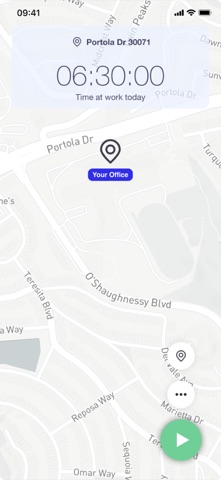
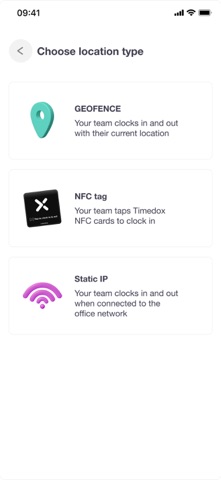
Timedox turns your team's phones into a time clock - and connects to your Timedox terminals so every punch, on-site or out in the field, lands in one place. PUNCH WITH A TAP Place a Timedox NFC sticker at any job site, vehicle, or entrance. Employees tap their phone to clock in and out. No menus, no manual entry, no chasing people at the end of the week. Each sticker is tied to its location, so the punch record shows where the work actually happened. BUILT FOR TEAMS THAT AREN'T ALL IN ONE BUILDING Cleaning crews, construction sites, home care, field service, security, multi-location retail. If your people start their day somewhere other than head office, Timedox was built for the way you work. WHAT YOU CAN DO • Clock in and out with an NFC tap or directly in the app • See who's on the clock right now, and where • Review and edit timecards before payroll • Apply overtime rules automatically • Export payroll-ready timesheets • Manage multiple sites and teams from a single account WORKS WITH YOUR TIMEDOX HARDWARE Already running Timedox fingerprint or face recognition terminals? Phone punches and terminal punches flow into the same timesheets — no reconciling two systems. FOR EMPLOYEES Clocking in takes a second. Check your own hours, see your schedule, and know your timesheet is right before payday. FOR MANAGERS AND OWNERS Stop rebuilding timesheets from memory and text messages. Approve hours in minutes, catch missed punches before they become payroll problems, and see what labor is actually costing you. GETTING STARTED Timedox requires a Timedox account. New accounts include a free 14-day trial — no card required. NFC tap-to-punch requires an NFC-capable iPhone and Timedox NFC stickers, available separately. Questions? Reach us at support@timedox.us
Latest release
What’s New
• Clock in and out quickly using NFC tags • Sign in more easily with Google • Improved phone number entry and verification • Enhanced one-time password autofill • Performance improvements and bug fixes for a smoother, more reliable experience
Audience growth
Ratings growth
Baseline captured. Growth appears after the crawler observes a changed rating count.
Momentum comes from crawler snapshots for the tracked storefront. “Viral growth signal” means unusually fast recent rating gains; it is an indicator, not download data.
Price tracking
Price intelligence
First snapshot captured. The trend line starts after the next crawler price observation.
- First observed Aug 21, 2026 · 12:44 AM Free
Screenshots