About this app
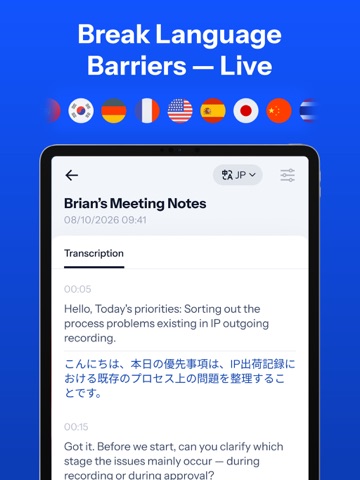
Record, transcribe and summarize anything — meetings, voice notes, lectures, and sermons — with one tap on Apple Watch, iPhone, iPad or Website - Owll AI. Owll is your AI note taker, voice recorder, and second brain. Capture voice notes from meetings, lectures, sermons, interviews, and calls — then get AI meeting summaries, timestamped transcripts, and smart action items. Record audio, upload files, or capture online calls from Zoom, Google Meet, and Microsoft Teams for fast audio transcription — then organize, highlight, and share notes. Use Owll as your reliable meeting recorder, speech-to-text tool, dictation app, or study partner — perfect for work, school, or personal productivity. All your notes sync across Apple Watch, iPhone, iPad, and the Web for a seamless workflow. KEY FEATURES — Seamless Sync: Apple Watch, iPhone, iPad & Web Tap once on your Apple Watch to record voice notes. Full AI transcripts and meeting notes sync across iPhone, iPad, and Web. — AI-Powered Recording, Summaries & To-Dos Record with one tap using Owll's AI note taker and built-in AI Coach. Supports voice recorder mode, speech-to-text, voice transcription, interview recording, and audio file imports — then generates concise meeting summaries and to-do lists. — AI Contact Manager for Sales & Client Notes Scan business cards to capture leads instantly. Record sales calls with auto summaries and follow-ups. Search customer notes, track deals, and close more sales faster. — Transcription for Online Meetings Owll transcribes Zoom, Google Meet, and Microsoft Teams sessions with timestamps and clear formatting. Searchable meeting notes help you stay focused. — Faith & Sermon Notes Capture every word of the sermon so you can worship fully present. Auto-generated sermon notes include key themes and scripture references — searchable across your faith journey. — Smart Folders & Note Sharing Create custom folders to organize voice recordings and meeting notes. Share key takeaways with teammates or classmates in one tap. — Smarter Note Review: Ask Owll AI Owll highlights main points, answers questions with built-in AI Q&A, and delivers clear summaries from transcripts, recordings, or any topic. — Real-Time Translation & Multilingual Transcription Understand any meeting, lecture, or conversation as it happens. Enable real-time translation before recording — choose your transcription language and target language — and Owll displays original and translated text side by side, live. After recording, review bilingual notes, switch between original, translation, or dual-language views, and share a bilingual transcript with your team. Supports 100+ languages. — AI Study Aid: Flashcards & Lecture Notes Convert audio into text with precise AI transcription. Smart summaries turn key points into lecture notes, study guides, and flashcards. Owll's AI quizzes create practice questions to reinforce key ideas — ideal as a note taking app or study companion. — Import, YouTube & OCR Support Import audio to text from any app or YouTube videos for instant transcripts. Use OCR to turn PDFs and images into searchable text. Why Choose Owll? Save Time: Hands-free voice recording on Apple Watch for walks, drives, or quick stand-ups. Organize Everything: All-in-one hub for meeting notes, sales leads, lecture notes, and sermon notes. Global Reach: Break language barriers — translate any recording into 100+ languages after recording. Second Brain: Every recording builds a searchable knowledge base — your memory, amplified. Subscription Plans Owll Plus offers these options: 1-Year Subscription 1-Month Subscription 1-Week Subscription Payment & Management Payments are billed to your App Store Account upon purchase. Subscriptions auto-renew unless canceled 24h before the period ends. Manage subscriptions in Account Settings. Terms & Privacy Terms of Use: https://owll.ai/user-agreement/#/terms-service/ Privacy Policy: https://owll.ai/user-agreement/#/privacy-policy/
Latest release
What’s New
Thank you for using Owll! Here's what's new: - Trash is here. Restore deleted notes and folders, or let them be removed automatically after 30 days. - Bug fixes and performance improvements to keep Owll running smoothly.
Audience growth
Ratings growth
Momentum comes from crawler snapshots for the tracked storefront. “Viral growth signal” means unusually fast recent rating gains; it is an indicator, not download data.
Price tracking
Price intelligence
- First observed Aug 1, 2026 · 1:25 PM Free
Screenshots