About this app
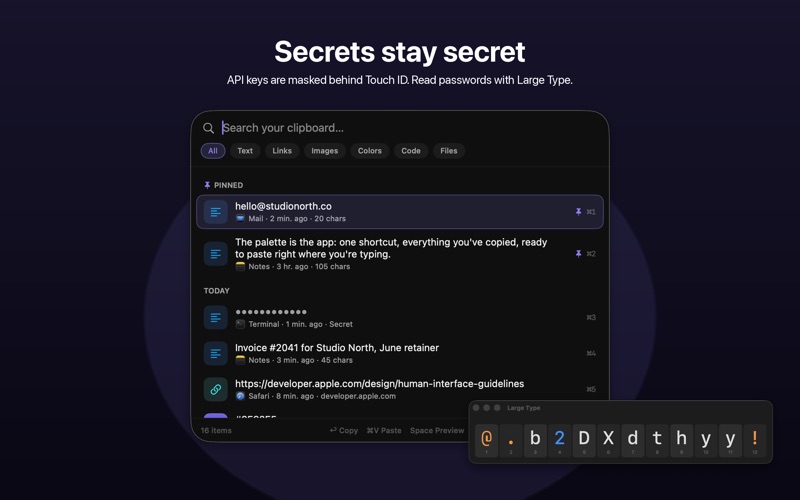
The Mac clipboard holds exactly one thing. Copy something else and the URL you needed, the paragraph you cut, the API key you generated: gone. Clippy remembers all of it. Press ⇧⌘V in any app and a Liquid Glass palette appears with everything you have copied. Type a few letters to find it, press Return, and it is back on your clipboard with your cursor exactly where you left it: one ⌘V and it lands. That is the whole product, and it is fast enough to live in your muscle memory. CLIPPY KNOWS WHAT YOU COPIED Links show their page title, icon, and a preview of the page. Colors show a live swatch with HEX, RGB, and HSL one click away. Code keeps syntax highlighting, and formatting is preserved when you paste into rich text apps. Images and files keep real thumbnails, and Clippy keeps a copy of a copied image even if the original file is deleted later. Every item remembers which app it came from. A REAL LIBRARY, NOT JUST A MENU Open the Library for a full window with sidebar categories, search, list and grid views, and a Finder-style details pane. Rename items so they are easy to find again, pin what you reuse, and see your most used items at a glance. SECRETS STAY SECRET Clippy treats your clipboard like the sensitive data it is. API keys and tokens are detected automatically and shown as dots, and revealing them takes Touch ID. Show a password as Large Type, a floating window with big numbered characters, or pin any text as a Sticky that stays on top while you type it somewhere else. Content that apps mark confidential is never stored at all, and one click excludes password managers entirely. BUILT FOR THE KEYBOARD ⇧⌘V summons the palette anywhere. ⌘1 to ⌘9 copy any of the first nine items instantly, Tab cycles the filters, Space previews, and Return copies the selected item so a single ⌘V drops it right where you are working. You can even edit text in the preview before copying it. PRIVATE BY DESIGN No servers, no accounts, no analytics. Everything stays on your Mac, and the App Store privacy label says Data Not Collected because there is nothing to collect. The only network use is fetching previews for links you copy, and you can turn that off. AT HOME ON macOS TAHOE Clippy 2.0 is rebuilt from the ground up for macOS 26 with Liquid Glass throughout: a native menu bar utility that launches at login, uses near-zero energy, and stays invisible until you summon it. A one-time purchase, no subscription. FREE TO TRY, YOURS FOREVER The free version keeps your latest 25 copies with search, previews, and every privacy feature. Clippy Pro unlocks unlimited history, pins, and Large Type & Sticky with a single one-time purchase. No subscription, ever. Bought Clippy while it was a paid app? Pro is already included. Upgrading from Clippy 1.x? Your history and settings carry over automatically.
Latest release
What’s New
** Bug Fix ** Fixes an important bug from 2.1: if you bought Clippy while it was a paid app and the update asked you to unlock Pro, this update restores your Pro automatically at launch.
Audience growth
Ratings growth
Baseline captured. Growth appears after the crawler observes a changed rating count.
Momentum comes from crawler snapshots for the tracked storefront. “Viral growth signal” means unusually fast recent rating gains; it is an indicator, not download data.
Price tracking
Price intelligence
First snapshot captured. The trend line starts after the next crawler price observation.
- First observed Aug 17, 2026 · 11:03 PM Free
Screenshots